本文主要是介绍Ubuntu20.04 [Ros Noetic]版本——在catkin_make编译时出现报错的解决方案,希望对大家解决编程问题提供一定的参考价值,需要的开发者们随着小编来一起学习吧!
今天在新的笔记本电脑上进行catkin_make的编译过程中遇到了报错,这个报错在之前也遇到过,但是,我却忘了怎么解决。很是头痛!
经过多篇博客的查询,特此解决了这个编译报错的问题,于此特地记录!!!
整体报错信息如下:
Base path: /home/hjx/hjx_file/URDF_model/catkin_ws
Source space: /home/hjx/hjx_file/URDF_model/catkin_ws/src
Build space: /home/hjx/hjx_file/URDF_model/catkin_ws/build
Devel space: /home/hjx/hjx_file/URDF_model/catkin_ws/devel
Install space: /home/hjx/hjx_file/URDF_model/catkin_ws/install
####
#### Running command: "cmake /home/hjx/hjx_file/URDF_model/catkin_ws/src -DCATKIN_DEVEL_PREFIX=/home/hjx/hjx_file/URDF_model/catkin_ws/devel -DCMAKE_INSTALL_PREFIX=/home/hjx/hjx_file/URDF_model/catkin_ws/install -G Unix Makefiles" in "/home/hjx/hjx_file/URDF_model/catkin_ws/build"
####
-- Using CATKIN_DEVEL_PREFIX: /home/hjx/hjx_file/URDF_model/catkin_ws/devel
-- Using CMAKE_PREFIX_PATH: /opt/ros/noetic
-- This workspace overlays: /opt/ros/noetic
-- Found PythonInterp: /home/hjx/anaconda3/bin/python3 (found suitable version "3.11.7", minimum required is "3")
-- Using PYTHON_EXECUTABLE: /home/hjx/anaconda3/bin/python3
-- Using Debian Python package layout
-- Using empy: /home/hjx/anaconda3/lib/python3.11/site-packages/em.py
-- Using CATKIN_ENABLE_TESTING: ON
-- Call enable_testing()
-- Using CATKIN_TEST_RESULTS_DIR: /home/hjx/hjx_file/URDF_model/catkin_ws/build/test_results
-- Forcing gtest/gmock from source, though one was otherwise available.
-- Found gtest sources under '/usr/src/googletest': gtests will be built
-- Found gmock sources under '/usr/src/googletest': gmock will be built
-- Found PythonInterp: /home/hjx/anaconda3/bin/python3 (found version "3.11.7")
-- Using Python nosetests: /usr/bin/nosetests3
-- catkin 0.8.10
-- BUILD_SHARED_LIBS is on
-- BUILD_SHARED_LIBS is on/opt/ros/noetic/share/catkin/cmake/em/order_packages.cmake.em:2:1: error: RuntimeError: ImportError: "from catkin_pkg.topological_order import topological_order" failed: cannot import name 'Sequence' from 'collections' (/home/hjx/anaconda3/lib/python3.11/collections/__init__.py)
Make sure that you have installed "catkin_pkg", it is up to date and on the PYTHONPATH.
<root>:1:1: from this context
Traceback (most recent call last):File "<string>", line 8, in <module>File "/home/hjx/anaconda3/lib/python3.11/site-packages/catkin_pkg/topological_order.py", line 39, in <module>from .packages import find_packagesFile "/home/hjx/anaconda3/lib/python3.11/site-packages/catkin_pkg/packages.py", line 38, in <module>from .package import _get_package_xmlFile "/home/hjx/anaconda3/lib/python3.11/site-packages/catkin_pkg/package.py", line 44, in <module>from catkin_pkg.condition import evaluate_conditionFile "/home/hjx/anaconda3/lib/python3.11/site-packages/catkin_pkg/condition.py", line 17, in <module>import pyparsing as ppFile "/home/hjx/anaconda3/lib/python3.11/site-packages/pyparsing/__init__.py", line 140, in <module>from .core import __diag__, __compat__File "/home/hjx/anaconda3/lib/python3.11/site-packages/pyparsing/core.py", line 31, in <module>from pathlib import PathFile "/home/hjx/anaconda3/lib/python3.11/site-packages/pathlib.py", line 10, in <module>from collections import Sequence
ImportError: cannot import name 'Sequence' from 'collections' (/home/hjx/anaconda3/lib/python3.11/collections/__init__.py)During handling of the above exception, another exception occurred:Traceback (most recent call last):File "/home/hjx/anaconda3/lib/python3.11/site-packages/em.py", line 6323, in <module>if __name__ == '__main__': main()^^^^^^File "/home/hjx/anaconda3/lib/python3.11/site-packages/em.py", line 6320, in mainexitCode = invoke(sys.argv[1:], executable=sys.argv[0], errors=None)^^^^^^^^^^^^^^^^^^^^^^^^^^^^^^^^^^^^^^^^^^^^^^^^^^^^^^^^^File "/home/hjx/anaconda3/lib/python3.11/site-packages/em.py", line 6280, in invokeinterp.go(File "/home/hjx/anaconda3/lib/python3.11/site-packages/em.py", line 4724, in goself.protect(name, method, file)File "/home/hjx/anaconda3/lib/python3.11/site-packages/em.py", line 4740, in protectcallable(*args, **kwargs)File "/home/hjx/anaconda3/lib/python3.11/site-packages/em.py", line 4758, in fileself.fileChunks(file, config.buffering, locals, dispatcher)File "/home/hjx/anaconda3/lib/python3.11/site-packages/em.py", line 4804, in fileChunkswhile not self.safe(scanner, done, locals, dispatcher):^^^^^^^^^^^^^^^^^^^^^^^^^^^^^^^^^^^^^^^^^^^^File "/home/hjx/anaconda3/lib/python3.11/site-packages/em.py", line 4862, in safeif dispatcher():^^^^^^^^^^^^File "/home/hjx/anaconda3/lib/python3.11/site-packages/em.py", line 5800, in dispatchself.handle((type, error, traceback), fatal)File "/home/hjx/anaconda3/lib/python3.11/site-packages/em.py", line 4843, in safereturn self.parse(scanner, locals)^^^^^^^^^^^^^^^^^^^^^^^^^^^File "/home/hjx/anaconda3/lib/python3.11/site-packages/em.py", line 4874, in parseself.run(token, locals)File "/home/hjx/anaconda3/lib/python3.11/site-packages/em.py", line 5115, in runtoken.run(self, locals)File "/home/hjx/anaconda3/lib/python3.11/site-packages/em.py", line 2571, in runinterp.execute(self.code, locals)File "/home/hjx/anaconda3/lib/python3.11/site-packages/em.py", line 5178, in executeself.core.execute(statements, self.globals, locals)File "/home/hjx/anaconda3/lib/python3.11/site-packages/em.py", line 4228, in executeexecFunc(code, globals)File "<string>", line 10, in <module>
RuntimeError: ImportError: "from catkin_pkg.topological_order import topological_order" failed: cannot import name 'Sequence' from 'collections' (/home/hjx/anaconda3/lib/python3.11/collections/__init__.py)
Make sure that you have installed "catkin_pkg", it is up to date and on the PYTHONPATH.
CMake Error at /opt/ros/noetic/share/catkin/cmake/safe_execute_process.cmake:11 (message):execute_process(/home/hjx/hjx_file/URDF_model/catkin_ws/build/catkin_generated/env_cached.sh"/home/hjx/anaconda3/bin/python3""/home/hjx/anaconda3/lib/python3.11/site-packages/em.py" "--raw-errors""-F""/home/hjx/hjx_file/URDF_model/catkin_ws/build/catkin_generated/order_packages.py""-o""/home/hjx/hjx_file/URDF_model/catkin_ws/build/catkin_generated/order_packages.cmake""/opt/ros/noetic/share/catkin/cmake/em/order_packages.cmake.em") returnederror code 1
Call Stack (most recent call first):/opt/ros/noetic/share/catkin/cmake/em_expand.cmake:25 (safe_execute_process)/opt/ros/noetic/share/catkin/cmake/catkin_workspace.cmake:35 (em_expand)CMakeLists.txt:69 (catkin_workspace)-- Configuring incomplete, errors occurred!
See also "/home/hjx/hjx_file/URDF_model/catkin_ws/build/CMakeFiles/CMakeOutput.log".
See also "/home/hjx/hjx_file/URDF_model/catkin_ws/build/CMakeFiles/CMakeError.log".
Invoking "cmake" failed
关于报错界面的部分截图:
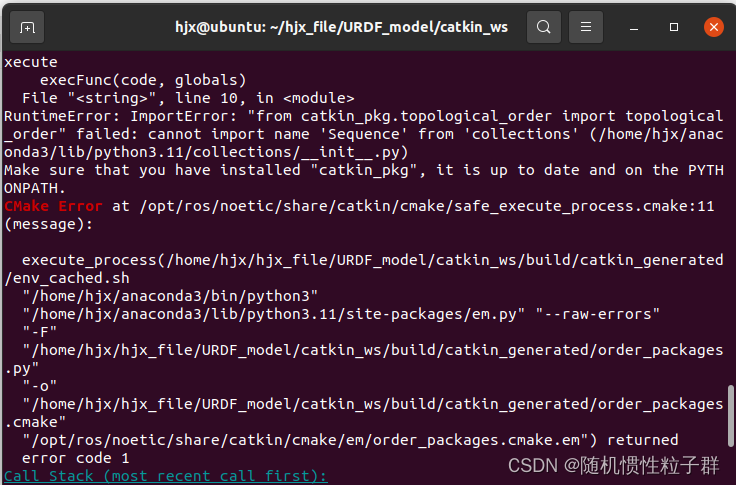
关于我在执行catkin_make是遇到的报错关键信息如下:
RuntimeError: ImportError: "from catkin_pkg.topological_order import topological_order" failed: cannot import name 'Sequence' from 'collections' (/home/hjx/anaconda3/lib/python3.11/collections/__init__.py)
Make sure that you have installed "catkin_pkg", it is up to date and on the PYTHONPATH.
CMake Error at /opt/ros/noetic/share/catkin/cmake/safe_execute_process.cmake:11 (message):execute_process(/home/hjx/hjx_file/URDF_model/catkin_ws/build/catkin_generated/env_cached.sh"/home/hjx/anaconda3/bin/python3""/home/hjx/anaconda3/lib/python3.11/site-packages/em.py" "--raw-errors""-F""/home/hjx/hjx_file/URDF_model/catkin_ws/build/catkin_generated/order_packages.py""-o""/home/hjx/hjx_file/URDF_model/catkin_ws/build/catkin_generated/order_packages.cmake""/opt/ros/noetic/share/catkin/cmake/em/order_packages.cmake.em") returnederror code 1
Call Stack (most recent call first):/opt/ros/noetic/share/catkin/cmake/em_expand.cmake:25 (safe_execute_process)/opt/ros/noetic/share/catkin/cmake/catkin_workspace.cmake:35 (em_expand)CMakeLists.txt:69 (catkin_workspace)-- Configuring incomplete, errors occurred!
See also "/home/hjx/hjx_file/URDF_model/catkin_ws/build/CMakeFiles/CMakeOutput.log".
See also "/home/hjx/hjx_file/URDF_model/catkin_ws/build/CMakeFiles/CMakeError.log".
Invoking "cmake" failed
其实,关键的报错点如下:
CMake Error at /opt/ros/noetic/share/catkin/cmake/safe_execute_process.cmake:11 (message):
根据这个报错提示,我找到了几篇相关的博客:
Ubuntu20.04安装Ros Noetic版本,在catkin_make编译时出现的问题_could not find py_em (missing: py_em)-CSDN博客
Ubuntu 20.04 ROS noetic 问题解决_cmake error at /opt/ros/noetic/share/catkin/cmake/-CSDN博客
根据上面这2篇博客其实就可以解决问题了
下面为给出解决这个报错的终端指令:
catkin_make -DPYTHON_EXECUTABLE=/usr/bin/python3
便可完成工作空间的创建!
下图是我catkin_make成功的页面截图:
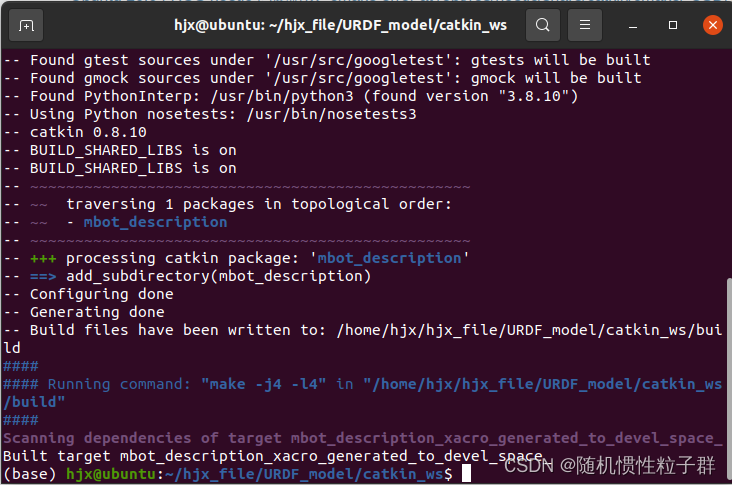
后面再次进行catkin_make编译时就不会再出现报错了
这篇关于Ubuntu20.04 [Ros Noetic]版本——在catkin_make编译时出现报错的解决方案的文章就介绍到这儿,希望我们推荐的文章对编程师们有所帮助!








