本文主要是介绍Ubuntu 16.04里下安装搜狗输入法(图文详解)(亲测好使),希望对大家解决编程问题提供一定的参考价值,需要的开发者们随着小编来一起学习吧!
开始想装搜狗输入法的时候没想到这么麻烦,比windows麻烦太多,不过ubuntu友好的操作界面,逼格,更适合编程等特点,让我流连忘返。
这是我转载的一篇亲测好使,比网上找到的其他的方法好使。
网址:https://www.cnblogs.com/zlslch/p/6943318.html
不多说,直接上干货!
其实啊,很简单
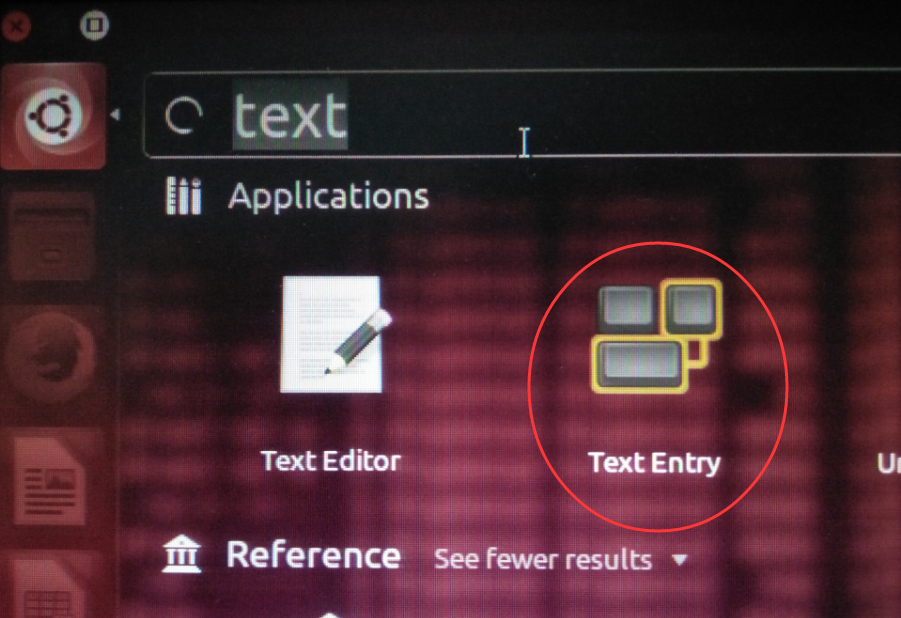
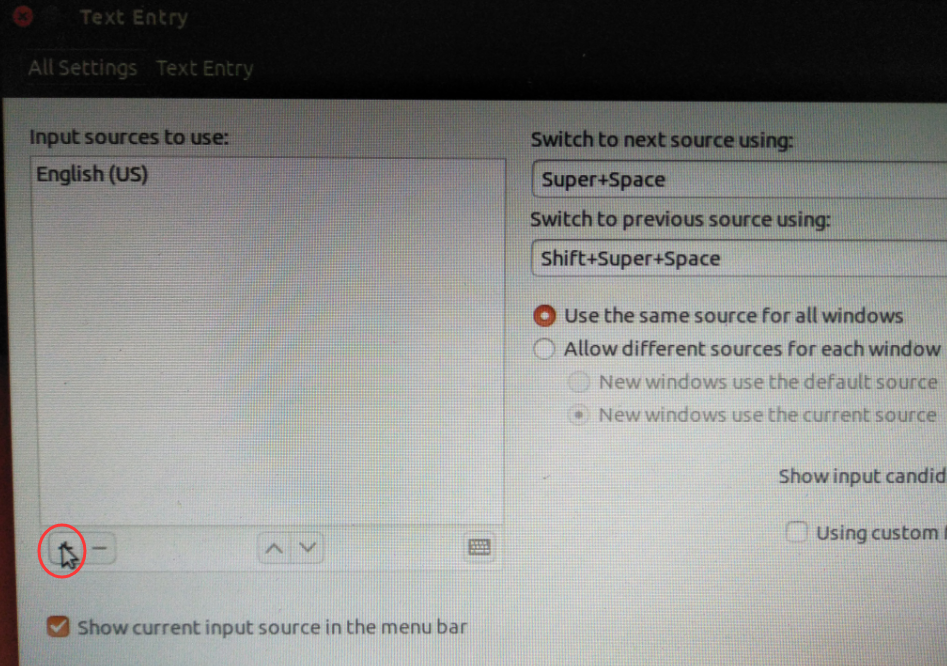
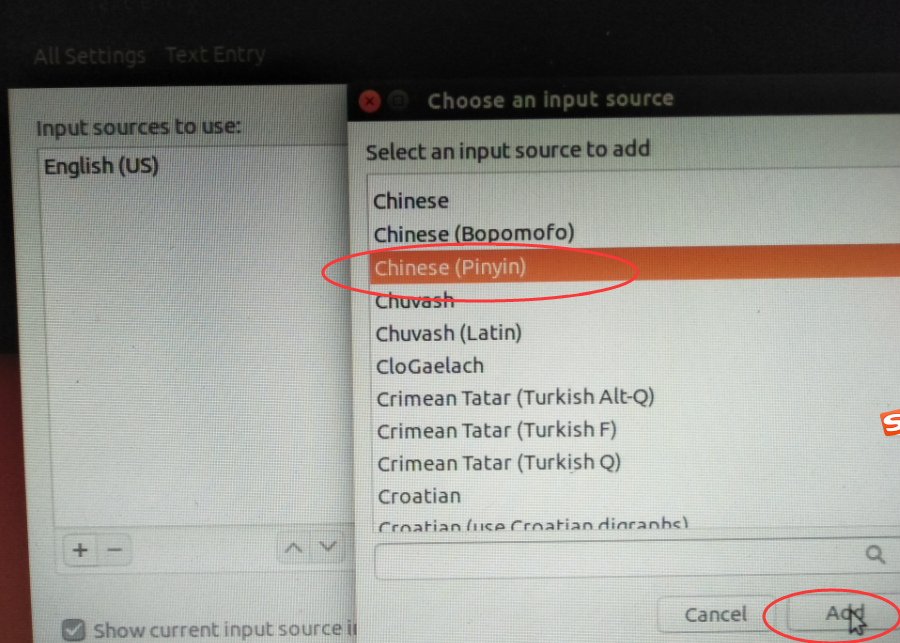
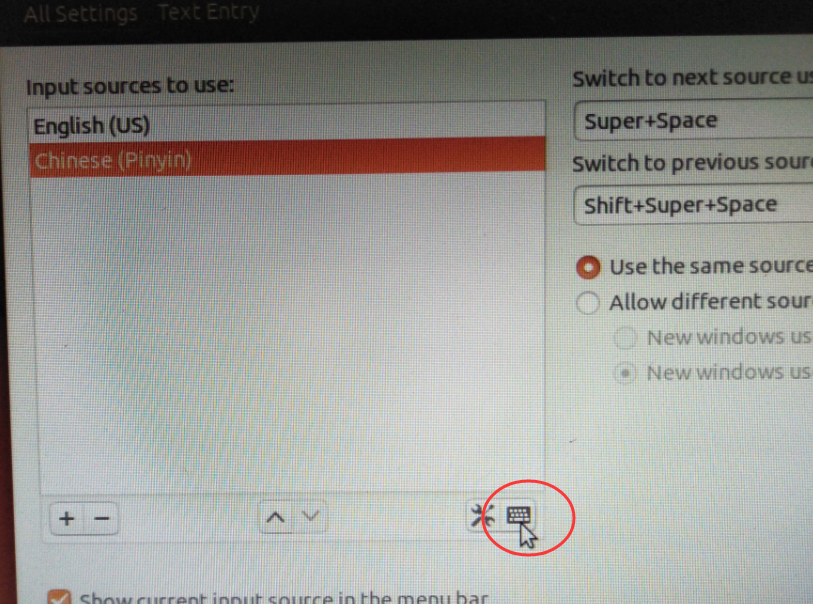
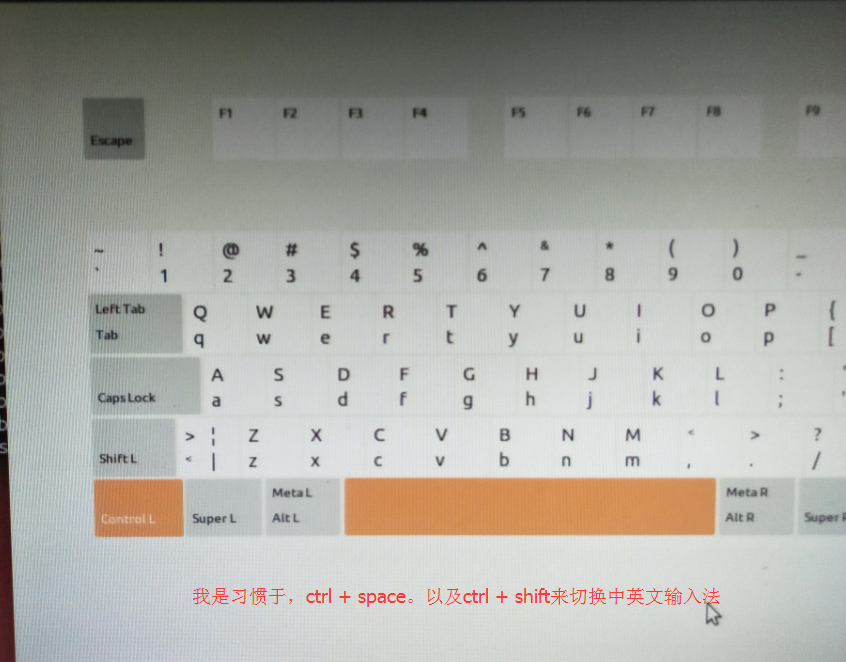
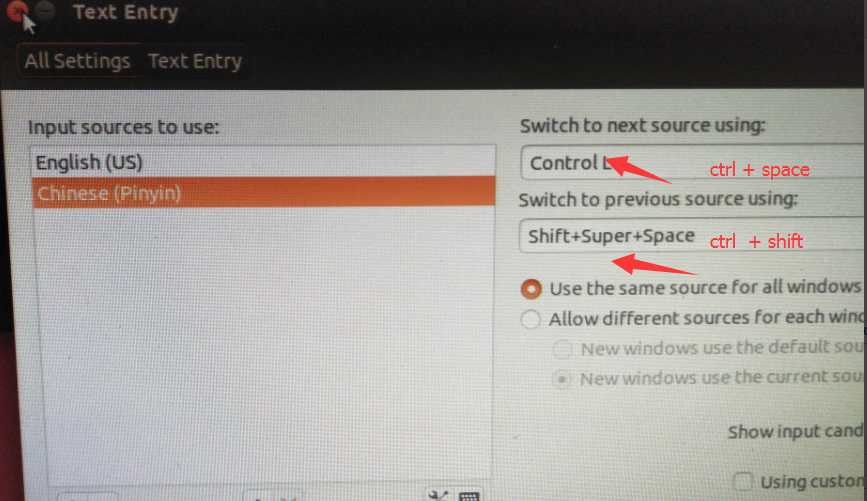
分三步走
1、添加fcitx的键盘输入法系统,因为sogou是基于fcitx的,而系统默认的是iBus;
2、安装sogou输入法;
3、设置系统参数及一些注意点。

zhouls@zhouls-virtual-machine:~$ sudo -s
[sudo] password for zhouls:
root@zhouls-virtual-machine:~# cat /etc/issue
Ubuntu 16.04.1 LTS \n \lroot@zhouls-virtual-machine:~#
第一步、添加fcitx键盘输入法系统
①先添加以下源
sudo add-apt-repository ppa:fcitx-team/nightly

root@zhouls-virtual-machine:~# sudo add-apt-repository ppa:fcitx-team/nightlyExperimental releases of Fcitx, use with caution.More info: https://launchpad.net/~fcitx-team/+archive/ubuntu/nightly
Press [ENTER] to continue or ctrl-c to cancel adding itgpg: keyring `/tmp/tmps7a9gr5b/secring.gpg' created
gpg: keyring `/tmp/tmps7a9gr5b/pubring.gpg' created
gpg: requesting key 7E5FA1EE from hkp server keyserver.ubuntu.com
gpg: /tmp/tmps7a9gr5b/trustdb.gpg: trustdb created
gpg: key 7E5FA1EE: public key "Launchpad PPA for Fcitx Team PPA" imported
gpg: Total number processed: 1
gpg:               imported: 1  (RSA: 1)
OK
root@zhouls-virtual-machine:~#
②添加源之后需要更新一下系统
sudo apt-get update

root@zhouls-virtual-machine:~# sudo apt-get update
Ign:1 http://repo.mongodb.org/apt/ubuntu xenial/mongodb-org/3.4 InRelease
Hit:2 http://cn.archive.ubuntu.com/ubuntu xenial InRelease
Hit:3 http://cn.archive.ubuntu.com/ubuntu xenial-updates InRelease
Hit:4 http://cn.archive.ubuntu.com/ubuntu xenial-backports InRelease
Hit:5 http://repo.mongodb.org/apt/ubuntu xenial/mongodb-org/3.4 Release
Hit:7 http://security.ubuntu.com/ubuntu xenial-security InRelease
Ign:8 http://ppa.launchpad.net/fcitx-team/nightly/ubuntu xenial InRelease
Ign:9 http://ppa.launchpad.net/fcitx-team/nightly/ubuntu xenial Release
Ign:10 http://ppa.launchpad.net/fcitx-team/nightly/ubuntu xenial/main amd64 Packages
Ign:11 http://ppa.launchpad.net/fcitx-team/nightly/ubuntu xenial/main i386 Packages
Ign:12 http://ppa.launchpad.net/fcitx-team/nightly/ubuntu xenial/main all Packages
Ign:13 http://ppa.launchpad.net/fcitx-team/nightly/ubuntu xenial/main Translation-en_US
Ign:14 http://ppa.launchpad.net/fcitx-team/nightly/ubuntu xenial/main Translation-en
Ign:15 http://ppa.launchpad.net/fcitx-team/nightly/ubuntu xenial/main amd64 DEP-11 Metadata
Ign:16 http://ppa.launchpad.net/fcitx-team/nightly/ubuntu xenial/main DEP-11 64x64 Icons
Ign:10 http://202.193.64.38/ppa.launchpad.net/fcitx-team/nightly/ubuntu xenial/main amd64 Packages
Ign:11 http://101.110.118.40/ppa.launchpad.net/fcitx-team/nightly/ubuntu xenial/main i386 Packages
Ign:13 http://202.193.64.38/ppa.launchpad.net/fcitx-team/nightly/ubuntu xenial/main Translation-en_US
Ign:16 http://ppa.launchpad.net/fcitx-team/nightly/ubuntu xenial/main DEP-11 64x64 Icons
Ign:10 http://202.193.64.38/ppa.launchpad.net/fcitx-team/nightly/ubuntu xenial/main amd64 Packages
Ign:11 http://101.110.118.40/ppa.launchpad.net/fcitx-team/nightly/ubuntu xenial/main i386 Packages
Ign:15 http://202.193.64.38/ppa.launchpad.net/fcitx-team/nightly/ubuntu xenial/main amd64 DEP-11 Metadata
Ign:12 http://202.193.64.38/ppa.launchpad.net/fcitx-team/nightly/ubuntu xenial/main all Packages
Ign:13 http://202.193.64.38/ppa.launchpad.net/fcitx-team/nightly/ubuntu xenial/main Translation-en_US
Ign:14 http://202.193.64.38/ppa.launchpad.net/fcitx-team/nightly/ubuntu xenial/main Translation-en
Ign:16 http://ppa.launchpad.net/fcitx-team/nightly/ubuntu xenial/main DEP-11 64x64 Icons
Ign:10 http://202.193.64.38/ppa.launchpad.net/fcitx-team/nightly/ubuntu xenial/main amd64 Packages
Ign:15 http://202.193.64.38/ppa.launchpad.net/fcitx-team/nightly/ubuntu xenial/main amd64 DEP-11 Metadata
Ign:11 http://101.110.118.40/ppa.launchpad.net/fcitx-team/nightly/ubuntu xenial/main i386 Packages
Ign:12 http://202.193.64.38/ppa.launchpad.net/fcitx-team/nightly/ubuntu xenial/main all Packages
Ign:14 http://202.193.64.38/ppa.launchpad.net/fcitx-team/nightly/ubuntu xenial/main Translation-en
Ign:13 http://202.193.64.38/ppa.launchpad.net/fcitx-team/nightly/ubuntu xenial/main Translation-en_US
Ign:10 http://202.193.64.38/ppa.launchpad.net/fcitx-team/nightly/ubuntu xenial/main amd64 Packages
Ign:16 http://202.193.64.38/ppa.launchpad.net/fcitx-team/nightly/ubuntu xenial/main DEP-11 64x64 Icons
Ign:11 http://101.110.118.40/ppa.launchpad.net/fcitx-team/nightly/ubuntu xenial/main i386 Packages
Ign:12 http://202.193.64.38/ppa.launchpad.net/fcitx-team/nightly/ubuntu xenial/main all Packages
Ign:13 http://202.193.64.38/ppa.launchpad.net/fcitx-team/nightly/ubuntu xenial/main Translation-en_US
Err:10 http://202.193.64.38/ppa.launchpad.net/fcitx-team/nightly/ubuntu xenial/main amd64 Packages404  Not Found
Ign:16 http://202.193.64.38/ppa.launchpad.net/fcitx-team/nightly/ubuntu xenial/main DEP-11 64x64 Icons
Ign:11 http://101.110.118.40/ppa.launchpad.net/fcitx-team/nightly/ubuntu xenial/main i386 Packages
Ign:12 http://202.193.64.38/ppa.launchpad.net/fcitx-team/nightly/ubuntu xenial/main all Packages
Ign:14 http://202.193.64.38/ppa.launchpad.net/fcitx-team/nightly/ubuntu xenial/main Translation-en
Ign:13 http://202.193.64.38/ppa.launchpad.net/fcitx-team/nightly/ubuntu xenial/main Translation-en_US
Reading package lists... Done
W: The repository 'http://ppa.launchpad.net/fcitx-team/nightly/ubuntu xenial Release' does not have a Release file.
N: Data from such a repository can't be authenticated and is therefore potentially dangerous to use.
N: See apt-secure(8) manpage for repository creation and user configuration details.
E: Failed to fetch http://ppa.launchpad.net/fcitx-team/nightly/ubuntu/dists/xenial/main/binary-amd64/Packages  404  Not Found
E: Failed to fetch http://101.110.118.20/ppa.launchpad.net/fcitx-team/nightly/ubuntu/dists/xenial/main/dep11/Components-amd64.yml.gz?mqcreq=1  404  Not Found
E: Some index files failed to download. They have been ignored, or old ones used instead.
root@zhouls-virtual-machine:~#
③开始安装fcitx
sudo apt-get install fcitx 
root@zhouls-virtual-machine:~# sudo apt-get install fcitx
Reading package lists... Done
Building dependency tree
Reading state information... Done
The following additional packages will be installed:fcitx-bin fcitx-config-common fcitx-config-gtk fcitx-data fcitx-frontend-allfcitx-frontend-gtk2 fcitx-frontend-gtk3 fcitx-frontend-qt4fcitx-frontend-qt5 fcitx-module-dbus fcitx-module-kimpanel fcitx-module-luafcitx-module-x11 fcitx-modules fcitx-ui-classic libfcitx-core0 libfcitx-qt0libfcitx-qt5-1 libpresage-data libpresage1v5 libtinyxml2.6.2v5 presage
Suggested packages:fcitx-m17n fcitx-tools kdebase-bin plasma-widgets-kimpanel
The following NEW packages will be installed:fcitx fcitx-bin fcitx-config-common fcitx-config-gtk fcitx-datafcitx-frontend-all fcitx-frontend-gtk2 fcitx-frontend-gtk3fcitx-frontend-qt4 fcitx-frontend-qt5 fcitx-module-dbusfcitx-module-kimpanel fcitx-module-lua fcitx-module-x11 fcitx-modulesfcitx-ui-classic libfcitx-core0 libfcitx-qt0 libfcitx-qt5-1 libpresage-datalibpresage1v5 libtinyxml2.6.2v5 presage
0 upgraded, 23 newly installed, 0 to remove and 236 not upgraded.
Need to get 6,011 kB of archives.
After this operation, 21.9 MB of additional disk space will be used.
Do you want to continue? [Y/n] y
Get:1 http://cn.archive.ubuntu.com/ubuntu xenial-updates/main amd64 libfcitx-core0 amd64 1:4.2.9.1-1ubuntu1.16.04.2 [54.7 kB]
Get:2 http://cn.archive.ubuntu.com/ubuntu xenial-updates/main amd64 fcitx-bin amd64 1:4.2.9.1-1ubuntu1.16.04.2 [41.2 kB]
Get:3 http://cn.archive.ubuntu.com/ubuntu xenial-updates/main amd64 fcitx-data all 1:4.2.9.1-1ubuntu1.16.04.2 [82.0 kB]
Get:4 http://cn.archive.ubuntu.com/ubuntu xenial/main amd64 libtinyxml2.6.2v5 amd64 2.6.2-3 [29.7 kB]
Get:5 http://cn.archive.ubuntu.com/ubuntu xenial/main amd64 libpresage-data all 0.9.1-1.1ubuntu2 [3,665 kB]
Get:6 http://cn.archive.ubuntu.com/ubuntu xenial/main amd64 libpresage1v5 amd64 0.9.1-1.1ubuntu2 [155 kB]
Get:7 http://cn.archive.ubuntu.com/ubuntu xenial-updates/main amd64 fcitx-modules amd64 1:4.2.9.1-1ubuntu1.16.04.2 [1,420 kB]
Get:8 http://cn.archive.ubuntu.com/ubuntu xenial-updates/main amd64 fcitx all 1:4.2.9.1-1ubuntu1.16.04.2 [5,576 B]
Get:9 http://cn.archive.ubuntu.com/ubuntu xenial/main amd64 fcitx-config-common all 0.4.8-3 [2,698 B]
Get:10 http://cn.archive.ubuntu.com/ubuntu xenial/main amd64 fcitx-config-gtk amd64 0.4.8-3 [35.8 kB]
Get:11 http://cn.archive.ubuntu.com/ubuntu xenial-updates/main amd64 fcitx-frontend-all all 1:4.2.9.1-1ubuntu1.16.04.2 [4,936 B]
Get:12 http://cn.archive.ubuntu.com/ubuntu xenial-updates/main amd64 fcitx-module-dbus amd64 1:4.2.9.1-1ubuntu1.16.04.2 [29.0 kB]
Get:13 http://cn.archive.ubuntu.com/ubuntu xenial-updates/main amd64 fcitx-frontend-gtk2 amd64 1:4.2.9.1-1ubuntu1.16.04.2 [14.2 kB]
Get:14 http://cn.archive.ubuntu.com/ubuntu xenial-updates/main amd64 fcitx-frontend-gtk3 amd64 1:4.2.9.1-1ubuntu1.16.04.2 [14.9 kB]
Get:15 http://cn.archive.ubuntu.com/ubuntu xenial-updates/main amd64 libfcitx-qt0 amd64 1:4.2.9.1-1ubuntu1.16.04.2 [69.5 kB]
Get:16 http://cn.archive.ubuntu.com/ubuntu xenial-updates/main amd64 fcitx-frontend-qt4 amd64 1:4.2.9.1-1ubuntu1.16.04.2 [28.9 kB]
Get:17 http://cn.archive.ubuntu.com/ubuntu xenial/main amd64 libfcitx-qt5-1 amd64 1.0.5-1 [57.6 kB]
Get:18 http://cn.archive.ubuntu.com/ubuntu xenial/main amd64 fcitx-frontend-qt5 amd64 1.0.5-1 [31.7 kB]
Get:19 http://cn.archive.ubuntu.com/ubuntu xenial-updates/main amd64 fcitx-module-kimpanel amd64 1:4.2.9.1-1ubuntu1.16.04.2 [17.9 kB]
Get:20 http://cn.archive.ubuntu.com/ubuntu xenial-updates/main amd64 fcitx-module-lua amd64 1:4.2.9.1-1ubuntu1.16.04.2 [17.3 kB]
Get:21 http://cn.archive.ubuntu.com/ubuntu xenial-updates/main amd64 fcitx-module-x11 amd64 1:4.2.9.1-1ubuntu1.16.04.2 [83.0 kB]
Get:22 http://cn.archive.ubuntu.com/ubuntu xenial-updates/main amd64 fcitx-ui-classic amd64 1:4.2.9.1-1ubuntu1.16.04.2 [96.3 kB]
Get:23 http://cn.archive.ubuntu.com/ubuntu xenial/main amd64 presage amd64 0.9.1-1.1ubuntu2 [54.4 kB]
Fetched 6,011 kB in 6s (949 kB/s)
Selecting previously unselected package libfcitx-core0:amd64.
(Reading database ... 209096 files and directories currently installed.)
Preparing to unpack .../libfcitx-core0_1%3a4.2.9.1-1ubuntu1.16.04.2_amd64.deb ...
Unpacking libfcitx-core0:amd64 (1:4.2.9.1-1ubuntu1.16.04.2) ...
Selecting previously unselected package fcitx-bin.
Preparing to unpack .../fcitx-bin_1%3a4.2.9.1-1ubuntu1.16.04.2_amd64.deb ...
Unpacking fcitx-bin (1:4.2.9.1-1ubuntu1.16.04.2) ...
Selecting previously unselected package fcitx-data.
Preparing to unpack .../fcitx-data_1%3a4.2.9.1-1ubuntu1.16.04.2_all.deb ...
Unpacking fcitx-data (1:4.2.9.1-1ubuntu1.16.04.2) ...
Selecting previously unselected package libtinyxml2.6.2v5:amd64.
Preparing to unpack .../libtinyxml2.6.2v5_2.6.2-3_amd64.deb ...
Unpacking libtinyxml2.6.2v5:amd64 (2.6.2-3) ...
Selecting previously unselected package libpresage-data.
Preparing to unpack .../libpresage-data_0.9.1-1.1ubuntu2_all.deb ...
Unpacking libpresage-data (0.9.1-1.1ubuntu2) ...
Selecting previously unselected package libpresage1v5:amd64.
Preparing to unpack .../libpresage1v5_0.9.1-1.1ubuntu2_amd64.deb ...
Unpacking libpresage1v5:amd64 (0.9.1-1.1ubuntu2) ...
Selecting previously unselected package fcitx-modules.
Preparing to unpack .../fcitx-modules_1%3a4.2.9.1-1ubuntu1.16.04.2_amd64.deb ...
Unpacking fcitx-modules (1:4.2.9.1-1ubuntu1.16.04.2) ...
Selecting previously unselected package fcitx.
Preparing to unpack .../fcitx_1%3a4.2.9.1-1ubuntu1.16.04.2_all.deb ...
Unpacking fcitx (1:4.2.9.1-1ubuntu1.16.04.2) ...
Selecting previously unselected package fcitx-config-common.
Preparing to unpack .../fcitx-config-common_0.4.8-3_all.deb ...
Unpacking fcitx-config-common (0.4.8-3) ...
Selecting previously unselected package fcitx-config-gtk.
Preparing to unpack .../fcitx-config-gtk_0.4.8-3_amd64.deb ...
Unpacking fcitx-config-gtk (0.4.8-3) ...
Selecting previously unselected package fcitx-frontend-all.
Preparing to unpack .../fcitx-frontend-all_1%3a4.2.9.1-1ubuntu1.16.04.2_all.deb ...
Unpacking fcitx-frontend-all (1:4.2.9.1-1ubuntu1.16.04.2) ...
Selecting previously unselected package fcitx-module-dbus.
Preparing to unpack .../fcitx-module-dbus_1%3a4.2.9.1-1ubuntu1.16.04.2_amd64.deb ...
Unpacking fcitx-module-dbus (1:4.2.9.1-1ubuntu1.16.04.2) ...
Selecting previously unselected package fcitx-frontend-gtk2.
Preparing to unpack .../fcitx-frontend-gtk2_1%3a4.2.9.1-1ubuntu1.16.04.2_amd64.deb ...
Unpacking fcitx-frontend-gtk2 (1:4.2.9.1-1ubuntu1.16.04.2) ...
Selecting previously unselected package fcitx-frontend-gtk3.
Preparing to unpack .../fcitx-frontend-gtk3_1%3a4.2.9.1-1ubuntu1.16.04.2_amd64.deb ...
Unpacking fcitx-frontend-gtk3 (1:4.2.9.1-1ubuntu1.16.04.2) ...
Selecting previously unselected package libfcitx-qt0:amd64.
Preparing to unpack .../libfcitx-qt0_1%3a4.2.9.1-1ubuntu1.16.04.2_amd64.deb ...
Unpacking libfcitx-qt0:amd64 (1:4.2.9.1-1ubuntu1.16.04.2) ...
Selecting previously unselected package fcitx-frontend-qt4.
Preparing to unpack .../fcitx-frontend-qt4_1%3a4.2.9.1-1ubuntu1.16.04.2_amd64.deb ...
Unpacking fcitx-frontend-qt4 (1:4.2.9.1-1ubuntu1.16.04.2) ...
Selecting previously unselected package libfcitx-qt5-1:amd64.
Preparing to unpack .../libfcitx-qt5-1_1.0.5-1_amd64.deb ...
Unpacking libfcitx-qt5-1:amd64 (1.0.5-1) ...
Selecting previously unselected package fcitx-frontend-qt5:amd64.
Preparing to unpack .../fcitx-frontend-qt5_1.0.5-1_amd64.deb ...
Unpacking fcitx-frontend-qt5:amd64 (1.0.5-1) ...
Selecting previously unselected package fcitx-module-kimpanel.
Preparing to unpack .../fcitx-module-kimpanel_1%3a4.2.9.1-1ubuntu1.16.04.2_amd64.deb ...
Unpacking fcitx-module-kimpanel (1:4.2.9.1-1ubuntu1.16.04.2) ...
Selecting previously unselected package fcitx-module-lua.
Preparing to unpack .../fcitx-module-lua_1%3a4.2.9.1-1ubuntu1.16.04.2_amd64.deb ...
Unpacking fcitx-module-lua (1:4.2.9.1-1ubuntu1.16.04.2) ...
Selecting previously unselected package fcitx-module-x11.
Preparing to unpack .../fcitx-module-x11_1%3a4.2.9.1-1ubuntu1.16.04.2_amd64.deb ...
Unpacking fcitx-module-x11 (1:4.2.9.1-1ubuntu1.16.04.2) ...
Selecting previously unselected package fcitx-ui-classic.
Preparing to unpack .../fcitx-ui-classic_1%3a4.2.9.1-1ubuntu1.16.04.2_amd64.deb ...
Unpacking fcitx-ui-classic (1:4.2.9.1-1ubuntu1.16.04.2) ...
Selecting previously unselected package presage.
Preparing to unpack .../presage_0.9.1-1.1ubuntu2_amd64.deb ...
Unpacking presage (0.9.1-1.1ubuntu2) ...
Processing triggers for libc-bin (2.23-0ubuntu7) ...
Processing triggers for man-db (2.7.5-1) ...
Processing triggers for shared-mime-info (1.5-2ubuntu0.1) ...
Processing triggers for hicolor-icon-theme (0.15-0ubuntu1) ...
Processing triggers for gnome-menus (3.13.3-6ubuntu3.1) ...
Processing triggers for desktop-file-utils (0.22-1ubuntu5) ...
Processing triggers for bamfdaemon (0.5.3~bzr0+16.04.20160701-0ubuntu1) ...
Rebuilding /usr/share/applications/bamf-2.index...
Processing triggers for mime-support (3.59ubuntu1) ...
Processing triggers for libgtk2.0-0:amd64 (2.24.30-1ubuntu1) ...
Processing triggers for libgtk-3-0:amd64 (3.18.9-1ubuntu3.1) ...
Setting up libfcitx-core0:amd64 (1:4.2.9.1-1ubuntu1.16.04.2) ...
Setting up fcitx-bin (1:4.2.9.1-1ubuntu1.16.04.2) ...
Setting up fcitx-data (1:4.2.9.1-1ubuntu1.16.04.2) ...
Setting up libtinyxml2.6.2v5:amd64 (2.6.2-3) ...
Setting up libpresage-data (0.9.1-1.1ubuntu2) ...
Setting up libpresage1v5:amd64 (0.9.1-1.1ubuntu2) ...
Setting up fcitx-modules (1:4.2.9.1-1ubuntu1.16.04.2) ...
Setting up fcitx (1:4.2.9.1-1ubuntu1.16.04.2) ...
update-alternatives: using /etc/X11/xinit/xinput.d/fcitx to provide /etc/X11/xinit/xinput.d/ja_JP (xinput-ja_JP) in auto mode
update-alternatives: using /etc/X11/xinit/xinput.d/fcitx to provide /etc/X11/xinit/xinput.d/ko_KR (xinput-ko_KR) in auto mode
update-alternatives: using /etc/X11/xinit/xinput.d/fcitx to provide /etc/X11/xinit/xinput.d/zh_CN (xinput-zh_CN) in auto mode
update-alternatives: using /etc/X11/xinit/xinput.d/fcitx to provide /etc/X11/xinit/xinput.d/zh_TW (xinput-zh_TW) in auto mode
update-alternatives: using /etc/X11/xinit/xinput.d/fcitx to provide /etc/X11/xinit/xinput.d/zh_HK (xinput-zh_HK) in auto mode
update-alternatives: using /etc/X11/xinit/xinput.d/fcitx to provide /etc/X11/xinit/xinput.d/zh_SG (xinput-zh_SG) in auto mode
Setting up fcitx-config-common (0.4.8-3) ...
Setting up fcitx-config-gtk (0.4.8-3) ...
Setting up fcitx-frontend-all (1:4.2.9.1-1ubuntu1.16.04.2) ...
Setting up fcitx-module-dbus (1:4.2.9.1-1ubuntu1.16.04.2) ...
Setting up fcitx-frontend-gtk2 (1:4.2.9.1-1ubuntu1.16.04.2) ...
Setting up fcitx-frontend-gtk3 (1:4.2.9.1-1ubuntu1.16.04.2) ...
Setting up libfcitx-qt0:amd64 (1:4.2.9.1-1ubuntu1.16.04.2) ...
Setting up fcitx-frontend-qt4 (1:4.2.9.1-1ubuntu1.16.04.2) ...
Setting up libfcitx-qt5-1:amd64 (1.0.5-1) ...
Setting up fcitx-frontend-qt5:amd64 (1.0.5-1) ...
Setting up fcitx-module-kimpanel (1:4.2.9.1-1ubuntu1.16.04.2) ...
Setting up fcitx-module-lua (1:4.2.9.1-1ubuntu1.16.04.2) ...
Setting up fcitx-module-x11 (1:4.2.9.1-1ubuntu1.16.04.2) ...
Setting up fcitx-ui-classic (1:4.2.9.1-1ubuntu1.16.04.2) ...
Setting up presage (0.9.1-1.1ubuntu2) ...
Processing triggers for libc-bin (2.23-0ubuntu7) ...
root@zhouls-virtual-machine:~#
④接着安装fcitx的配置工具
sudo apt-get install fcitx-config-gtk
root@zhouls-virtual-machine:~# sudo apt-get install fcitx-config-gtk
Reading package lists... Done
Building dependency tree
Reading state information... Done
fcitx-config-gtk is already the newest version (0.4.8-3).
fcitx-config-gtk set to manually installed.
0 upgraded, 0 newly installed, 0 to remove and 236 not upgraded.
root@zhouls-virtual-machine:~#
⑤然后安装fcitx的table-all软件包
sudo apt-get install fcitx-table-all
root@zhouls-virtual-machine:~# sudo apt-get install fcitx-table-all
Reading package lists... Done
Building dependency tree
Reading state information... Done
The following additional packages will be installed:fcitx-pinyin fcitx-table fcitx-table-bingchan fcitx-table-cangjiefcitx-table-dianbaoma fcitx-table-erbi fcitx-table-wanfeng fcitx-table-wbpyfcitx-table-wubi fcitx-table-ziranma
The following NEW packages will be installed:fcitx-pinyin fcitx-table fcitx-table-all fcitx-table-bingchanfcitx-table-cangjie fcitx-table-dianbaoma fcitx-table-erbifcitx-table-wanfeng fcitx-table-wbpy fcitx-table-wubi fcitx-table-ziranma
0 upgraded, 11 newly installed, 0 to remove and 236 not upgraded.
Need to get 5,575 kB of archives.
After this operation, 27.9 MB of additional disk space will be used.
Do you want to continue? [Y/n] y
Get:1 http://cn.archive.ubuntu.com/ubuntu xenial-updates/main amd64 fcitx-pinyin amd64 1:4.2.9.1-1ubuntu1.16.04.2 [2,060 kB]
Get:2 http://cn.archive.ubuntu.com/ubuntu xenial-updates/main amd64 fcitx-table amd64 1:4.2.9.1-1ubuntu1.16.04.2 [44.6 kB]
Get:3 http://cn.archive.ubuntu.com/ubuntu xenial-updates/universe amd64 fcitx-table-all all 1:4.2.9.1-1ubuntu1.16.04.2 [4,986 B]
Get:4 http://cn.archive.ubuntu.com/ubuntu xenial-updates/universe amd64 fcitx-table-bingchan all 1:4.2.9.1-1ubuntu1.16.04.2 [109 kB]
Get:5 http://cn.archive.ubuntu.com/ubuntu xenial-updates/universe amd64 fcitx-table-cangjie all 1:4.2.9.1-1ubuntu1.16.04.2 [27.1 kB]
Get:6 http://cn.archive.ubuntu.com/ubuntu xenial-updates/universe amd64 fcitx-table-dianbaoma all 1:4.2.9.1-1ubuntu1.16.04.2 [17.2 kB]
Get:7 http://cn.archive.ubuntu.com/ubuntu xenial-updates/universe amd64 fcitx-table-erbi all 1:4.2.9.1-1ubuntu1.16.04.2 [365 kB]
Get:8 http://cn.archive.ubuntu.com/ubuntu xenial-updates/universe amd64 fcitx-table-wanfeng all 1:4.2.9.1-1ubuntu1.16.04.2 [501 kB]
Get:9 http://cn.archive.ubuntu.com/ubuntu xenial-updates/universe amd64 fcitx-table-wbpy all 1:4.2.9.1-1ubuntu1.16.04.2 [1,643 kB]
Get:10 http://cn.archive.ubuntu.com/ubuntu xenial-updates/universe amd64 fcitx-table-wubi all 1:4.2.9.1-1ubuntu1.16.04.2 [497 kB]
Get:11 http://cn.archive.ubuntu.com/ubuntu xenial-updates/universe amd64 fcitx-table-ziranma all 1:4.2.9.1-1ubuntu1.16.04.2 [306 kB]
Fetched 5,575 kB in 5s (976 kB/s)
Selecting previously unselected package fcitx-pinyin.
(Reading database ... 209504 files and directories currently installed.)
Preparing to unpack .../fcitx-pinyin_1%3a4.2.9.1-1ubuntu1.16.04.2_amd64.deb ...
Unpacking fcitx-pinyin (1:4.2.9.1-1ubuntu1.16.04.2) ...
Selecting previously unselected package fcitx-table.
Preparing to unpack .../fcitx-table_1%3a4.2.9.1-1ubuntu1.16.04.2_amd64.deb ...
Unpacking fcitx-table (1:4.2.9.1-1ubuntu1.16.04.2) ...
Selecting previously unselected package fcitx-table-all.
Preparing to unpack .../fcitx-table-all_1%3a4.2.9.1-1ubuntu1.16.04.2_all.deb ...
Unpacking fcitx-table-all (1:4.2.9.1-1ubuntu1.16.04.2) ...
Selecting previously unselected package fcitx-table-bingchan.
Preparing to unpack .../fcitx-table-bingchan_1%3a4.2.9.1-1ubuntu1.16.04.2_all.deb ...
Unpacking fcitx-table-bingchan (1:4.2.9.1-1ubuntu1.16.04.2) ...
Selecting previously unselected package fcitx-table-cangjie.
Preparing to unpack .../fcitx-table-cangjie_1%3a4.2.9.1-1ubuntu1.16.04.2_all.deb ...
Unpacking fcitx-table-cangjie (1:4.2.9.1-1ubuntu1.16.04.2) ...
Selecting previously unselected package fcitx-table-dianbaoma.
Preparing to unpack .../fcitx-table-dianbaoma_1%3a4.2.9.1-1ubuntu1.16.04.2_all.deb ...
Unpacking fcitx-table-dianbaoma (1:4.2.9.1-1ubuntu1.16.04.2) ...
Selecting previously unselected package fcitx-table-erbi.
Preparing to unpack .../fcitx-table-erbi_1%3a4.2.9.1-1ubuntu1.16.04.2_all.deb ...
Unpacking fcitx-table-erbi (1:4.2.9.1-1ubuntu1.16.04.2) ...
Selecting previously unselected package fcitx-table-wanfeng.
Preparing to unpack .../fcitx-table-wanfeng_1%3a4.2.9.1-1ubuntu1.16.04.2_all.deb ...
Unpacking fcitx-table-wanfeng (1:4.2.9.1-1ubuntu1.16.04.2) ...
Selecting previously unselected package fcitx-table-wbpy.
Preparing to unpack .../fcitx-table-wbpy_1%3a4.2.9.1-1ubuntu1.16.04.2_all.deb ...
Unpacking fcitx-table-wbpy (1:4.2.9.1-1ubuntu1.16.04.2) ...
Selecting previously unselected package fcitx-table-wubi.
Preparing to unpack .../fcitx-table-wubi_1%3a4.2.9.1-1ubuntu1.16.04.2_all.deb ...
Unpacking fcitx-table-wubi (1:4.2.9.1-1ubuntu1.16.04.2) ...
Selecting previously unselected package fcitx-table-ziranma.
Preparing to unpack .../fcitx-table-ziranma_1%3a4.2.9.1-1ubuntu1.16.04.2_all.deb ...
Unpacking fcitx-table-ziranma (1:4.2.9.1-1ubuntu1.16.04.2) ...
Processing triggers for doc-base (0.10.7) ...
Processing 2 added doc-base files...
Setting up fcitx-pinyin (1:4.2.9.1-1ubuntu1.16.04.2) ...
Setting up fcitx-table (1:4.2.9.1-1ubuntu1.16.04.2) ...
Setting up fcitx-table-all (1:4.2.9.1-1ubuntu1.16.04.2) ...
Setting up fcitx-table-bingchan (1:4.2.9.1-1ubuntu1.16.04.2) ...
Setting up fcitx-table-cangjie (1:4.2.9.1-1ubuntu1.16.04.2) ...
Setting up fcitx-table-dianbaoma (1:4.2.9.1-1ubuntu1.16.04.2) ...
Setting up fcitx-table-erbi (1:4.2.9.1-1ubuntu1.16.04.2) ...
Setting up fcitx-table-wanfeng (1:4.2.9.1-1ubuntu1.16.04.2) ...
Setting up fcitx-table-wbpy (1:4.2.9.1-1ubuntu1.16.04.2) ...
Setting up fcitx-table-wubi (1:4.2.9.1-1ubuntu1.16.04.2) ...
Setting up fcitx-table-ziranma (1:4.2.9.1-1ubuntu1.16.04.2) ...
root@zhouls-virtual-machine:~#
⑥安装im-switch切换工具
sudo apt-get install im-switch
root@zhouls-virtual-machine:~# sudo apt-get install im-switch
Reading package lists... Done
Building dependency tree
Reading state information... Done
Note, selecting 'im-config' instead of 'im-switch'
The following packages will be upgraded:im-config
1 upgraded, 0 newly installed, 0 to remove and 235 not upgraded.
Need to get 23.3 kB of archives.
After this operation, 4,096 B of additional disk space will be used.
Get:1 http://cn.archive.ubuntu.com/ubuntu xenial-updates/main amd64 im-config all 0.29-1ubuntu12.4 [23.3 kB]
Fetched 23.3 kB in 0s (85.1 kB/s)
(Reading database ... 209582 files and directories currently installed.)
Preparing to unpack .../im-config_0.29-1ubuntu12.4_all.deb ...
Unpacking im-config (0.29-1ubuntu12.4) over (0.29-1ubuntu12) ...
Processing triggers for gnome-menus (3.13.3-6ubuntu3.1) ...
Processing triggers for desktop-file-utils (0.22-1ubuntu5) ...
Processing triggers for bamfdaemon (0.5.3~bzr0+16.04.20160701-0ubuntu1) ...
Rebuilding /usr/share/applications/bamf-2.index...
Processing triggers for mime-support (3.59ubuntu1) ...
Processing triggers for man-db (2.7.5-1) ...
Setting up im-config (0.29-1ubuntu12.4) ...
root@zhouls-virtual-machine:~#
⑦ 看看我们的fcitx是否安装完成

说明,安装成功!
其实fcitx只是一个输入法工具,本身不带资源包的,所以Ubuntu下安装搜狗输入法,需要我们自己来下载搜狗输入法的资源包 。
第二步、安装sogou输入法
①选择你操作系统的版本下载就可以了


②用dpkg命令来安装搜狗输入法资源包
sudo dpkg -i sogoupinyin_***_amd64.deb 
root@zhouls-virtual-machine:~/Downloads# pwd
/home/zhouls/Downloads
root@zhouls-virtual-machine:~/Downloads# ls
jdk-8u60-linux-x64.tar.gz                  sogoupinyin_2.1.0.0086_amd64.deb
mongodb-linux-x86_64-ubuntu1604-3.4.4.tgz  vmware-tools-distrib
neo4j-community-3.2.0-unix.tar.gz
root@zhouls-virtual-machine:~/Downloads# sudo dpkg -i sogoupinyin_2.1.0.0086_amd64.deb
Selecting previously unselected package sogoupinyin.
(Reading database ... 209582 files and directories currently installed.)
Preparing to unpack sogoupinyin_2.1.0.0086_amd64.deb ...
Unpacking sogoupinyin (2.1.0.0086) ...
dpkg: dependency problems prevent configuration of sogoupinyin:sogoupinyin depends on libopencc2 | libopencc1; however:Package libopencc2 is not installed.Package libopencc1 is not installed.sogoupinyin depends on fcitx-libs (>= 4.2.7); however:Package fcitx-libs is not installed.sogoupinyin depends on fcitx-libs-qt (>= 4.2.7); however:Package fcitx-libs-qt is not installed.dpkg: error processing package sogoupinyin (--install):dependency problems - leaving unconfigured
Processing triggers for libglib2.0-0:amd64 (2.48.1-1~ubuntu16.04.1) ...
No such key 'Gtk/IMModule' in schema 'org.gnome.settings-daemon.plugins.xsettings' as specified in override file '/usr/share/glib-2.0/schemas/50_sogoupinyin.gschema.override'; ignoring override for this key.
Processing triggers for gnome-menus (3.13.3-6ubuntu3.1) ...
Processing triggers for desktop-file-utils (0.22-1ubuntu5) ...
Processing triggers for bamfdaemon (0.5.3~bzr0+16.04.20160701-0ubuntu1) ...
Rebuilding /usr/share/applications/bamf-2.index...
Processing triggers for mime-support (3.59ubuntu1) ...
Processing triggers for hicolor-icon-theme (0.15-0ubuntu1) ...
Processing triggers for shared-mime-info (1.5-2ubuntu0.1) ...
Errors were encountered while processing:sogoupinyin
root@zhouls-virtual-machine:~/Downloads#
第三步、设置语言选项
①到系统设置->语言支持,将键盘输入法系统由默认的iBus设置为fcitx


root@zhouls-virtual-machine:~# sudo apt-get install -f
Reading package lists... Done
Building dependency tree
Reading state information... Done
Correcting dependencies... Done
The following additional packages will be installed:fcitx-libs fcitx-libs-qt libfcitx-config4 libfcitx-utils0 libopencc1
Recommended packages:libfcitx-gclient0
The following NEW packages will be installed:fcitx-libs fcitx-libs-qt libopencc1
The following packages will be upgraded:libfcitx-config4 libfcitx-utils0
2 upgraded, 3 newly installed, 0 to remove and 233 not upgraded.
1 not fully installed or removed.
Need to get 689 kB of archives.
After this operation, 9,114 kB of additional disk space will be used.
Do you want to continue? [Y/n] y
Get:1 http://cn.archive.ubuntu.com/ubuntu xenial/universe amd64 libopencc1 amd64 0.4.3-2build1 [614 kB]
Get:2 http://cn.archive.ubuntu.com/ubuntu xenial-updates/main amd64 libfcitx-utils0 amd64 1:4.2.9.1-1ubuntu1.16.04.2 [33.8 kB]
Get:3 http://cn.archive.ubuntu.com/ubuntu xenial-updates/main amd64 libfcitx-config4 amd64 1:4.2.9.1-1ubuntu1.16.04.2 [33.9 kB]
Get:4 http://cn.archive.ubuntu.com/ubuntu xenial-updates/universe amd64 fcitx-libs all 1:4.2.9.1-1ubuntu1.16.04.2 [3,818 B]
Get:5 http://cn.archive.ubuntu.com/ubuntu xenial-updates/universe amd64 fcitx-libs-qt all 1:4.2.9.1-1ubuntu1.16.04.2 [3,792 B]
Fetched 689 kB in 4s (146 kB/s)
Selecting previously unselected package libopencc1:amd64.
(Reading database ... 209876 files and directories currently installed.)
Preparing to unpack .../libopencc1_0.4.3-2build1_amd64.deb ...
Unpacking libopencc1:amd64 (0.4.3-2build1) ...
Preparing to unpack .../libfcitx-utils0_1%3a4.2.9.1-1ubuntu1.16.04.2_amd64.deb ...
Unpacking libfcitx-utils0:amd64 (1:4.2.9.1-1ubuntu1.16.04.2) over (1:4.2.9.1-1ubuntu1) ...
Preparing to unpack .../libfcitx-config4_1%3a4.2.9.1-1ubuntu1.16.04.2_amd64.deb ...
Unpacking libfcitx-config4:amd64 (1:4.2.9.1-1ubuntu1.16.04.2) over (1:4.2.9.1-1ubuntu1) ...
Selecting previously unselected package fcitx-libs.
Preparing to unpack .../fcitx-libs_1%3a4.2.9.1-1ubuntu1.16.04.2_all.deb ...
Unpacking fcitx-libs (1:4.2.9.1-1ubuntu1.16.04.2) ...
Selecting previously unselected package fcitx-libs-qt.
Preparing to unpack .../fcitx-libs-qt_1%3a4.2.9.1-1ubuntu1.16.04.2_all.deb ...
Unpacking fcitx-libs-qt (1:4.2.9.1-1ubuntu1.16.04.2) ...
Processing triggers for libc-bin (2.23-0ubuntu7) ...
Setting up libopencc1:amd64 (0.4.3-2build1) ...
Setting up libfcitx-utils0:amd64 (1:4.2.9.1-1ubuntu1.16.04.2) ...
Setting up libfcitx-config4:amd64 (1:4.2.9.1-1ubuntu1.16.04.2) ...
Setting up fcitx-libs (1:4.2.9.1-1ubuntu1.16.04.2) ...
Setting up fcitx-libs-qt (1:4.2.9.1-1ubuntu1.16.04.2) ...
Setting up sogoupinyin (2.1.0.0086) ...
Processing triggers for libc-bin (2.23-0ubuntu7) ...
root@zhouls-virtual-machine:~#
然后,再次,进入语言支持设置界面


耐心等待,需要一段时间。
将键盘输入法系统由默认的iBus设置为fcitx
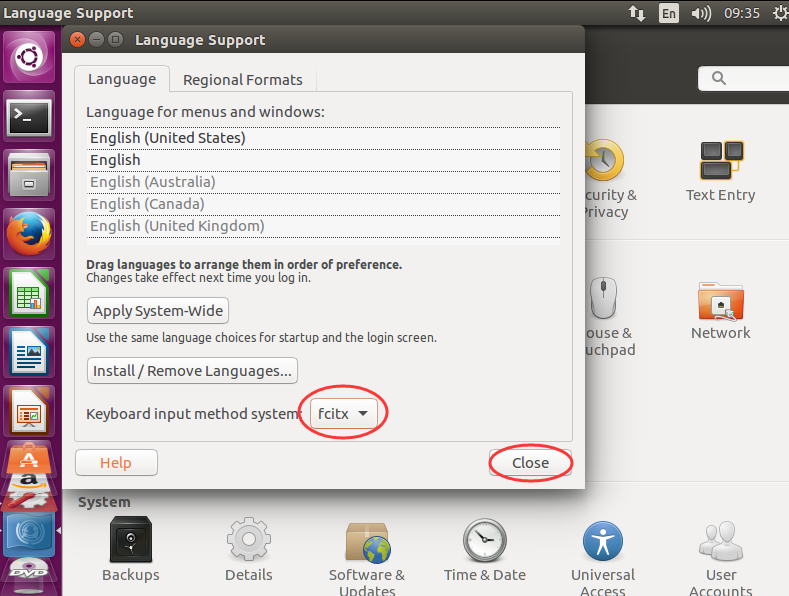
②这个时候是看不到效果的,一定要注销一次


③搜索出fcitx配置,将sogou输入法设为默认即可
由

变成


成功!
这篇关于Ubuntu 16.04里下安装搜狗输入法(图文详解)(亲测好使)的文章就介绍到这儿,希望我们推荐的文章对编程师们有所帮助!






