本文主要是介绍Python标准库 ~ turtle绘图(下) · 其他操作和实例,希望对大家解决编程问题提供一定的参考价值,需要的开发者们随着小编来一起学习吧!
Python的turtle库是一个用于绘制图形的库,它来自 Wally Feurzeig, Seymour Papert 于 1967 年在麻省理工学院MIT人工智能实验室开发的 Logo 编程语言。由于turtle绘图十分的直观而且十分受欢迎,所以turtle也逐渐的成为了Python的标准库之一。它很容易学习并且使用简单。

书接上回
介绍完了基本功能,
我们再来介绍下Screen类的函数
Screen类
| 函数名称 | 数据类型 | 功能 |
|---|---|---|
| 颜色字符串或颜色元组 | 调整背景颜色 |
| '文件名' | 将背景设为('bg.png') |
| * | 清空屏幕 |
| * | 刷新屏幕 |
| 分辨率长,分辨率长,颜色字符串 | 调整画布分辨率 |
| 非负整型数,非负整型数 | 在第(8)此刷新屏幕时延迟(25) |
| 函数,检测的按键 | 当键盘按下并松开(‘UP’)键,执行(fun)函数 |
| 函数,检测的按键 | 当键盘松开(‘UP’)键,执行(fun)函数 |
| 函数,检测的按键 | 当键盘按下(‘UP’)键,执行(fun)函数 |
| 函数,检测的按键编号 | 当鼠标编号为(1)的按键时,执行(fun)函数 |
| * | 获取画布 |
| * | 获取可绘制的形状 |
| * | 获取已定义的画笔 |
| * | 获取画布高度 |
| * | 获取画布宽度 |
| * | 关闭窗口 |
| * | 点击窗口时关闭窗口 |
| 窗口长,窗口宽, 距离边缘的纵值,距离边缘的值横 | 调整画布大小 |
turtle库快速参考
Python官网:turtle --- 海龟绘图 — Python 3.11.2 文档
github源码:cpython/turtle.py at 3.11 · python/cpython · GitHub
下面是Turtle库函数的参考表

实例
到这里已经可以自己动手写出一个简单的图形了吗?
1.樱花树
文章参考:如何利用 Turtle 绘制一棵漂亮的樱花树
from turtle import *
from random import *
from math import *def tree(n, l):pd()  # 下笔# 阴影效果t = cos(radians(heading() + 45)) / 8 + 0.25pencolor(t, t, t)pensize(n / 3)forward(l)  # 画树枝if n > 0:b = random() * 15 + 10  # 右分支偏转角度c = random() * 15 + 10  # 左分支偏转角度d = l * (random() * 0.25 + 0.7)  # 下一个分支的长度# 右转一定角度,画右分支right(b)tree(n - 1, d)# 左转一定角度,画左分支left(b + c)tree(n - 1, d)# 转回来right(c)else:# 画叶子right(90)n = cos(radians(heading() - 45)) / 4 + 0.5pencolor(n, n * 0.8, n * 0.8)circle(3)left(90)# 添加0.3倍的飘落叶子if (random() > 0.7):pu()# 飘落t = heading()an = -40 + random() * 40setheading(an)dis = int(800 * random() * 0.5 + 400 * random() * 0.3 + 200 * random() * 0.2)forward(dis)setheading(t)# 画叶子pd()right(90)n = cos(radians(heading() - 45)) / 4 + 0.5pencolor(n * 0.5 + 0.5, 0.4 + n * 0.4, 0.4 + n * 0.4)circle(2)left(90)pu()# 返回t = heading()setheading(an)backward(dis)setheading(t)pu()backward(l)  # 退回bgcolor(0.5, 0.5, 0.5)  # 背景色
ht()  # 隐藏turtle
speed(0)  # 速度 1-10渐进,0 最快
tracer(0, 0)
pu()  # 抬笔
backward(100)
left(90)  # 左转90度
pu()  # 抬笔
backward(300)  # 后退300
tree(12, 100)  # 递归7层
done()
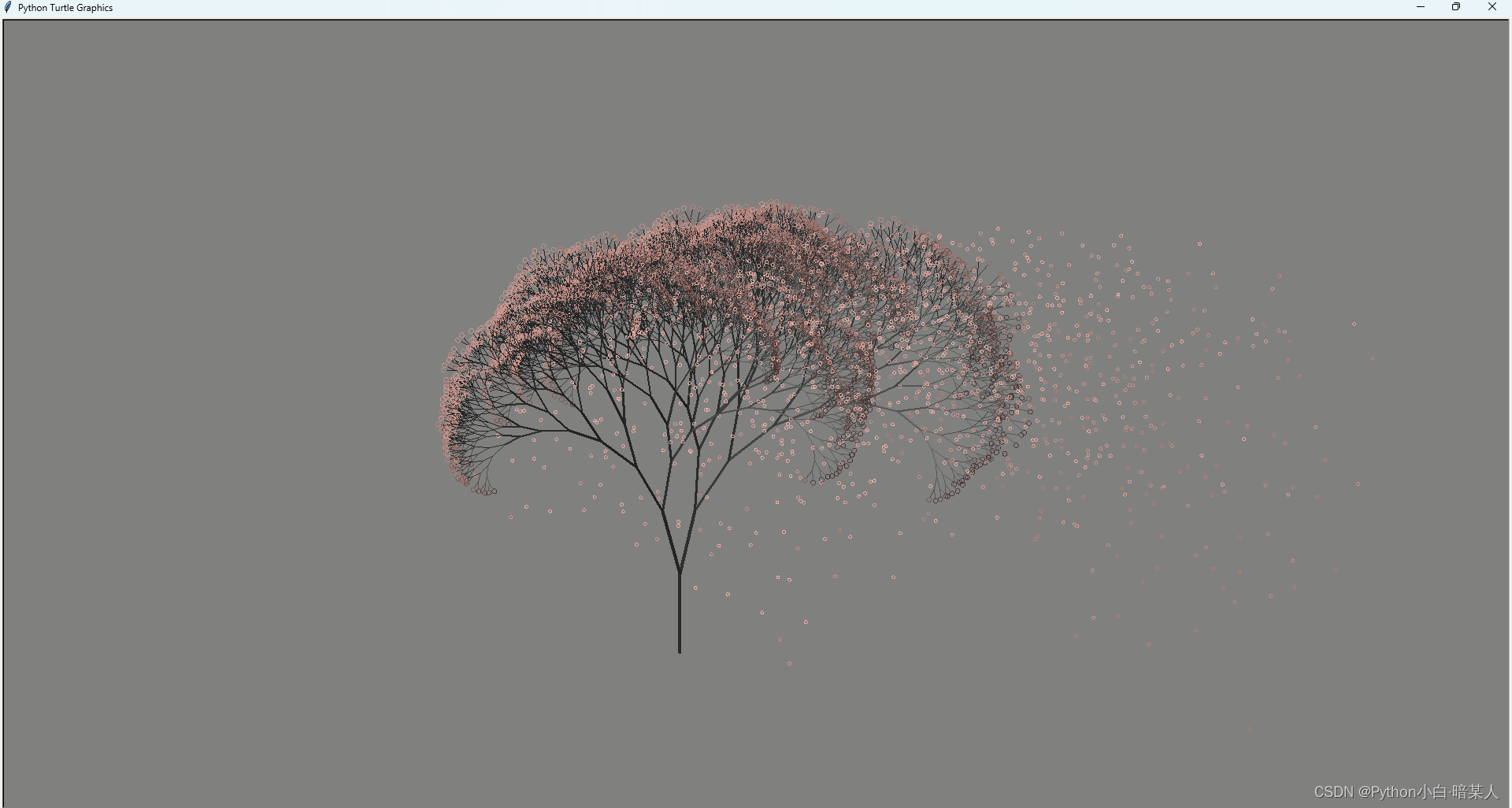
2.Kitty猫
文章参考:Python-turtle绘画旅程第二站:Hello Kitty
import math
import turtle as t# 计算长度、角度 t1:画笔对象  r:半径  angle:扇形(圆形)的角度
def myarc(t1, r, angle):arc_length = 2 * math.pi * r * angle / 360  # angle角度的扇形的弧长n = int(arc_length / 3) + 1  # 线段条数step_length = arc_length / n  # 每条线段的长度step_angle = angle / n  # 每条线段的角度polyline(t1, n, step_length, step_angle)# 画弧线 t1:画笔对象  n:线段条数  length:每条线段长度  angle:每条线段的角度
def polyline(t1, n, length, angle):for index in range(n):t1.fd(length)t1.lt(angle)# 小花
def flower(n):for x in range(n):t.forward(0.5)if x < 80:t.left(1)elif x < 120:t.left(2.3)else:t.left(1)# 画布
t.screensize(500, 500, "white")
t.pensize(8)
t.pencolor("black")
t.speed(10)# 头
t.penup()
t.goto(-130, 170)
t.pendown()
t.setheading(220)
for x in range(580):t.forward(1)if x < 250:t.left(0.5)elif x < 350:t.left(0.1)else:t.left(0.5)# 耳朵
t.setheading(70)
for y in range(150):t.forward(1)if y < 80:t.left(0.2)elif y < 90:t.left(10)else:t.left(0.2)
t.setheading(160)
for y1 in range(140):t.forward(1)t.left(0.15)
t.setheading(140)
for y2 in range(157):t.forward(1)if y2 < 65:t.left(0.2)elif y2 < 75:t.left(8)else:t.left(0.5)t.pensize(5)
# 左眼睛
t.penup()
t.goto(-100, 60)
t.setheading(350)
t.pendown()
t.fillcolor("#000")
t.begin_fill()
step = 0.3
for i in range(2):for j in range(60):if j < 30:step += 0.02else:step -= 0.02t.forward(step)t.left(3)
t.end_fill()
# 右眼睛
t.penup()
t.goto(50, 40)
t.setheading(350)
t.pendown()
t.fillcolor("#000")
t.begin_fill()
step = 0.3
for i in range(2):for j in range(60):if j < 30:step += 0.02else:step -= 0.02t.forward(step)t.left(3)
t.end_fill()
# 鼻子
t.penup()
t.goto(-40, 30)
t.setheading(260)
t.pendown()
t.fillcolor("#ebc80e")
t.begin_fill()
step = 0.3
for i in range(2):for j in range(60):if j < 30:step += 0.02else:step -= 0.02t.forward(step)t.left(3)
t.end_fill()# 小花
t.penup()
t.goto(20, 180)
t.pendown()
t.fillcolor("#dd4a76")
t.begin_fill()
t.setheading(175)
flower(200)
t.setheading(250)
flower(200)
t.setheading(325)
flower(200)
t.setheading(40)
flower(200)
t.setheading(115)
flower(170)
t.end_fill()
t.penup()
t.goto(30, 180)
t.setheading(270)
t.pendown()
t.fillcolor("#e7be04")
t.begin_fill()
t.circle(10)
t.end_fill()
# 胡子
t.penup()
t.goto(-150, 65)
t.pendown()
t.setheading(170)
t.pensize(6)
for y in range(40):t.forward(1)t.left(0.3)t.penup()
t.goto(-150, 85)
t.pendown()
t.setheading(160)
for y in range(50):t.forward(1)t.left(0.3)t.penup()
t.goto(-150, 45)
t.pendown()
t.setheading(180)
for y in range(55):t.forward(1)t.left(0.3)t.penup()
t.goto(110, 10)
t.setheading(340)
t.pendown()
for y in range(40):t.forward(1)t.right(0.3)
t.penup()
t.goto(120, 30)
t.setheading(350)
t.pendown()
for y in range(30):t.forward(1)t.right(0.3)
t.penup()
t.goto(115, 50)
t.setheading(360)
t.pendown()
for y in range(50):t.forward(1)t.right(0.3)# 身子
t.pensize(8)
t.penup()
t.goto(-100, -30)
t.setheading(230)
t.pendown()
t.fillcolor("#efa9c1")
t.begin_fill()
for z in range(140):t.forward(1)t.left(0.2)
t.setheading(340)
for z in range(200):t.forward(1)t.left(0.1)
t.setheading(85)
for z in range(140):t.forward(1)t.left(0.1)
t.end_fill()
t.penup()
t.goto(-73, -33)
t.pendown()
t.setheading(250)
t.fillcolor("#da4b76")
t.begin_fill()
myarc(t, 40, 205)
t.setheading(170)
t.pensize(6)
t.forward(75)
t.end_fill()
# 左胳膊
t.pensize(8)
t.penup()
t.goto(-120, -17)
t.setheading(230)
t.pendown()
t.fillcolor("#d64b75")
t.begin_fill()
t.forward(50)
t.setheading(320)
for k in range(27):t.forward(1)t.left(1)
t.setheading(55)
for k in range(50):t.forward(1)t.right(0.1)
t.end_fill()
# 左手
t.penup()
t.goto(-125, -15)
t.setheading(140)
t.pendown()
t.fillcolor("#fff")
t.begin_fill()
t.forward(8)
t.setheading(50)
myarc(t, 10, 190)
t.setheading(150)
for j in range(80):t.forward(1)t.left(2.2)
t.forward(24)
t.end_fill()
# 右胳膊
t.penup()
t.goto(27, -45)
t.pendown()
t.fillcolor("#db4e79")
t.setheading(350)
t.begin_fill()
for x in range(50):t.forward(1)t.right(1)
t.setheading(220)
t.forward(40)
t.setheading(100)
for x in range(50):t.forward(1)t.left(0.2)
t.end_fill()
# 右手
t.penup()
t.goto(70, -75)
t.pendown()
t.setheading(300)
t.forward(8)
t.setheading(30)
for x in range(40):t.forward(1)t.right(5)
t.setheading(280)
for x in range(70):t.forward(1)t.right(2)
# 右脚
t.penup()
t.goto(-70, -180)
t.pendown()
t.setheading(250)
for x in range(30):t.forward(1)t.left(0.3)
for x in range(160):t.forward(1)if x < 30:t.left(3)elif x < 65:t.left(0.1)else:t.left(1)
# 左脚
t.penup()
t.goto(-150, -210)
t.setheading(340)
t.pendown()
t.fillcolor("#fff")
t.begin_fill()
step = 1.5
for i in range(2):for j in range(60):if j < 30:step += 0.1else:step -= 0.1t.forward(step)t.left(3)
t.end_fill()t.hideturtle()
t.mainloop()

3.小黄人
文章参考:turtle的使用以及画小黄人
import turtle
turtle.setup(800,800)
#turtle.hideturtle()
turtle.speed(5)
turtle.width(1)# 大轮廓
turtle.fillcolor('yellow')
turtle.begin_fill()
turtle.up()
turtle.goto(150,150)
turtle.down()
turtle.left(90)
turtle.circle(150,180)
turtle.fd(300)
turtle.circle(150,180)
turtle.fd(300)
turtle.end_fill()# 眼镜框
turtle.up()
turtle.goto(0,150)
turtle.down()
turtle.width(3)
turtle.fillcolor('white')
turtle.begin_fill()
turtle.circle(40)
turtle.circle(-40)
turtle.end_fill()
turtle.up()
turtle.setx(80)
turtle.down()
turtle.right(90)
turtle.width(15)
turtle.fd(70)
turtle.up()
turtle.setx(-80)
turtle.down()
turtle.fd(-70)# 眼睛
turtle.up()
turtle.setx(-50)
turtle.dot(40)
turtle.up()
turtle.setx(30)
turtle.dot(40)
turtle.pencolor('white')
turtle.up()
turtle.setx(-41)
turtle.dot(16)
turtle.up()
turtle.setx(39)
turtle.dot(16)
turtle.down()# 嘴巴
turtle.pencolor('red')
turtle.width(3)
turtle.up()
turtle.goto(-50,50)
turtle.right(45)
turtle.down()
turtle.circle(70,90)# 衣服  176185
turtle.pencolor('black')
turtle.fillcolor('#176185')
turtle.begin_fill()
turtle.right(45)
turtle.up()
turtle.goto(-150,-150)
turtle.down()
turtle.width(1)
turtle.fd(50)
turtle.goto(-100,-100)
turtle.fd(200)
turtle.goto(100,-150)
turtle.fd(50)
turtle.right(90)
turtle.circle(-150,180)
turtle.end_fill()
turtle.up()
turtle.goto(-90,-100)
turtle.down()
turtle.fillcolor('#176185')
turtle.begin_fill()
turtle.goto(-150,-35)
turtle.bk(15)
turtle.goto(-100,-110)
turtle.goto(-90,-100)
turtle.end_fill()
turtle.up()
turtle.goto(90,-100)
turtle.down()
turtle.fillcolor('#176185')
turtle.begin_fill()
turtle.goto(150,-35)
turtle.bk(15)
turtle.goto(100,-110)
turtle.goto(90,-100)
turtle.end_fill()# 口袋
turtle.up()
turtle.goto(-50,-130)
turtle.down()
turtle.width(3)
turtle.goto(50,-130)
turtle.bk(30)
turtle.circle(50,-180)
turtle.bk(30)# 头发
turtle.up()
turtle.goto(0,300)
turtle.down()
turtle.bk(50)
turtle.up()
turtle.goto(10,299)
turtle.down()
turtle.goto(13,340)
turtle.up()
turtle.goto(-10,299)
turtle.down()
turtle.goto(-14,340)
turtle.up()
turtle.goto(-15,298)
turtle.down()
turtle.goto(-17,335)
turtle.up()
turtle.goto(15,298)
turtle.down()
turtle.goto(18,330)turtle.mainloop()
罗盘时钟
最火的罗盘时钟也安排
文章参考:python实现抖音上比较火的罗盘时钟
import turtle
from datetime import *# 抬起画笔,向前运动一段距离放下
def Skip(step):turtle.penup()turtle.forward(step)turtle.pendown()def drawCircle(content,content_len,init_data,init_data_type,circle_radius,circle_radius_step,color,font_size):'''content:传入的数组,代表要画的圆上面写的内容,比如1-12月content_len:数组长度,用这个元素来做循环,便于调整每次的偏置角度init_data: x轴正方向显示当前时间,这个数据就是当前时间init_data_type:代表这个是什么类型的,时,分,秒之类的circle_radius:圆的半径circle_radius_step: 圆环上的数据根据半径和这个长度结合写上内容color: 画笔颜色'''#turtle.pos()turtle.home()#turtle.mode("logo")turtle.pensize(3)turtle.pencolor(color)turtle.fillcolor('#33BB00')#turtle.right(90)# turtle.right(-360/content_len)# Skip(circle_radius+circle_radius_step+10*3)# turtle.write(' ', align="center", font=("Courier", font_size,'bold'))# Skip(-circle_radius-circle_radius_step-10*3)# #turtle.right(360/content_len)Skip(circle_radius+circle_radius_step+10*3)turtle.write(init_data_type, align="center", font=("Courier", font_size,'bold'))Skip(-circle_radius-circle_radius_step-10*3)#turtle.right(-90)initdata_index=content.index(init_data)for i in range(initdata_index,content_len):Skip(circle_radius)fantilen=len(content[i])if i == initdata_index:turtle.forward(75)turtle.forward(-90)turtle.forward(15)for name in range(fantilen):turtle.write(content[i][name], align="center", font=("Courier", font_size))Skip(15)Skip(-15*fantilen)Skip(-circle_radius)turtle.left(360/content_len)for i in range(initdata_index):Skip(circle_radius)fantilen=len(content[i])for name in range(fantilen):turtle.write(content[i][name], align="center", font=("Courier", font_size))Skip(15)Skip(-15*fantilen)Skip(-circle_radius)turtle.left(360/content_len)def Week(t):week = ["星期一", "星期二", "星期三","星期四", "星期五", "星期六", "星期日"]return week[t.weekday()]def Date(t):y = t.yearm = t.monthd = t.dayreturn "%s-%d-%d" % (y, m, d)def  runclock():turtle.reset()t = datetime.today()print(t)second = t.second #+ t.microsecond * 0.000001minute = t.minute #+ second / 60.0hour = t.hour# + minute / 60.0Traditional_Chinese= [' ','壹', '贰', '叁', '肆', '伍', '陆', '柒', '捌', '玖', '拾', '拾壹', '拾贰', '拾叁', '拾肆', '拾伍', '拾陆', '拾柒', '拾捌', '拾玖', '贰拾', '贰拾壹', '贰拾贰', '贰拾叁', '贰拾肆', '贰拾伍', '贰拾陆', '贰拾柒', '贰拾捌', '贰拾玖','叁拾', '叁拾壹', '叁拾贰', '叁拾叁', '叁拾肆', '叁拾伍', '叁拾陆', '叁拾柒', '叁拾捌', '叁拾玖','肆拾', '肆拾壹', '肆拾贰', '肆拾叁', '肆拾肆', '肆拾伍', '肆拾陆', '肆拾柒', '肆拾捌', '肆拾玖','伍拾', '伍拾壹', '伍拾贰', '伍拾叁', '伍拾肆', '伍拾伍', '伍拾陆', '伍拾柒', '伍拾捌', '伍拾玖']Simplified_Chinese=[' ','一', '二', '三', '四', '五', '六', '七', '八', '九', '十',
'十一', '十二', '十三', '十四', '十五', '十六', '十七', '十八', '十九',
'二十','二十一', '二十二', '二十三', '二十四', '二十五', '二十六', '二十七', '二十八', '二十九','三十','三十一', '三十二', '三十三', '三十四', '三十五', '三十六', '三十七', '三十八', '三十九', '四十','四十一', '四十二', '四十三', '四十四', '四十五', '四十六', '四十七', '四十八', '四十九',
'五十', '五十一', '五十二', '五十三', '五十四', '五十五', '五十六', '五十七', '五十八', '五十九'
]hours= ['壹', '贰', '叁', '肆', '伍', '陆', '柒', '捌', '玖','拾', '拾壹','拾贰','拾叁', '拾肆', '拾伍', '拾陆', '拾柒', '拾捌', '拾玖',  '贰拾', '贰拾壹', '贰拾贰', '贰拾叁', '贰拾肆']Simplified_hours=['一', '二', '三', '四', '五', '六', '七', '八', '九', '十',
'十一', '十二', '十三', '十四', '十五', '十六', '十七', '十八', '十九',
'二十' ,'二十一', '二十二', '二十三', '二十四']drawCircle(Simplified_Chinese,len(Simplified_Chinese),Simplified_Chinese[second],'秒',250,25,'blue',10)drawCircle(Simplified_Chinese,len(Simplified_Chinese),Simplified_Chinese[minute],'分',170,20,'green',10)drawCircle(Simplified_hours,len(Simplified_hours),Simplified_hours[hour-1],'时',80,15,'red',10)printer = turtle.Turtle()# 隐藏画笔的turtle形状printer.hideturtle()printer.color('#11CCFF')printer.right(-90)printer.penup()printer.forward(40)printer.write(Week(t), align="center",font=("Courier", 10, "bold"))printer.back(80)printer.write(Date(t), align="center",font=("Courier", 14, "bold"))print(Week(t),Date(t))printer.right(90)turtle.ontimer(runclock, 1000)def main():# 打开/关闭龟动画,并为更新图纸设置延迟。turtle.tracer(False)ts = turtle.getscreen()ts.bgcolor("black")runclock()turtle.mainloop()
if __name__ == "__main__":main()

关于Turtlue库的介绍到这里就结束了,我是暗某人
欢迎点赞,评论
这篇关于Python标准库 ~ turtle绘图(下) · 其他操作和实例的文章就介绍到这儿,希望我们推荐的文章对编程师们有所帮助!




