本文主要是介绍【深度学习】yolov7 pytorch模型转onnx,转ncnn模型和mnn模型使用细节,希望对大家解决编程问题提供一定的参考价值,需要的开发者们随着小编来一起学习吧!
文章目录
- 前言
- 1.前置
- 1.1 安装必要的库
- 1.2 .pt 权重转ncnn 和mnn所需要的权重
- 2、编码C++项目
- 1.ncnn
- 2.mnn
- 总结
前言
yolov7 pytorch模型转onnx,转ncnn模型和mnn模型使用细节,记录一下
git仓库:
yolov7 https://github.com/WongKinYiu/yolov7
ncnn:https://github.com/Tencent/ncnn
mnn:https://github.com/alibaba/MNN
1.前置
1.1 安装必要的库
安装opencv, 我是编译安装的,编了一个多小时,少不更事啊
sudo apt-get update
sudo apt-get install libopencv-dev
后面会用到opencv库,等会会提到;
编译安装ncnn和mnn
ncnn
cd 到 ncnn的文件夹
cd /home/ubuntu/workplace/ncnn209  mkdir build210  cd build/211  cmake ..212  make install213  sudo make installcmake  ,, 它会找到上一级目录的cmakelist进行编译
mnn:
套路是一样的,
但需要改一下,cmakelist文件 第41行,将off 改成on 这是将onnx转成.mnn 所需要的二进制文件。
option(MNN_BUILD_CONVERTER “Build Converter” ON)
cd /home/ubuntu/workplace/mnn209 mkdir build210 cd build/211 cmake ..212 make install213 sudo make install
1.2 .pt 权重转ncnn 和mnn所需要的权重
其实2步走:
1, .pt 转 .onnx
cd 到yolov7的目录,转模型到onnx,不要把nms加
cd /home/ubuntu/workplace/pycharm_project/yolov7
python export.py --weights yolov7.pt --simplify --img-size 640
2.1 对ncnn .onnx 转成 .bin 和 .param 经过1已经生成了 所需要的权重
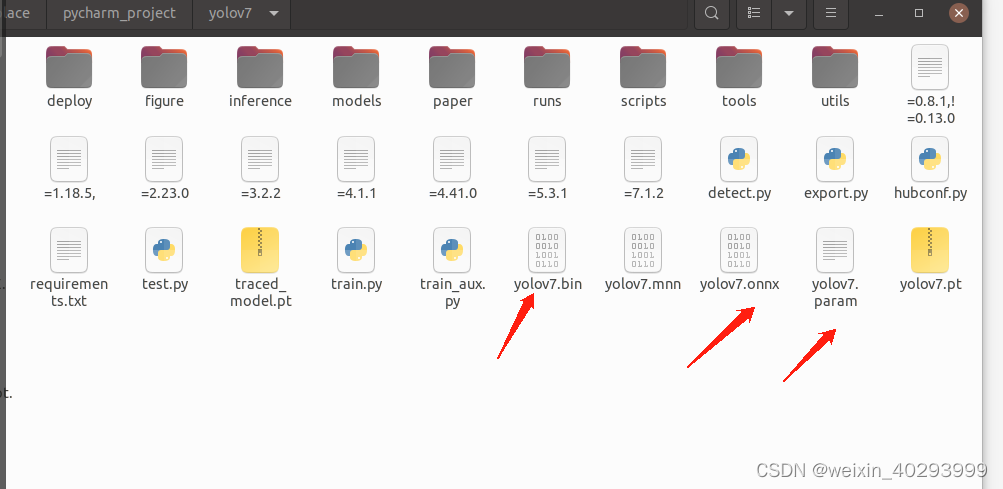 也可以
也可以
ubuntu@ubuntu:~/ncnn/build/install/bin$ ./onnx2ncnn /home/ubuntu/yolov7/yolov7.onnx /home/ubuntu/yolov7/yolov7/yolov7.param /home/ubuntu/yolov7/yolov7.bin
在使用ncnn库加载模型时,通常需要两个文件:.param文件和.bin文件。其中,.param 文件主要用於描述模型的结构和参数信息,而.bin文件则包含了模型中的权重和偏置等信息。这两个文件都是由模型训练过程中产生的。
2.2 对mnn .onnx 转 .mnn
去编译好的mnn文件夹下

./MNNConvert -f ONNX --modelFile /home/ubuntu/workplace/pycharm_project/yolov7/yolov7.onnx --MNNModel /home/ubuntu/workplace/pycharm_project/yolov7/yolov7.mnn --bizCode MNN
就会转出.mnn 的权重
2、编码C++项目
1.ncnn
cmakelist.txt
cmake_minimum_required(VERSION 3.16)
project(untitled22)
set(CMAKE_CXX_FLAGS "-std=c++11")
set(CMAKE_C_FLAGS "${CMAKE_C_FLAGS} -fopenmp ")
set(CMAKE_CXX_FLAGS "${CMAKE_CXX_FLAGS} -fopenmp")
set(CMAKE_CXX_STANDARD 11)
include_directories(${CMAKE_SOURCE_DIR})
include_directories(${CMAKE_SOURCE_DIR}/include)
include_directories(${CMAKE_SOURCE_DIR}/include/ncnn)
find_package(OpenCV REQUIRED)
#message(STATUS ${OpenCV_INCLUDE_DIRS})
#添加头文件
include_directories(${OpenCV_INCLUDE_DIRS})
#链接Opencv库add_library(libncnn STATIC IMPORTED)
set_target_properties(libncnn PROPERTIES IMPORTED_LOCATION ${CMAKE_SOURCE_DIR}/lib/libncnn.a)add_executable(untitled22 main.cpp)
target_link_libraries(untitled22 ${OpenCV_LIBS} libncnn )
目录结构
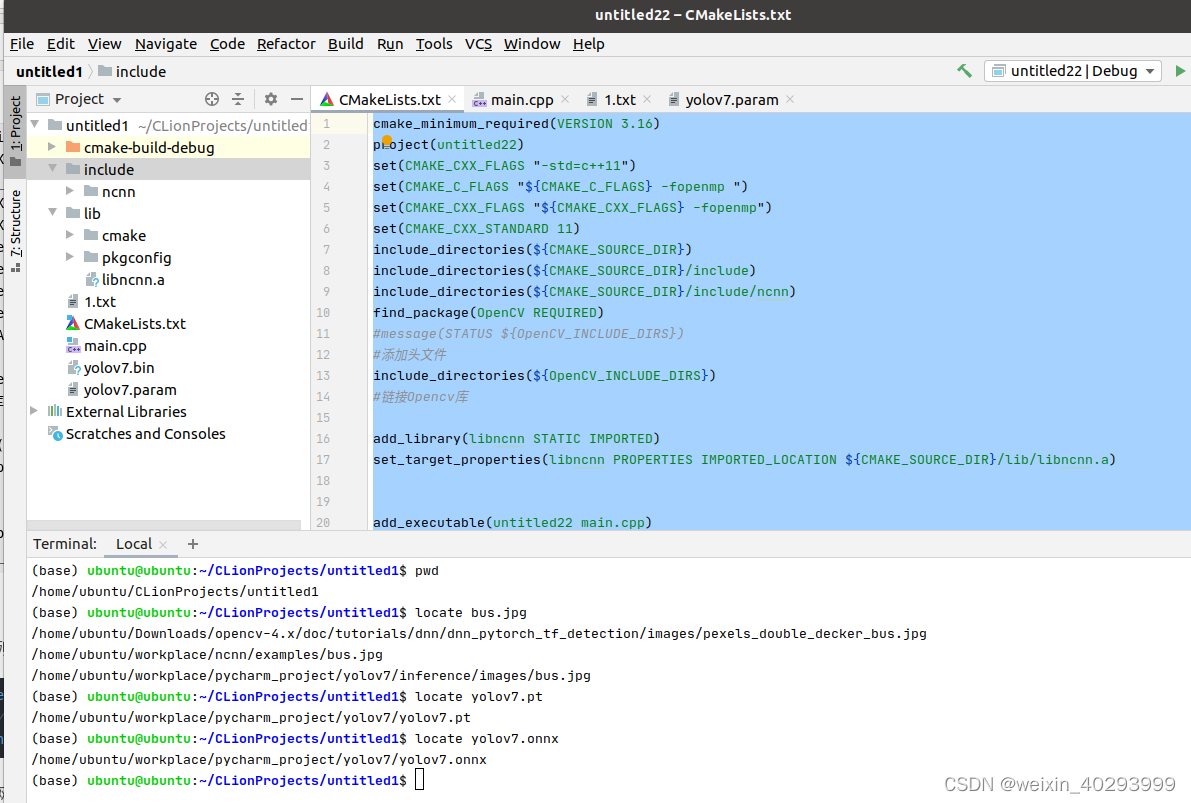 main.cpp
// Tencent is pleased to support the open source community by making ncnn available.
//
// Copyright (C) 2020 THL A29 Limited, a Tencent company. All rights reserved.
//
// Licensed under the BSD 3-Clause License (the "License"); you may not use this file except
// in compliance with the License. You may obtain a copy of the License at
//
// https://opensource.org/licenses/BSD-3-Clause
//
// Unless required by applicable law or agreed to in writing, software distributed
// under the License is distributed on an "AS IS" BASIS, WITHOUT WARRANTIES OR
// CONDITIONS OF ANY KIND, either express or implied. See the License for the
// specific language governing permissions and limitations under the License.#include "layer.h"
#include "net.h"#if defined(USE_NCNN_SIMPLEOCV)
#include "simpleocv.h"
#else
#include <opencv2/core/core.hpp>
#include <opencv2/highgui/highgui.hpp>
#include <opencv2/imgproc/imgproc.hpp>
#endif
#include <float.h>
#include <stdio.h>
#include <vector>#define MAX_STRIDE 32struct Object
{cv::Rect_<float> rect;int label;float prob;
};static inline float intersection_area(const Object& a, const Object& b)
{cv::Rect_<float> inter = a.rect & b.rect;return inter.area();
}static void qsort_descent_inplace(std::vector<Object>& objects, int left, int right)
{int i = left;int j = right;float p = objects[(left + right) / 2].prob;while (i <= j){while (objects[i].prob > p)i++;while (objects[j].prob < p)j--;if (i <= j){// swapstd::swap(objects[i], objects[j]);i++;j--;}}#pragma omp parallel sections{
#pragma omp section{if (left < j) qsort_descent_inplace(objects, left, j);}
#pragma omp section{if (i < right) qsort_descent_inplace(objects, i, right);}}
}static void qsort_descent_inplace(std::vector<Object>& objects)
{if (objects.empty())return;qsort_descent_inplace(objects, 0, objects.size() - 1);
}static void nms_sorted_bboxes(const std::vector<Object>& faceobjects, std::vector<int>& picked, float nms_threshold, bool agnostic = false)
{picked.clear();const int n = faceobjects.size();std::vector<float> areas(n);for (int i = 0; i < n; i++){areas[i] = faceobjects[i].rect.area();}for (int i = 0; i < n; i++){const Object& a = faceobjects[i];int keep = 1;for (int j = 0; j < (int)picked.size(); j++){const Object& b = faceobjects[picked[j]];if (!agnostic && a.label != b.label)continue;// intersection over unionfloat inter_area = intersection_area(a, b);float union_area = areas[i] + areas[picked[j]] - inter_area;// float IoU = inter_area / union_areaif (inter_area / union_area > nms_threshold)keep = 0;}if (keep)picked.push_back(i);}
}static inline float sigmoid(float x)
{return static_cast<float>(1.f / (1.f + exp(-x)));
}static void generate_proposals(const ncnn::Mat& anchors, int stride, const ncnn::Mat& in_pad, const ncnn::Mat& feat_blob, float prob_threshold, std::vector<Object>& objects)
{const int num_grid = feat_blob.h;int num_grid_x;int num_grid_y;if (in_pad.w > in_pad.h){num_grid_x = in_pad.w / stride;num_grid_y = num_grid / num_grid_x;}else{num_grid_y = in_pad.h / stride;num_grid_x = num_grid / num_grid_y;}const int num_class = feat_blob.w - 5;const int num_anchors = anchors.w / 2;for (int q = 0; q < num_anchors; q++){const float anchor_w = anchors[q * 2];const float anchor_h = anchors[q * 2 + 1];const ncnn::Mat feat = feat_blob.channel(q);for (int i = 0; i < num_grid_y; i++){for (int j = 0; j < num_grid_x; j++){const float* featptr = feat.row(i * num_grid_x + j);float box_confidence = sigmoid(featptr[4]);if (box_confidence >= prob_threshold){// find class index with max class scoreint class_index = 0;float class_score = -FLT_MAX;for (int k = 0; k < num_class; k++){float score = featptr[5 + k];if (score > class_score){class_index = k;class_score = score;}}float confidence = box_confidence * sigmoid(class_score);if (confidence >= prob_threshold){float dx = sigmoid(featptr[0]);float dy = sigmoid(featptr[1]);float dw = sigmoid(featptr[2]);float dh = sigmoid(featptr[3]);float pb_cx = (dx * 2.f - 0.5f + j) * stride;float pb_cy = (dy * 2.f - 0.5f + i) * stride;float pb_w = pow(dw * 2.f, 2) * anchor_w;float pb_h = pow(dh * 2.f, 2) * anchor_h;float x0 = pb_cx - pb_w * 0.5f;float y0 = pb_cy - pb_h * 0.5f;float x1 = pb_cx + pb_w * 0.5f;float y1 = pb_cy + pb_h * 0.5f;Object obj;obj.rect.x = x0;obj.rect.y = y0;obj.rect.width = x1 - x0;obj.rect.height = y1 - y0;obj.label = class_index;obj.prob = confidence;objects.push_back(obj);}}}}}
}static int detect_yolov7(const cv::Mat& bgr, std::vector<Object>& objects)
{ncnn::Net yolov7;yolov7.opt.use_vulkan_compute = true;// yolov7.opt.use_bf16_storage = true;// original pretrained model from https://github.com/WongKinYiu/yolov7// the ncnn model https://github.com/nihui/ncnn-assets/tree/master/modelsyolov7.load_param("/home/ubuntu/CLionProjects/untitled1/yolov7.param");yolov7.load_model("/home/ubuntu/CLionProjects/untitled1/yolov7.bin");const int target_size = 640;const float prob_threshold = 0.25f;const float nms_threshold = 0.45f;int img_w = bgr.cols;int img_h = bgr.rows;// letterbox pad to multiple of MAX_STRIDEint w = img_w;int h = img_h;float scale = 1.f;if (w > h){scale = (float)target_size / w;w = target_size;h = h * scale;}else{scale = (float)target_size / h;h = target_size;w = w * scale;}ncnn::Mat in = ncnn::Mat::from_pixels_resize(bgr.data, ncnn::Mat::PIXEL_BGR2RGB, img_w, img_h, w, h);int wpad = (w + MAX_STRIDE - 1) / MAX_STRIDE * MAX_STRIDE - w;int hpad = (h + MAX_STRIDE - 1) / MAX_STRIDE * MAX_STRIDE - h;ncnn::Mat in_pad;ncnn::copy_make_border(in, in_pad, hpad / 2, hpad - hpad / 2, wpad / 2, wpad - wpad / 2, ncnn::BORDER_CONSTANT, 114.f);const float norm_vals[3] = {1 / 255.f, 1 / 255.f, 1 / 255.f};in_pad.substract_mean_normalize(0, norm_vals);ncnn::Extractor ex = yolov7.create_extractor();ex.input("images", in_pad);std::vector<Object> proposals;// stride 8{ncnn::Mat out;ex.extract("output", out);ncnn::Mat anchors(6);anchors[0] = 12.f;anchors[1] = 16.f;anchors[2] = 19.f;anchors[3] = 36.f;anchors[4] = 40.f;anchors[5] = 28.f;std::vector<Object> objects8;generate_proposals(anchors, 8, in_pad, out, prob_threshold, objects8);proposals.insert(proposals.end(), objects8.begin(), objects8.end());}// stride 16{ncnn::Mat out;ex.extract("516", out);ncnn::Mat anchors(6);anchors[0] = 36.f;anchors[1] = 75.f;anchors[2] = 76.f;anchors[3] = 55.f;anchors[4] = 72.f;anchors[5] = 146.f;std::vector<Object> objects16;generate_proposals(anchors, 16, in_pad, out, prob_threshold, objects16);proposals.insert(proposals.end(), objects16.begin(), objects16.end());}// stride 32{ncnn::Mat out;ex.extract("528", out);ncnn::Mat anchors(6);anchors[0] = 142.f;anchors[1] = 110.f;anchors[2] = 192.f;anchors[3] = 243.f;anchors[4] = 459.f;anchors[5] = 401.f;std::vector<Object> objects32;generate_proposals(anchors, 32, in_pad, out, prob_threshold, objects32);proposals.insert(proposals.end(), objects32.begin(), objects32.end());}// sort all proposals by score from highest to lowestqsort_descent_inplace(proposals);// apply nms with nms_thresholdstd::vector<int> picked;nms_sorted_bboxes(proposals, picked, nms_threshold);int count = picked.size();objects.resize(count);for (int i = 0; i < count; i++){objects[i] = proposals[picked[i]];// adjust offset to original unpaddedfloat x0 = (objects[i].rect.x - (wpad / 2)) / scale;float y0 = (objects[i].rect.y - (hpad / 2)) / scale;float x1 = (objects[i].rect.x + objects[i].rect.width - (wpad / 2)) / scale;float y1 = (objects[i].rect.y + objects[i].rect.height - (hpad / 2)) / scale;// clipx0 = std::max(std::min(x0, (float)(img_w - 1)), 0.f);y0 = std::max(std::min(y0, (float)(img_h - 1)), 0.f);x1 = std::max(std::min(x1, (float)(img_w - 1)), 0.f);y1 = std::max(std::min(y1, (float)(img_h - 1)), 0.f);objects[i].rect.x = x0;objects[i].rect.y = y0;objects[i].rect.width = x1 - x0;objects[i].rect.height = y1 - y0;}return 0;
}static void draw_objects(const cv::Mat& bgr, const std::vector<Object>& objects)
{static const char* class_names[] = {"person", "bicycle", "car", "motorcycle", "airplane", "bus", "train", "truck", "boat", "traffic light","fire hydrant", "stop sign", "parking meter", "bench", "bird", "cat", "dog", "horse", "sheep", "cow","elephant", "bear", "zebra", "giraffe", "backpack", "umbrella", "handbag", "tie", "suitcase", "frisbee","skis", "snowboard", "sports ball", "kite", "baseball bat", "baseball glove", "skateboard", "surfboard","tennis racket", "bottle", "wine glass", "cup", "fork", "knife", "spoon", "bowl", "banana", "apple","sandwich", "orange", "broccoli", "carrot", "hot dog", "pizza", "donut", "cake", "chair", "couch","potted plant", "bed", "dining table", "toilet", "tv", "laptop", "mouse", "remote", "keyboard", "cell phone","microwave", "oven", "toaster", "sink", "refrigerator", "book", "clock", "vase", "scissors", "teddy bear","hair drier", "toothbrush"};static const unsigned char colors[19][3] = {{54, 67, 244},{99, 30, 233},{176, 39, 156},{183, 58, 103},{181, 81, 63},{243, 150, 33},{244, 169, 3},{212, 188, 0},{136, 150, 0},{80, 175, 76},{74, 195, 139},{57, 220, 205},{59, 235, 255},{7, 193, 255},{0, 152, 255},{34, 87, 255},{72, 85, 121},{158, 158, 158},{139, 125, 96}};int color_index = 0;cv::Mat image = bgr.clone();for (size_t i = 0; i < objects.size(); i++){const Object& obj = objects[i];const unsigned char* color = colors[color_index % 19];color_index++;cv::Scalar cc(color[0], color[1], color[2]);fprintf(stderr, "%d = %.5f at %.2f %.2f %.2f x %.2f\n", obj.label, obj.prob,obj.rect.x, obj.rect.y, obj.rect.width, obj.rect.height);cv::rectangle(image, obj.rect, cc, 2);char text[256];sprintf(text, "%s %.1f%%", class_names[obj.label], obj.prob * 100);int baseLine = 0;cv::Size label_size = cv::getTextSize(text, cv::FONT_HERSHEY_SIMPLEX, 0.5, 1, &baseLine);int x = obj.rect.x;int y = obj.rect.y - label_size.height - baseLine;if (y < 0)y = 0;if (x + label_size.width > image.cols)x = image.cols - label_size.width;cv::rectangle(image, cv::Rect(cv::Point(x, y), cv::Size(label_size.width, label_size.height + baseLine)),cc, -1);cv::putText(image, text, cv::Point(x, y + label_size.height),cv::FONT_HERSHEY_SIMPLEX, 0.5, cv::Scalar(255, 255, 255));}cv::imshow("image", image);cv::waitKey(0);
}int main(int argc, char** argv)
{cv::Mat m = cv::imread("/home/ubuntu/workplace/ncnn/examples/bus.jpg");if (m.empty()){return -1;}std::vector<Object> objects;detect_yolov7(m, objects);draw_objects(m, objects);return 0;
}
参考源码https://github.com/Tencent/ncnn/tree/master/examples
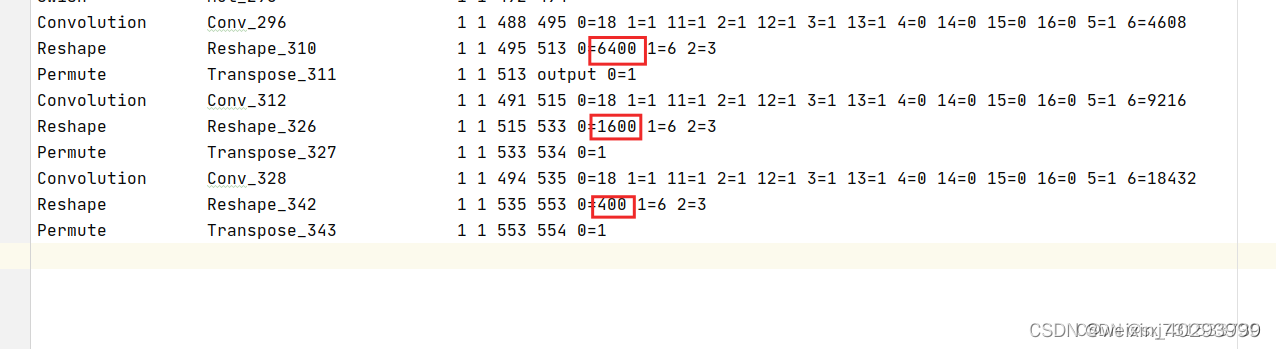
模型需要改掉后面的param文件这三个红框改成-1,否则会出现乱框
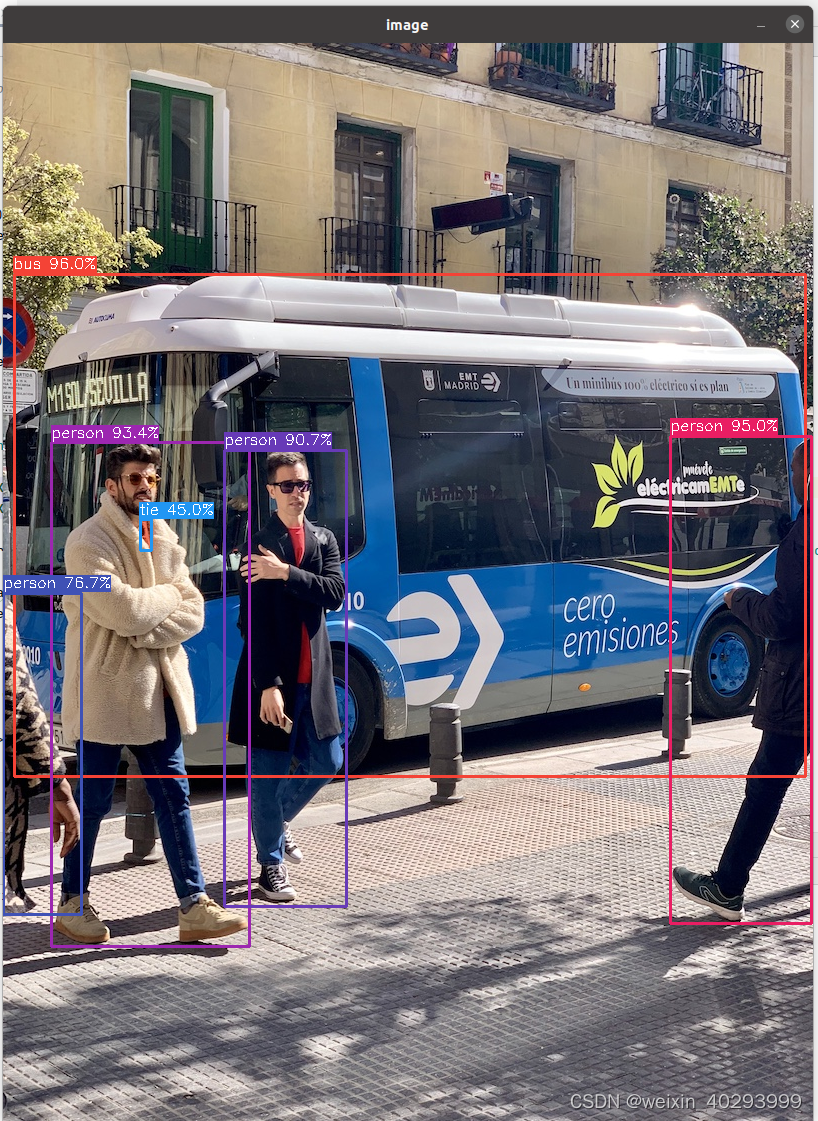
效果图
2.mnn
目录结构:
 cmakelist.txt
cmake_minimum_required(VERSION 3.16)
project(untitled22)
set(CMAKE_CXX_FLAGS "-std=c++11")
set(CMAKE_C_FLAGS "${CMAKE_C_FLAGS} -fopenmp ")
set(CMAKE_CXX_FLAGS "${CMAKE_CXX_FLAGS} -fopenmp")
set(CMAKE_CXX_STANDARD 11)
include_directories(${CMAKE_SOURCE_DIR})
include_directories(${CMAKE_SOURCE_DIR}/include)
include_directories(${CMAKE_SOURCE_DIR}/include/MNN)
find_package(OpenCV REQUIRED)
#message(STATUS ${OpenCV_INCLUDE_DIRS})
#添加头文件
include_directories(${OpenCV_INCLUDE_DIRS})
#链接Opencv库add_library(libmnn SHARED IMPORTED)
set_target_properties(libmnn PROPERTIES IMPORTED_LOCATION ${CMAKE_SOURCE_DIR}/libMNN.so)add_executable(untitled22 main.cpp)
target_link_libraries(untitled22 ${OpenCV_LIBS} libmnn )
main.cpp
#include <iostream>
#include <algorithm>
#include <vector>
#include <opencv2/core/core.hpp>
#include <opencv2/highgui/highgui.hpp>
#include <opencv2/imgproc.hpp>
#include <opencv2/opencv.hpp>
#include<MNN/Interpreter.hpp>
#include<MNN/ImageProcess.hpp>
using namespace std;
using namespace cv;typedef struct {int width;int height;
} YoloSize;typedef struct {std::string name;int stride;std::vector<YoloSize> anchors;
} YoloLayerData;class BoxInfo
{
public:int x1,y1,x2,y2,label,id;float score;
};static inline float sigmoid(float x)
{return static_cast<float>(1.f / (1.f + exp(-x)));
}
double GetIOU(cv::Rect_<float> bb_test, cv::Rect_<float> bb_gt)
{float in = (bb_test & bb_gt).area();float un = bb_test.area() + bb_gt.area() - in;if (un < DBL_EPSILON)return 0;return (double)(in / un);
}
std::vector<BoxInfo> decode_infer(MNN::Tensor & data, int stride,  int net_size, int num_classes,const std::vector<YoloSize> &anchors, float threshold)
{std::vector<BoxInfo> result;int batchs, channels, height, width, pred_item ;batchs = data.shape()[0];channels = data.shape()[1];height = data.shape()[2];width = data.shape()[3];pred_item = data.shape()[4];auto data_ptr = data.host<float>();for(int bi=0; bi<batchs; bi++){auto batch_ptr = data_ptr + bi*(channels*height*width*pred_item);for(int ci=0; ci<channels; ci++){auto channel_ptr = batch_ptr + ci*(height*width*pred_item);for(int hi=0; hi<height; hi++){auto height_ptr = channel_ptr + hi*(width * pred_item);for(int wi=0; wi<width; wi++){auto width_ptr = height_ptr + wi*pred_item;auto cls_ptr = width_ptr + 5;auto confidence = sigmoid(width_ptr[4]);for(int cls_id=0; cls_id<num_classes; cls_id++){float score = sigmoid(cls_ptr[cls_id]) * confidence;if(score > threshold){float cx = (sigmoid(width_ptr[0]) * 2.f - 0.5f + wi) * (float) stride;float cy = (sigmoid(width_ptr[1]) * 2.f - 0.5f + hi) * (float) stride;float w = pow(sigmoid(width_ptr[2]) * 2.f, 2) * anchors[ci].width;float h = pow(sigmoid(width_ptr[3]) * 2.f, 2) * anchors[ci].height;BoxInfo box;box.x1 = std::max(0, std::min(net_size, int((cx - w / 2.f) )));box.y1 = std::max(0, std::min(net_size, int((cy - h / 2.f) )));box.x2 = std::max(0, std::min(net_size, int((cx + w / 2.f) )));box.y2 = std::max(0, std::min(net_size, int((cy + h / 2.f) )));box.score = score;box.label = cls_id;result.push_back(box);}}}}}}return result;
}void nms(std::vector<BoxInfo> &input_boxes, float NMS_THRESH) {std::sort(input_boxes.begin(), input_boxes.end(), [](BoxInfo a, BoxInfo b) { return a.score > b.score; });std::vector<float> vArea(input_boxes.size());for (int i = 0; i < int(input_boxes.size()); ++i) {vArea[i] = (input_boxes.at(i).x2 - input_boxes.at(i).x1 + 1)* (input_boxes.at(i).y2 - input_boxes.at(i).y1 + 1);}for (int i = 0; i < int(input_boxes.size()); ++i) {for (int j = i + 1; j < int(input_boxes.size());) {float xx1 = std::max(input_boxes[i].x1, input_boxes[j].x1);float yy1 = std::max(input_boxes[i].y1, input_boxes[j].y1);float xx2 = std::min(input_boxes[i].x2, input_boxes[j].x2);float yy2 = std::min(input_boxes[i].y2, input_boxes[j].y2);float w = std::max(float(0), xx2 - xx1 + 1);float h = std::max(float(0), yy2 - yy1 + 1);float inter = w * h;float ovr = inter / (vArea[i] + vArea[j] - inter);if (ovr >= NMS_THRESH) {input_boxes.erase(input_boxes.begin() + j);vArea.erase(vArea.begin() + j);} else {j++;}}}
}
void scale_coords(std::vector<BoxInfo> &boxes, int w_from, int h_from, int w_to, int h_to)
{float w_ratio = float(w_to)/float(w_from);float h_ratio = float(h_to)/float(h_from);for(auto &box: boxes){box.x1 *= w_ratio;box.x2 *= w_ratio;box.y1 *= h_ratio;box.y2 *= h_ratio;}return ;
}cv::Mat draw_box(cv::Mat & cv_mat, std::vector<BoxInfo> &boxes, const std::vector<std::string> &labels,unsigned char colors[][3])
{for(auto box : boxes){int width = box.x2-box.x1;int height = box.y2-box.y1;cv::Point p = cv::Point(box.x1, box.y1);cv::Rect rect = cv::Rect(box.x1, box.y1, width, height);cv::rectangle(cv_mat, rect, cv::Scalar(colors[box.label][0],colors[box.label][1],colors[box.label][2]));string text = labels[box.label] + ":" + std::to_string(box.score) ;cv::putText(cv_mat, text, p, cv::FONT_HERSHEY_PLAIN, 1, cv::Scalar(colors[box.label][0],colors[box.label][1],colors[box.label][2]));}return cv_mat;
}int main(int argc, char **argv) {std::vector<std::string> labels = {"person", "bicycle", "car", "motorcycle", "airplane", "bus", "train", "truck", "boat", "traffic light","fire hydrant", "stop sign", "parking meter", "bench", "bird", "cat", "dog", "horse", "sheep", "cow","elephant", "bear", "zebra", "giraffe", "backpack", "umbrella", "handbag", "tie", "suitcase", "frisbee","skis", "snowboard", "sports ball", "kite", "baseball bat", "baseball glove", "skateboard", "surfboard","tennis racket", "bottle", "wine glass", "cup", "fork", "knife", "spoon", "bowl", "banana", "apple","sandwich", "orange", "broccoli", "carrot", "hot dog", "pizza", "donut", "cake", "chair", "couch","potted plant", "bed", "dining table", "toilet", "tv", "laptop", "mouse", "remote", "keyboard", "cell phone","microwave", "oven", "toaster", "sink", "refrigerator", "book", "clock", "vase", "scissors", "teddy bear","hair drier", "toothbrush"};unsigned char colors[][3] = {{255, 0, 0}};cv::Mat bgr = cv::imread("/home/ubuntu/workplace/ncnn/examples/bus.jpg");;// 预处理和源码不太一样,所以影响了后面的int target_size = 640;cv::Mat resize_img;cv::resize(bgr, resize_img, cv::Size(target_size, target_size));float cls_threshold = 0.25;// MNN inferenceauto mnnNet = std::shared_ptr<MNN::Interpreter>(MNN::Interpreter::createFromFile("/home/ubuntu/workplace/pycharm_project/yolov7/yolov7.mnn"));auto t1 = std::chrono::steady_clock::now();MNN::ScheduleConfig netConfig;netConfig.type = MNN_FORWARD_CPU;netConfig.numThread = 4;auto session = mnnNet->createSession(netConfig);auto input = mnnNet->getSessionInput(session, "images");mnnNet->resizeTensor(input, {1, 3, (int) target_size, (int) target_size});mnnNet->resizeSession(session);MNN::CV::ImageProcess::Config config;const float mean_vals[3] = {0, 0, 0};const float norm_255[3] = {1.f / 255, 1.f / 255.f, 1.f / 255};std::shared_ptr<MNN::CV::ImageProcess> pretreat(MNN::CV::ImageProcess::create(MNN::CV::BGR, MNN::CV::RGB, mean_vals, 3,norm_255, 3));pretreat->convert(resize_img.data, (int) target_size, (int) target_size, resize_img.step[0], input);mnnNet->runSession(session);std::vector<YoloLayerData> yolov7_layers{{"528",    32, {{142, 110}, {192, 243}, {459, 401}}},{"516",    16, {{36,  75}, {76,  55},  {72,  146}}},{"output", 8,  {{12,  16}, {19,  36},  {40,  28}}},};auto output = mnnNet->getSessionOutput(session, yolov7_layers[2].name.c_str());MNN::Tensor outputHost(output, output->getDimensionType());output->copyToHostTensor(&outputHost);//毫秒级std::vector<float> vec_scores;std::vector<float> vec_new_scores;std::vector<int> vec_labels;int outputHost_shape_c = outputHost.channel();int outputHost_shape_d = outputHost.dimensions();int outputHost_shape_w = outputHost.width();int outputHost_shape_h = outputHost.height();printf("shape_d=%d shape_c=%d shape_h=%d shape_w=%d outputHost.elementSize()=%d\n", outputHost_shape_d,outputHost_shape_c, outputHost_shape_h, outputHost_shape_w, outputHost.elementSize());auto yolov7_534 = mnnNet->getSessionOutput(session, yolov7_layers[1].name.c_str());MNN::Tensor output_534_Host(yolov7_534, yolov7_534->getDimensionType());yolov7_534->copyToHostTensor(&output_534_Host);outputHost_shape_c = output_534_Host.channel();outputHost_shape_d = output_534_Host.dimensions();outputHost_shape_w = output_534_Host.width();outputHost_shape_h = output_534_Host.height();printf("shape_d=%d shape_c=%d shape_h=%d shape_w=%d output_534_Host.elementSize()=%d\n", outputHost_shape_d,outputHost_shape_c, outputHost_shape_h, outputHost_shape_w, output_534_Host.elementSize());auto yolov7_554 = mnnNet->getSessionOutput(session, yolov7_layers[0].name.c_str());MNN::Tensor output_544_Host(yolov7_554, yolov7_554->getDimensionType());yolov7_554->copyToHostTensor(&output_544_Host);outputHost_shape_c = output_544_Host.channel();outputHost_shape_d = output_544_Host.dimensions();outputHost_shape_w = output_544_Host.width();outputHost_shape_h = output_544_Host.height();printf("shape_d=%d shape_c=%d shape_h=%d shape_w=%d output_544_Host.elementSize()=%d\n", outputHost_shape_d,outputHost_shape_c, outputHost_shape_h, outputHost_shape_w, output_544_Host.elementSize());std::vector<YoloLayerData> & layers = yolov7_layers;std::vector<BoxInfo> result;std::vector<BoxInfo> boxes;float threshold = 0.5;float nms_threshold = 0.7;boxes = decode_infer(outputHost, layers[2].stride, target_size, labels.size(), layers[2].anchors, threshold);result.insert(result.begin(), boxes.begin(), boxes.end());boxes = decode_infer(output_534_Host, layers[1].stride, target_size, labels.size(), layers[1].anchors, threshold);result.insert(result.begin(), boxes.begin(), boxes.end());boxes = decode_infer(output_544_Host, layers[0].stride, target_size, labels.size(), layers[0].anchors, threshold);result.insert(result.begin(), boxes.begin(), boxes.end());nms(result, nms_threshold);scale_coords(result, target_size, target_size, bgr.cols, bgr.rows);cv::Mat frame_show = draw_box(bgr, result, labels,colors);cv::imshow("out",bgr);cv::imwrite("dp.jpg",bgr);cv::waitKey(0);mnnNet->releaseModel();mnnNet->releaseSession(session);return 0;
}
总结
前后处理是硬功夫,加油!!!
这篇关于【深度学习】yolov7 pytorch模型转onnx,转ncnn模型和mnn模型使用细节的文章就介绍到这儿,希望我们推荐的文章对编程师们有所帮助!





