本文主要是介绍【vue scrollTo 数据无限滚动 】,希望对大家解决编程问题提供一定的参考价值,需要的开发者们随着小编来一起学习吧!
vue数据无限滚动
参考来源 Vue3 实现消息无限滚动的新思路 —— 林三心不学挖掘机
vue3代码
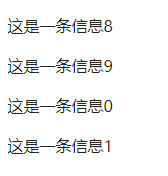
<template><div class="scroll-container" ref="scrollRef"><div v-for="(item, index) in list" :key="index" style="height: 40px; line-height: 40px;">{{ item.title }}</div></div>
</template><script setup>
import  { onMounted, ref } from 'vue'
defineOptions({name: 'publicRecruitment-bountyDisplay'})// 容器的 dom 节点
const scrollRef = ref()
// 模拟列表数据
const dataSource = new Array(10).fill(0).map((_, index) => ({title: `这是一条信息${index}`
}))
const list = ref([...dataSource])// 记录原始数据的长度
const len = dataSource.length
onMounted(() => {// 滚动的距离let top = 0// 索引let index = 0const scroll = () => {// 垂直方向滚动scrollRef.value?.scrollTo({top: top++})if (top % 40 === 0) {// 哪一项滚不见了,就拿这一项 push 到列表中const target = list.value[index]if (target) list.value.push(target)if (index < (len - 1)) {// 不断递增index++} else {// 刚好滚动完一轮,重新来过,初始化数据top = 0index = 0scrollRef.value?.scrollTo({top: 0})list.value = [...dataSource]}}// 不断滚动requestAnimationFrame(scroll)}scroll()
})
</script><style lang="scss" scoped>
.scroll-container {//   防止有滚动条出现overflow: hidden;height: 150px;
}
</style>
兼容升级版本
1.如果数据长度形成的总高度少于容器高度,不设置滚动
2.如果数据长度仅高于容器高度不足一个数据单位的长度会出现抖动滚动。解决方法:将数据复制一份
删减代码

<!-- 滚动展示 -->
<template><div style="height: 100%; width: 100%;"><div class="mb-3" style="font-size: 13px; color: #666;">无缝衔接滚动</div><!-- 滚动 --><divclass="scroll-container"ref="scrollRef"style="height: calc(100% - 32px); overflow: hidden; font-size: 13px;color: #333;"><!-- 数据list --><divv-for="(item) in list":key="item.name"class="d-flex justify-space-between align-center":style="`height: ${dataItemHeight}px;`"><div class="ml-2">{{ item.name }}</div></div></div></div>
</template><script setup>
import  { onMounted, ref } from 'vue'
defineOptions({name: 'publicRecruitment-bountyDisplay'})
// 滚动实现代码部分
const dataItemHeight = 40
// 容器的 dom 节点
const scrollRef = ref()
// // 模拟列表数据
let listSource = new Array(10).fill(0).map((_, index) => ({ name: `name${index}`}))
const list = ref([...listSource])// 记录原始数据的长度
let len = listSource.length
onMounted(() => {// 滚动的距离let top = 0// 索引let index = 0const scroll = () => {// 垂直方向滚动scrollRef.value?.scrollTo({top: top++,})if (top % dataItemHeight === 0) {// 哪一项滚不见了,就拿这一项 push 到列表中const target = list.value[index]if (target) list.value.push(target)if (index < len - 1) {// 不断递增index++} else {// 刚好滚动完一轮,重新来过,初始化数据top = 0index = 0scrollRef.value?.scrollTo({top: 0,})list.value = [...listSource]}}// 不断滚动requestAnimationFrame(scroll)}// 如果数据长度形成的总高度少于容器高度,不设置滚动const clientHeight = scrollRef.value?.clientHeightif (len*dataItemHeight > clientHeight) {if ((len - 1)*dataItemHeight < clientHeight) {// 如果clientHeight刚好大于len*dataItemHeight,但不满足(len+1)*dataItemHeight会出现抖动。// 解决方法:将数据复制一份listSource = listSource.concat(...Array.from({ length: 1 }, () => [...listSource]))list.value = listSourcelen = listSource.length}scroll()}
})
</script>
<style lang="scss" scoped>
.red {color: red;
}
.ellipsisText {// width: 120px;white-space: nowrap;text-overflow: ellipsis;overflow: hidden;
}
</style>
完整代码
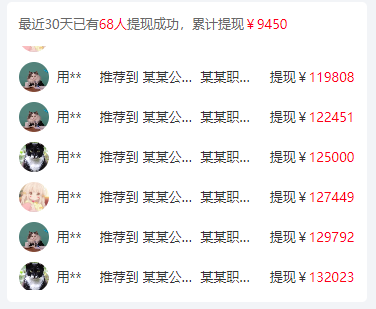
<!-- 滚动展示 -->
<template><div style="height: 100%; width: 100%;"><div class="mb-3" style="font-size: 13px; color: #666;">最近30天已有<span class="red">68人</span>提现成功,累计提现<span class="red">¥9450</span></div><!-- 滚动 --><divclass="scroll-container"ref="scrollRef"style="height: calc(100% - 32px); overflow: hidden; font-size: 13px;color: #333;"><!-- 数据list --><divv-for="(item) in list":key="item[keyText] || item.name"class="d-flex justify-space-between align-center":style="`height: ${dataItemHeight}px;`"><!-- 头像、用户名 --><div class="d-flex align-center"><v-avatar size="30" :image="item.avatar || 'https://minio.citupro.com/dev/menduner/7.png'"></v-avatar><div class="ml-2">{{ formatName(item.name) }}</div><!-- <div class="ml-2">{{ item.name }}</div> --></div><div class="d-flex" style="width: calc(100% - 65px);"><!-- 内容 --><div class="d-flex ellipsisText mx-4" style="flex: 1;"><div>推荐到</div><div class="ellipsisText ml-1" style="max-width: 100px;">{{ item.company }}</div><div class="ellipsisText ml-1" style="max-width: 60px;">{{ item.job }}</div></div><!-- 赏金 --><div>提现¥<span class="red">{{ item.money }}</span></div></div></div></div></div>
</template><script setup>
import  { onMounted, ref } from 'vue'defineOptions({name: 'publicRecruitment-bountyDisplay'})
defineProps({keyText: {type: String,default: 'id'}
})
const avatarList = ['https://img0.baidu.com/it/u=230622178,1565949306&fm=253&fmt=auto&app=138&f=JPEG?w=449&h=300','https://img0.baidu.com/it/u=1401084042,2724457850&fm=253&fmt=auto&app=138&f=JPEG?w=500&h=726','https://img1.baidu.com/it/u=3995643348,1848098846&fm=253&fmt=auto&app=138&f=JPEG?w=800&h=800','https://img0.baidu.com/it/u=230622178,1565949306&fm=253&fmt=auto&app=138&f=JPEG?w=449&h=300','https://img0.baidu.com/it/u=1401084042,2724457850&fm=253&fmt=auto&app=138&f=JPEG?w=500&h=726','https://img1.baidu.com/it/u=3995643348,1848098846&fm=253&fmt=auto&app=138&f=JPEG?w=800&h=800','https://img0.baidu.com/it/u=230622178,1565949306&fm=253&fmt=auto&app=138&f=JPEG?w=449&h=300',
]
let listSource = []
for (let index = 0; index < 68; index++) {const obj = {id: 'id' + (index+1),name: '用户' + (index+1),// name: (index+1),avatar: avatarList[index % 7],company: '某某公司' + (index+1),job: '某某职位' + (index+1),money: index*index*(100 - index) || 100,}listSource.push(obj)
}// 用户名加*号
const formatName = (name) => {if (!name.length) {return name} else if (name.length === 1) {  return name // 如果名字只有一个字,则直接返回该字  } else if (name.length === 2) {  return name.charAt(0) + '*' // 如果名字有两个字,则返回第一个字后跟一个星号  } else {  return name.charAt(0) + '**' // 如果名字有多于两个字,则返回第一个字后跟两个星号  }
}// 滚动实现代码部分
const dataItemHeight = 40
// 容器的 dom 节点
const scrollRef = ref()
// // 模拟列表数据
// const listSource = new Array(10).fill(0).map((_, index) => ({ title: `这是一条信息${index}`}))
const list = ref([...listSource])// 记录原始数据的长度
let len = listSource.length
onMounted(() => {// 滚动的距离let top = 0// 索引let index = 0const scroll = () => {// 垂直方向滚动scrollRef.value?.scrollTo({top: top++,})if (top % dataItemHeight === 0) {// 哪一项滚不见了,就拿这一项 push 到列表中const target = list.value[index]if (target) list.value.push(target)if (index < len - 1) {// 不断递增index++} else {// 刚好滚动完一轮,重新来过,初始化数据top = 0index = 0scrollRef.value?.scrollTo({top: 0,})list.value = [...listSource]}}// 不断滚动requestAnimationFrame(scroll)}// 如果数据长度形成的总高度少于容器高度,不设置滚动const clientHeight = scrollRef.value?.clientHeightif (len*dataItemHeight > clientHeight) {if ((len - 1)*dataItemHeight < clientHeight) {// 如果clientHeight刚好大于len*dataItemHeight,但不满足(len+1)*dataItemHeight会出现抖动。// 解决方法:将数据复制一份listSource = listSource.concat(...Array.from({ length: 1 }, () => [...listSource]))list.value = listSourcelen = listSource.length}scroll()}
})
</script>
<style lang="scss" scoped>
.red {color: red;
}
.ellipsisText {// width: 120px;white-space: nowrap;text-overflow: ellipsis;overflow: hidden;
}
</style>
这篇关于【vue scrollTo 数据无限滚动 】的文章就介绍到这儿,希望我们推荐的文章对编程师们有所帮助!




