本文主要是介绍vue+element的表格(el-table)排班情况表(2024-05-09),希望对大家解决编程问题提供一定的参考价值,需要的开发者们随着小编来一起学习吧!
vue+element的表格(el-table)排班情况,增删查改等简单功能

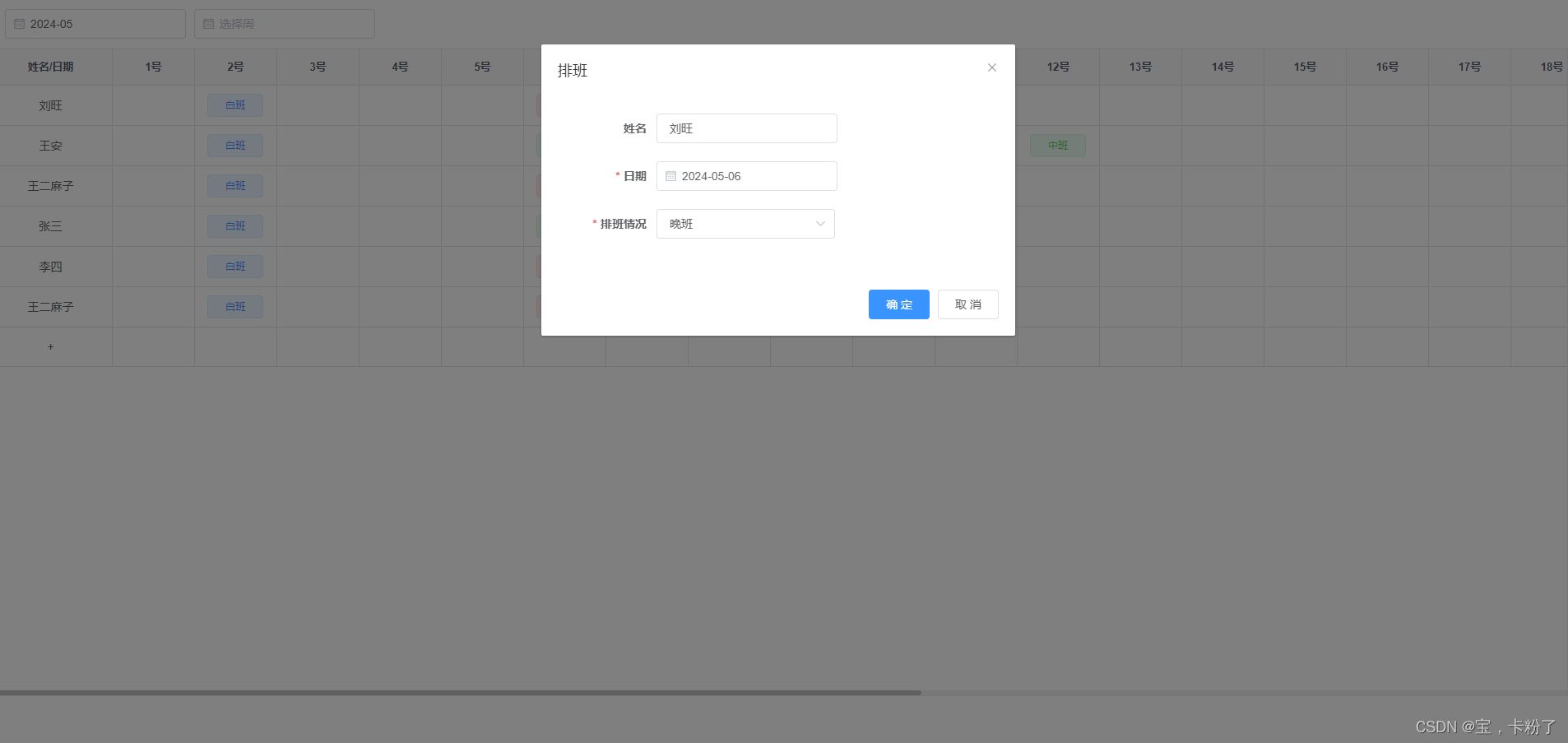
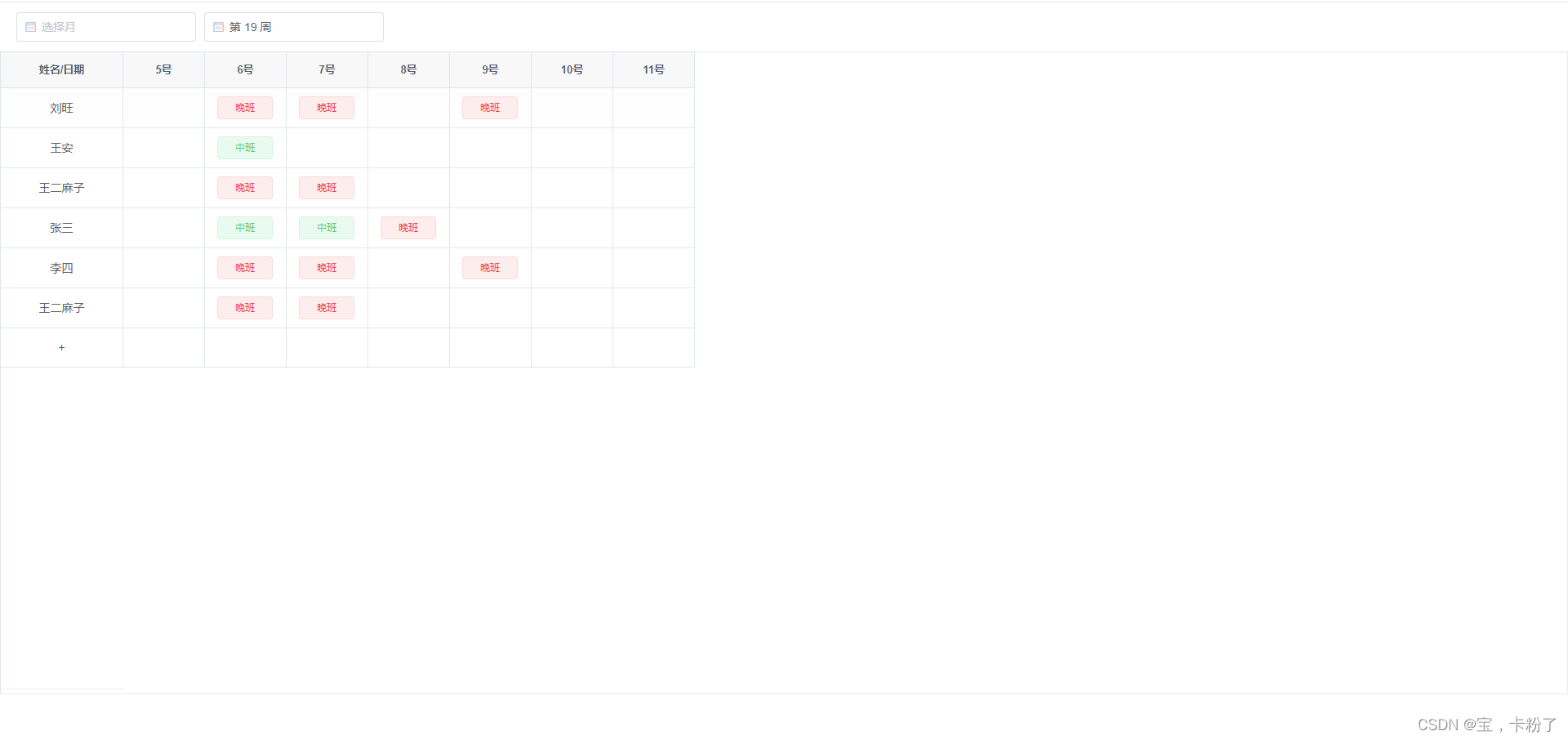
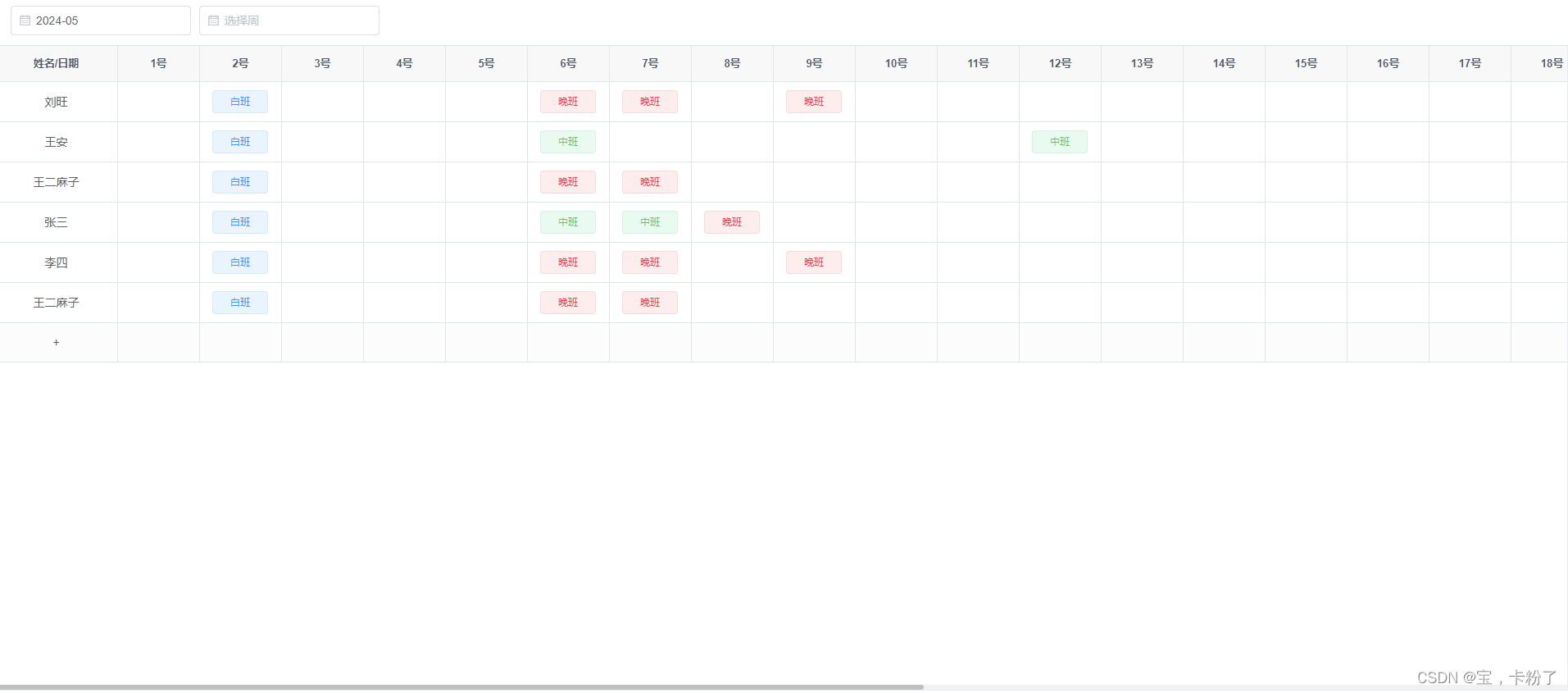
代码:
<template><!-- 表格 --><div class="sedules"><el-header><el-date-pickerv-model="monthValue2"type="month"placeholder="选择月"value-format="yyyy-M"@change="changeMonth"></el-date-picker><el-date-pickerstyle="margin-left: 10px;"v-model="weekValue1"type="week"format="第 WW 周"placeholder="选择周"@change="changeWeek"></el-date-picker></el-header><div class="table-content"><el-tablev-loading="loading"class="sedules-table":data="persons"borderheight="300"><el-table-columnprop="name"width="150"align="center"label="姓名/日期"fixed><template slot-scope="{row}"><span :class="row.name === '+'?'cur':''" @click="clicksName(row)">{{ row.name }}</span></template></el-table-column><template v-for="(col,i) in nowMonthDays"><el-table-column:show-overflow-tooltip="true":label="col.date":key="col.date"width="100"align="center"><template slot-scope="{row}"><span v-if="filed(col, row).show" class="row-tag" @click="showLog(filed(col, row))"><i class="el-icon-close" @click.stop="handleCloseTag(filed(col, row))"></i><el-tag v-if="filed(col, row).typeId === 0"> 白班 </el-tag><el-tag v-else-if="filed(col, row).typeId === 1" type="success"> 中班 </el-tag><el-tag v-else-if="filed(col, row).typeId === 2" type="danger"> 晚班 </el-tag><span v-else> </span></span><i class="icon-plus row-tag" v-else @click="showLog(filed(col, row))"> </i></template></el-table-column></template></el-table></div><!-- 添加或修改对话框 --><el-dialog :title="title" :visible.sync="open" width="30%" append-to-body><el-form ref="form" :model="form" :rules="rules" label-width="120px"><el-form-item label="姓名" prop="name"><el-input style="width: 220px;" v-model="form.name" placeholder="姓名"></el-input></el-form-item><el-form-item label="日期" prop="day"><el-date-pickerv-model="form.day"format="yyyy-MM-dd"value-format="yyyy-MM-dd"placeholder="请选择日期"clearable/></el-form-item><el-form-item label="排班情况" prop="typeName"><el-select v-model="form.typeName" clearable placeholder="请选择" @change="$forceUpdate()"><el-optionv-for="dict in sys_day_type":key="dict.value":label="dict.label":value="dict.value"@click.native="getTypeName(dict)"/></el-select></el-form-item><!-- <el-form-item label="备注" v-show="false">--><!-- <el-input v-model="form.remark" type="textarea" placeholder="请输入内容"/>--><!-- </el-form-item>--></el-form><div slot="footer" class="dialog-footer"><el-button type="primary" @click="submit">确 定</el-button><el-button @click="cancel">取 消</el-button></div></el-dialog></div>
</template>
<script>
import calendar from '@/utils/js-calendar-converter.js'export default {name: 'paiban',data() {return {insDate: new Date().getFullYear() + '-' + (new Date().getMonth() + 1),weekValue1: '',monthValue2: new Date().getFullYear() + '-' + (new Date().getMonth() + 1),loading: false,title: '排班',form: {},// 是否显示弹出层open: false,year: new Date().getFullYear(),month: new Date().getMonth() + 1,weeksArr: ['日', '一', '二', '三', '四', '五', '六'],nowMonthDays: [],persons: [{'id': this.$uuid(),'name': '刘旺','list': [{ day: '2024-5-2', typeName: '白班', typeId: 0 },{ day: '2024-5-6', typeName: '晚班', typeId: 2 },{ day: '2024-5-7', typeName: '晚班', typeId: 2 },{ day: '2024-5-9', typeName: '晚班', typeId: 2 }]},{'id': this.$uuid(),'name': '王安','list': [{ day: '2024-5-2', typeName: '白班', typeId: 0 },{ day: '2024-5-6', typeName: '中班', typeId: 1 },{ day: '2024-5-12', typeName: '中班', typeId: 1 }]},{'id': this.$uuid(),'name': '王二麻子','list': [{ day: '2024-5-2', typeName: '白班', typeId: 0 },{ day: '2024-5-6', typeName: '中班', typeId: 2 },{ day: '2024-5-7', typeName: '中班', typeId: 2 }]},{'id': this.$uuid(),'name': '张三','list': [{ day: '2024-5-2', typeName: '白班', typeId: 0 }, // 白班{ day: '2024-5-6', typeName: '白班', typeId: 1 }, // 白班{ day: '2024-5-7', typeName: '中班', typeId: 1 }, // 中班{ day: '2024-5-8', typeName: '晚班', typeId: 2 }] // 晚班},{'id': this.$uuid(),'name': '李四','list': [{ day: '2024-5-2', typeName: '白班', typeId: 0 },{ day: '2024-5-6', typeName: '晚班', typeId: 2 },{ day: '2024-5-7', typeName: '晚班', typeId: 2 },{ day: '2024-5-9', typeName: '晚班', typeId: 2 }]},{'id': this.$uuid(),'name': '王二麻子','list': [{ day: '2024-5-2', typeName: '白班', typeId: 0 },{ day: '2024-5-6', typeName: '中班', typeId: 2 },{ day: '2024-5-7', typeName: '中班', typeId: 2 }]}],sys_day_type: [{ value: 0, label: '白班' },{ value: 1, label: '中班' },{ value: 2, label: '晚班' }],// 表单校验rules: {day: [{ required: true, message: '日期不能为空', trigger: 'blur' }],typeName: [{ required: true, message: '排班情况不能为空', trigger: 'blur' }]},timeRange: []}},computed: {},mounted() {this.persons = this.persons.map((two) => {two.list.unshift({})return two})this.persons.push({id: this.$uuid(),name: '+',list: []})this.getNowMonthDays(this.year, this.month)},methods: {clicksName(val) {debuggerthis.open = truethis.title = "新增排班"},changeWeek(val) {this.timeRange = []if (val) {// 时间选择器按周const { year, month, day } = this.getMonday('s', 0, val)const { year: year1, month: month1, day: day1 } = this.getMonday('e', 0, val)for (let i = 0; i < 7; i++) {this.timeRange.push(day + i)}this.monthValue2 = ''this.getNowMonthDays(this.year, this.month, this.timeRange)} else {this.monthValue2 = this.insDatethis.getNowMonthDays(this.year, this.month)}},changeMonth(val) {const [yy, mm] = val.split('-')this.getNowMonthDays((yy - 0), (mm - 0))this.weekValue1 = ''},/*方法:得到本周、上周、下周的起始、结束日期参数:type为字符串类型,有两种选择,"s"代表开始,"e"代表结束,dates为数字类型,不传或0代表本周,-1代表上currentTime:当前时间Mon Apr 01 2024 00:00:00 GMT+0800 (GMT+08:00)使用方法: console.log('本周结束日期',getDateFn.getMonday('e'));console.log('上周开始日期',getDateFn.getMonday('s',-1))*/getMonday(type, dates, currentTime) {var now = currentTime || new Date()var nowTime = now.getTime()var day = now.getDay()var longTime = 24 * 60 * 60 * 1000var n = longTime * 7 * (dates || 0)if (type == 's') {var dd = nowTime - (day - 1) * longTime + n}if (type == 'e') {var dd = nowTime + (7 - day) * longTime + n}dd = new Date(dd)var y = dd.getFullYear()var m = dd.getMonth() + 1var d = dd.getDate()console.log(dd)// m = m < 10 ? '0' + m : m// d = d < 10 ? '0' + d : d// var day = y + '-' + m + '-' + dreturn { day: d - 1, year: y, month: m }},handleCloseTag(col) {const that = thisthis.$confirm('此操作删除记录, 是否继续?', '提示', {confirmButtonText: '确定',cancelButtonText: '取消',type: 'warning'}).then(() => {that.persons = that.persons.map((person) => {if (person.name === col.name) {person.list = person.list.filter((per) => {if (per.day !== col.day) {return per}})}return person})this.$message({type: 'success',message: '删除成功!'})}).catch(() => {})},getTypeName(item) {this.form.typeId = item.valuethis.form.typeName = item.label},filed(col, row) {let rows = row.list.find((one) => {if (one.day === col.day) {return one}})if (rows) {const rt1 = { show: true, ...rows, ...col, ...row }return rt1} else {const rt2 = { show: false, ...col, ...row }return rt2}},showLog(col) {console.log(col)this.open = truethis.form = colthis.title = '排班'},submit() {const that = thisthat.persons = that.persons.map((person) => {if (person.name === that.form.name) {const one = person.list.find((per) => {if (per.day === that.form.day) {return per}})if (one) {one.typeId = that.form.typeIdone.typeName = that.form.typeName} else {person.list.push({day: that.form.day,typeId: that.form.typeId,typeName: that.form.typeName})}}return person})this.getNowMonthDays(this.year, this.month, this.timeRange)that.open = false},cancel() {this.open = false},// 获取当月天数getThisMonthDays(year, month) {return new Date(year, month, 0).getDate()},/** 获取当月日期 */getNowMonthDays(year, month, week) {let that = thisconst nowMonthDays = []that.loading = truethat.year = yearthat.month = monthsetTimeout(() => {if (week && week.length) {for (let i in week) {const times = `${year + '-' + month + '-' + week[i]}` // 2023-3-3const lunar = calendar.solar2lunar(year, month, week[i])nowMonthDays.push({id: this.$uuid(),date: week[i] + '号', // 几号week: this.weeksArr[new Date(year, month - 1, week[i]).getDay()], // 星期几day: times,lunar: lunar.IMonthCn + lunar.IDayCn})}} else {let days = that.getThisMonthDays(year, month) // 获取当月的天数for (let i = 1; i <= days; i++) {const d = new Date(year, month - 1, i)const years = d.getFullYear()const months = d.getMonth() + 1const day2 = d.getDate()const times = `${years + '-' + months + '-' + day2}` // 2023-3-3const lunar = calendar.solar2lunar(years, months, day2)// var holidays = ['2024-5-1', '2024-5-2', '2024-5-3', '2024-5-4', '2024-5-5']nowMonthDays.push({id: that.$uuid(),date: i + '号', // 几号week: that.weeksArr[new Date(year, month - 1, i).getDay()], // 星期几day: times,lunar: lunar.IMonthCn + lunar.IDayCn})}}that.nowMonthDays = nowMonthDaysthat.loading = false}, 500)},// 默认显示当前年度getdatatime() {this.value1 = new Date()}}
}
</script>
<style lang="scss" scoped>
.sedules {height: 90%;.el-header {display: flex;justify-content: flex-start;align-content: center;align-items: center;}.table-content {position: relative;width: 100%;height: calc(100% - 40px);}::v-deep.sedules-table.el-table {height: 100% !important;overflow: auto;& .el-table__cell.is-hidden > * {visibility: visible;}.el-table__fixed-body-wrapper {top: 44px !important;}.el-table__body-wrapper {height: calc(100% - 45px) !important;}.cur {cursor: pointer;}.el-table .cell {padding: 0;&.el-tooltip {white-space: nowrap;min-width: 50px;height: 100%;display: block;padding: 0;}}.row-tag {position: relative;display: inline-block;height: 100%;min-height: 20px;cursor: pointer;width: calc(100% - 10px);padding: 0;i.el-icon-close {position: absolute;right: 0;color: transparent;}&:hover {i.el-icon-close {color: #a7a7a7;}}.el-tag {width: 100%;}}}}
</style>
这篇关于vue+element的表格(el-table)排班情况表(2024-05-09)的文章就介绍到这儿,希望我们推荐的文章对编程师们有所帮助!





