本文主要是介绍学习 :ASP.NET中使用LINQ,希望对大家解决编程问题提供一定的参考价值,需要的开发者们随着小编来一起学习吧!
第0步:建立一个C# LINQ ASP.NET网站
建立一个能使用LINQ/DLINQ/XLINQ和新的C#3.0语言特性的ASP.NET网站,在VS中选择文件->新建网站然后选 择"LINQ ASP.NET Web Site Template":
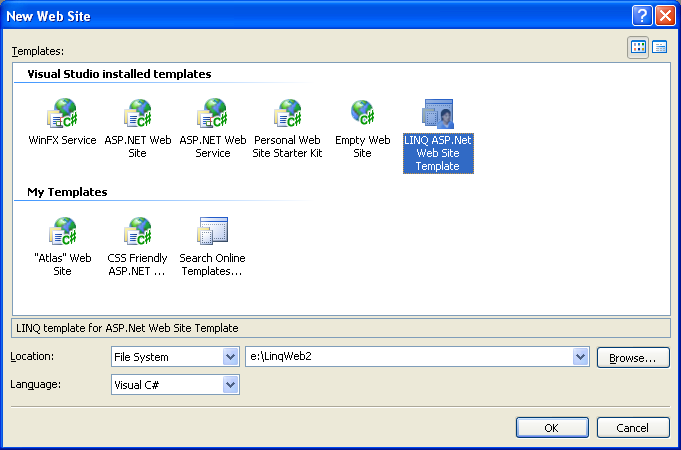
默认会创建一个如下所示的网站 工程:
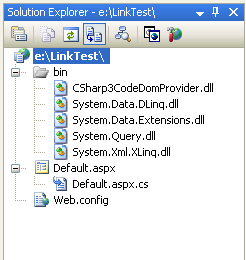
注意它在/bin文件夹中引入了一些LINQ程序集。它同样在web.config文件中添加了一些配置以告诉VS和ASP.NET 使用C# 3.0编译器来编译和运行程序:
< system.codedom >
< compilers >
< compiler language = "c#;cs;csharp"
& nbsp; extension=".cs"
type="Microsoft.CSharp.CSharp3CodeProvider, CSharp3CodeDomProvider"/>
</ compilers >
</ system.codedom >
注意C# 3.0编译器和CodeDOM提供器可以和C# 2.0版本并肩运行, 因此你无需担心安装LINQ会破坏VS或ASP.NET。
第一步:建立第一个使用了LINQ的ASP.NET页 面
新建一个叫Step1.aspx的新页面。添加一个GridView控件到页面中,如下所 示:
<% @ Page Language="C#" CodeFile="Step1.aspx.cs" Inherits="Step1" %>
< html >
< body >
<form id="form1" runat="server">
<div>
<h1>City Names</h1>
<asp:GridView ID="GridView1" runat="server">
</asp:GridView>
</div>
</form>
</ body >
</ html >
然后在后台代码文件中我们将编写经典的“hello world”LINQ示例-包括对一列字符串的搜索和排 序:
using System;
using System.Web;
using System.Web.UI;
using System.Web.UI.WebControls;
using System.Query;
public partial class Step1 : System.Web.UI.Page
{
protected void Page_Load(object sender, EventArgs e)
{
string[] cities = { "London", "Amsterdam", "San Francisco", "Las Vegas",
& nbsp; "Boston", "Raleigh", "Chicago", "Charlestown",
& nbsp; "Helsinki", "Nice", "Dublin" };
GridView1.DataSource = from city in cities
& nbsp; where city.Length > 4
& nbsp; orderby city
& nbsp; select city.ToUpper();
GridView1.DataBind();
}
}
在上面的示例中,我列出了一组我今年一月到五月所去过的城市的名称。然后我用LINQ查询表达式(query expression)对这个数组进行操作。这个查询表达式返回名字多于4个字符的所有城市,然后按照城市名 称的字母进行排序并把名字转换为大写。
LINQ查询返回如下类型:IEnumerable<T>-"select"子句选择的对象类型决定了这里 的<T>的类型。因为上面例子中"city"是一个字符串,所以类型安全的结果是一个如下所示的基于泛型 的集合:
IEnumerable<string> result = from city in cities
& nbsp; where city.Length > 4
& nbsp; orderby city
& nbsp; select city.ToUpper();
因为ASP.NET控件能绑定到任何的IEnumerable集合,所以我们可以很容易的把LINQ查询结果绑定到GridView中, 然后调用DataBind()方法来生成如下的页面输出:
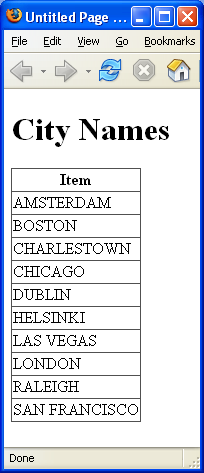
注意,除了可以使用上面的GridView控件外,我也可以使用 <asp:repeater>, <asp:datalist>, <asp:dropdownlist>, 或者任何其他ASP.NET的列表 控件(可以是产品自带或者开发人员自己开发的控件)。在这些示例中我只使用了<asp:gridview>-但 是你们可以使用任何其他的控件。
第二步:使用功能更丰富的集合
搜索一个数组的字符串并没多大意思,虽然有时候很有用。如果我们能对自己的功能更丰富的那些集合中搜索将 会更有趣。好消息是,LINQ使这些变得很简单。例如,为了更好记录我去过的地方,我在我的工程中建立了一 个叫"Location"的简单类:
using System;
public class Location
{
// Fields
private string _country;
private int _distance;
private string _city;
// Properties
public string Country
{
get { return _country; }
set { _country = value; }
}
public int Distance
{
get { return _distance; }
set { _distance = value; }
}
public string City
{
get { return _city; }
set { _city = value; }
}
}
它公开了三个属性来表示国家、城市名称和到西雅图的距离。然后我新建一个包含GridView控件的Step3.aspx页 面,其中GridView定义了三列,如下所示:
<% @ Page Language="C#" CodeFile="Step2.aspx.cs" Inherits="Step2" %>
< html >
< body >
<form id="form1" runat="server">
<h1>Cities and their Distances</h1>
<asp:GridView ID="GridView1" AutoGenerateColumns="false" runat="server">
<Columns>
<asp:BoundField HeaderText="Country" DataField="Country" />
<asp:BoundField HeaderText="City" DataField="City" />
<asp:BoundField HeaderText="Distance from Seattle" DataField="Distance" />
</Columns>
</asp:GridView>
</form>
</ body >
</ html >
然后我建立一个Location对象集合来绑定到Grid中,后台代码文件如下所示:
using System;
using System.Collections.Generic;
using System.Web;
using System.Query;
public partial class Step2 : System.Web.UI.Page
{
protected void Page_Load(object sender, EventArgs e)
{
List<Location> cities = new List<Location>{
& nbsp; & nbsp; new Location { City="London", Distance=4789, Country="UK" },
& nbsp; & nbsp; new Location { City="Amsterdam", Distance=4869, Country="Netherlands" },
& nbsp; & nbsp; new Location { City="San Francisco", Distance=684, Country="USA" },
& nbsp; new Location { City="Las Vegas", Distance=872, Country="USA" },
& nbsp; & nbsp; new Location { City="Boston", Distance=2488, Country="USA" },
& nbsp; & nbsp; new Location { City="Raleigh", Distance=2363, Country="USA" },
& nbsp; & nbsp; new Location { City="Chicago", Distance=1733, Country="USA" },
& nbsp; & nbsp; new Location { City="Charleston", Distance=2421, Country="USA" },
& nbsp; & nbsp; new Location { City="Helsinki", Distance=4771, Country="Finland" },
& nbsp; & nbsp; new Location { City="Nice", Distance=5428, Country="France" },
& nbsp; & nbsp; new Location { City="Dublin", Distance=4527, Country="Ireland" }
& nbsp; };
GridView1.DataSource = from location in cities
& nbsp; where location.Distance > 1000
& nbsp; orderby location.Country, location.City
& nbsp; select location;
GridView1.DataBind();
}
}
上面的后台代码展示了几个非常酷的特性。首先是C# 3.0新的简便的构造器写法,在创建对象的同时,还可以同 时设置这些对象的属性的值::
new Location { City="London", Distance=4789, Country="UK" }
这在实例化和同时添加对象到集合中的情形下非常有用,以及在 后面将用到的匿名类型的情形中也非常有用。注意到我这次并没有用数组,而是用了一个类型为Location的基 于泛型的List集合。LINQ支持对任何的IEnumerable<T>集合执行查询,所以你可以使用现有的任何泛型 或者非泛型的对象集合。
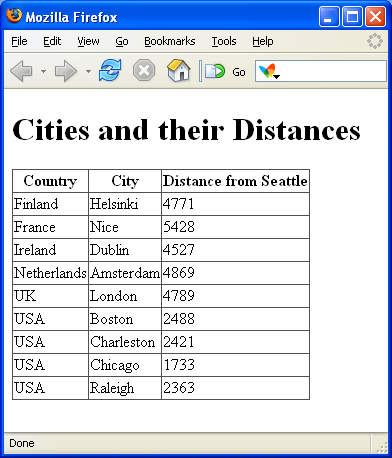
在下面的LINQ查询中我返回了距离西雅图超过100英里的城市的集合。我还选择了对查询进行先国家后城市名称 的排序操作。这个LINQ查询的结果的类型是由location变量来确定下来的─在这里,其类型 是Location:
IEumerable<Location> result = from location in cities
& nbsp; where location.Distance > 1000
& nbsp; orderby location.Country, location.City
& nbsp; select location;
当我把结果绑定到GridView中将会得到如下结果:
第三步:稍微重构一下City集合
因为我们将在好几个示例中重用这个城市集合,我决定把它封装到一个"TravelOrganizer"类中,如下所 示:
using System;
using System.Collections.Generic;
public class TravelOrganizer
{
public List<Location> PlacesVisited
{
get
{
List<Location> cities = new List<Location>{
& nbsp; & nbsp; new Location { City="London", Distance=4789, Country="UK" },
& nbsp; & nbsp; new Location { City="Amsterdam", Distance=4869, Country="Netherlands" },
& nbsp; & nbsp; new Location { City="San Francisco", Distance=684, Country="USA" },
& nbsp; & nbsp; new Location { City="Las Vegas", Distance=872, Country="USA" },
& nbsp; & nbsp; new Location { City="Boston", Distance=2488, Country="USA" },
& nbsp; & nbsp; new Location { City="Raleigh", Distance=2363, Country="USA" },
& nbsp; & nbsp; new Location { City="Chicago", Distance=1733, Country="USA" },
& nbsp; & nbsp; new Location { City="Charleston", Distance=2421, Country="USA" },
& nbsp; & nbsp; new Location { City="Helsinki", Distance=4771, Country="Finland" },
& nbsp; new Location { City="Nice", Distance=5428, Country="France" },
& nbsp; & nbsp; new Location { City="Dublin", Distance=4527, Country="Ireland" }
& nbsp; & nbsp; };
return cities;
}
}
}
这使我只需要编写如下的代码就能得到跟上面同样的结果:
using System;
using System.Collections.Generic;
using System.Web;
using System.Web.UI;
using System.Query;
public partial class Step3 : System.Web.UI.Page
{
protected void Page_Load(object sender, EventArgs e)
{
TravelOrganizer travel = new TravelOrganizer();
GridView1.DataSource = from location in travel.PlacesVisited
& nbsp; where location.Distance > 1000
& nbsp; orderby location.Country, location.City
& nbsp; select location;
GridView1.DataBind();
}
}
LINQ很酷之处就是它是强类型的。这意味着,
1) 你的所有的查询都会进行编译时检查。不像现在的SQL语句,你只有到运行时才会发现你的错误所 在。这意味着你在开发时就可以检查你的代码的正确性,例如,如果我把上面的"distance"误写成 了"distanse",编译器将为我捕获到这个错误。
2) 当你写LINQ查询的时候你将在VS或免费的Visual Web Developer中获得智能感知的提示。这不仅加 快了编码的输入速度,而且使我们在处理无论简单还是复杂的集合和数据源对象模型时都变得非常容 易。
第四步:使用.NET的标准查询操作符做Skip和Take操 作
LINQ支持许多内置的标准查询操作。如果你在类之前加入"using System.Query"语句你就可以在代码 中使用这些操作。例如,如果我要列出第2远到第6远的城市,我就可以使用象下面这样的编 码:
using System;
using System.Web.UI;
using System.Query;
public partial class Step4 : System.Web.UI.Page
{
protected void Page_Load(object sender, EventArgs e)
{
TravelOrganizer travel = new TravelOrganizer();
GridView1.DataSource = (from location in travel.PlacesVisited
& nbsp; orderby location.Distance descending
& nbsp; select location).Skip(1).Take(5);
GridView1.DataBind();
}
}
注意我是怎么通过距离的远近来对结果进行排序的。然后我使 用Skip操作来跳过第一个城市,然后使用Take操作来只返回5个结 果。
NET标准查询操作的真正强大之处在于,这些操作不是写死 的(hard-coded ),任何开发人员都可以添加新的或替换其中的操作。这就可以支持实现非常强有力的特定 域(domain specific)操作。例如,当你在DLINQ里使用Skip和Take操作时,DLINQ实际上是把这些操作转换成 服务器端分页的后台SQL逻辑,这样,只有少量的记录从数据库返回,不管数据表中是否有十几万条数据。这 意味着我们可以在大量关系数据之上很轻易地实现高效的web数据分页。注意:在LINQ正式发行之前,你可以 使用这里提到的技术。
第五步:.NET的标准查询操作续
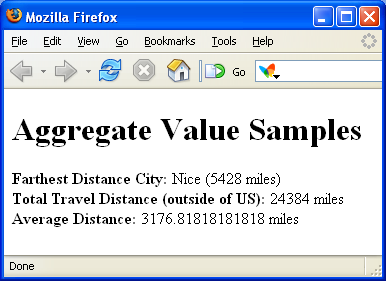
除了可以返回数据集之外,我们可以使用.NET标准查询操作来返回单个或者统计数据结果。下面的例子演示了怎 么做:
<% @ Page Language="C#" CodeFile="Step5.aspx.cs" Inherits="Step5" %>
< html >
< body >
<form id="form1" runat="server">
<div>
<h1>Aggregate Value Samples</h1>
<div>
<b>Farthest Distance City:</b>
<asp:Label ID="MaxCityNameTxt" runat="server" Text="Label"></asp:Label>
<asp:Label ID="MaxCityDistanceTxt" runat="server" Text="Label"></asp:Label>
</div>
<div>
<b>Total Travel Distance (outside of US):</b>
<asp:Label ID="TotalDistanceTxt" runat="server" Text="Label"></asp:Label>
</div>
<div>
<b>Average Distance:</b>
<asp:Label ID="AverageDistanceTxt" runat="server" Text="Label"></asp:Label>
</div>
</div>
</form>
</ body >
</ html >
Step5.aspx.cs后台代码文件:
using System;
using System.Collections.Generic;
using System.Web.UI;
using System.Query;
public partial class Step5 : System.Web.UI.Page
{
protected void Page_Load(object sender, EventArgs e)
{
TravelOrganizer travel = new TravelOrganizer();
//
// Calculate farthest city away
Location farthestCity = (from location in travel.PlacesVisited
& nbsp; & nbsp; orderby location.Distance descending
& nbsp; & nbsp; select location).First();
MaxCityNameTxt.Text = farthestCity.City;
MaxCityDistanceTxt.Text = "(" + farthestCity.Distance + " miles)";
//
// Calculate total city distances of all cities outside US
int totalDistance = (from location in travel.PlacesVisited
& nbsp; where location.Country != "USA"
& nbsp; select location).Sum(loc => loc.Distance);
TotalDistanceTxt.Text = totalDistance + " miles";
//
// Calculate average city distances of each city trip
double averageDistance = travel.PlacesVisited. Average(loc => loc.Distance);
AverageDistanceTxt.Text = averageDistance + " miles";
}
}
注意,上面最后两个例子使用了新的Lambda表达式(Lambda Expression)支持-这些表达式允许我们通过譬如象 委托这样的代码段在数据之上做进一步的操作,从而计算出一个结果来。你也可以用之来建立你自己的.NET查 询操作(例如:你可以建立一些特定领域的查询来计算运费或者收入税)。所有的对象都是强类型的,而且支 持智能感知和编译时检查。
上面示例的输出如下所示:
第六步:匿名类型(Anonymous Types)
LINQ能够利用的另一个C#和VB新特性之一就是对“匿名类型”的支 持。这允许你不需明确声明对象模型就能很容易地创建和使用内联的类型结构,因为类型可以通过数据的初始 化推断出来。这在使用LINQ查询“自定义构形(custom shape)”数据时非常的有 用。
例如,考虑这样一个场景:你正在处理一个具有许多属性的数据库或者强类型的集合-但是你只关心其中少数的 几个字段。与创建和处理整个类型相比,仅返回你所需要的字段将会更加有用些。我们来新建一 个"step6.aspx"文件来实现以上操作:
<% @ Page Language="C#" AutoEventWireup="true" CodeFile="Step6.aspx.cs" Inherits="Step6" %>
< html >
< body >
<form id="form1" runat="server">
<div>
<h1>Anonymous Type</h1>
<asp:GridView ID="GridView1" runat="server">
</asp:GridView>
</div>
</form>
</ body >
</ html >
在我们的后台代码文件中我们将编写一个使用匿名类型的LINQ查询,如下所 示:
using System;
using System.Web.UI;
using System.Query;
public partial class Step6 : System.Web.UI.Page
{
protected void Page_Load(object sender, EventArgs e)
{
TravelOrganizer travel = new TravelOrganizer();
GridView1.DataSource = from location in travel.PlacesVisited
& nbsp; orderby location.City
& nbsp; select new {
& nbsp; & nbsp; City = location.City,
& nbsp; & nbsp; Distance = location.Distance
& nbsp; };
GridView1.DataBind();
}
}
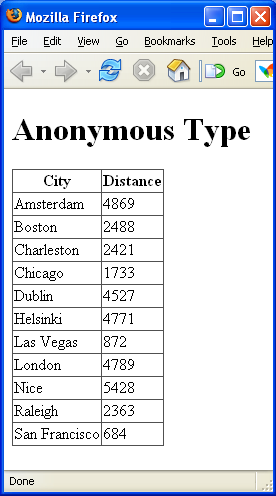
注意,我们并没有像上面一样从select子句中返回一个"location"对象,我们通过新建一个具有City和Distance 两个属性的匿名类型来实现。这两个属性的类型是根据它们初始化时赋与的值来自动确定的,在这里是一个是 string,另一个是int。将其绑定到GridView时,将产生如下输出:
第七步:匿名类型续
前面的示例展示了一个使用匿名类型来自定 义LINQ查询输出的基本例子。下面的示例提供了一个更复杂和更实际的场景。它把我们的城市列表转换成一个分层的结果集合──我们将使用一个匿名类型来对结果按国家分组,这个匿名类型包含了一个国家名称,一个城 市详细信息的子集合和在这个国家中所有城市距离的总和,这距离之和将通过第五步中示范过的lambda表达式 来计算:
using System;
using System.Web.UI;
using System.Query;
public partial class Step7 : System.Web.UI.Page
{
protected void Page_Load(object sender, EventArgs e)
{
TravelOrganizer travel = new TravelOrganizer();
GridView1.DataSource = from location in travel.PlacesVisited
& nbsp; group location by location.Country into loc
& nbsp; select new {
& nbsp; & nbsp; Country = loc.Key,
& nbsp; & nbsp; Cities = loc,
& nbsp; & nbsp; TotalDistance = loc.Sum(dist => dist.Distance)
& nbsp; };
GridView1.DataBind();
}
}
我们.aspx页面中的GridView是这样定义的:
<% @ Page Language="C#" AutoEventWireup="true" CodeFile="Step7.aspx.cs" Inherits="Step7" %>
< html >
< body >
<form id="form1" runat="server">
<div>
<h1>Groupings with Anonymous Classes</h1>
<asp:GridView ID="GridView1" AutoGenerateColumns="false" runat="server">
<Columns>
<asp:BoundField HeaderText="Country" DataField="Country" />
<asp:TemplateField HeaderText="Cities">
& nbsp; <ItemTemplate>
& nbsp;
& nbsp; <asp:BulletedList ID="BulletedList1" runat="server"
& nbsp; & nbsp; DataSource='<%#Eval("Cities")%>' DataValueField="City"/>
& nbsp;
& nbsp; </ItemTemplate>
</asp:TemplateField>
<asp:BoundField HeaderText="Total Distance" DataField="TotalDistance" />
</Columns>
</asp:GridView>
</div>
</form>
</ body >
</ html >
注意,我在GridView的模版列中添加了一个"Cities"列,并且在其中添加了一个<asp:bulletedlist>控件 (一个新的ASP.NET 2.0自带控件)来绑定在上面用LINQ查询所得到的分层结果。生成的输出如下所 示:
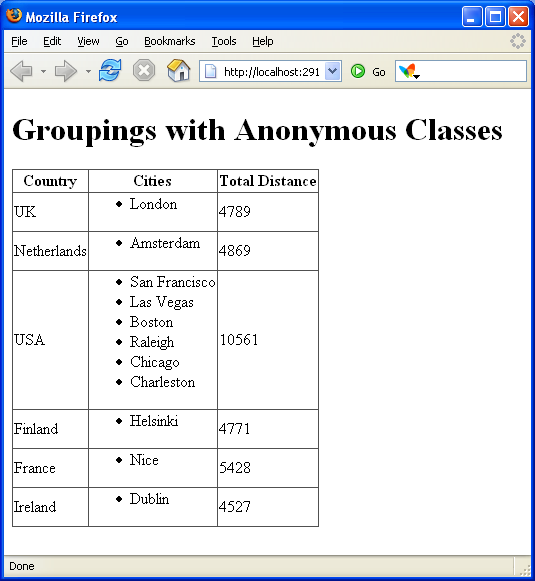
注意,所有上面的绑定语法和层次绑定在现在的ASP.NET 2.0中是完全支持的,所以,你可以在现有的程序中使 用这些技术。新颖(我也认为非常酷)之处,是匿名类型和LINQ提供的数据构形功能,这个功能使得在ASP.NET 控件里绑定分层数据非常容易。
下一步
上面所有的例子操作的都是本地内存中的集合数据。他们展示了你如何在.NET对象模型中使用LINQ,包括那些你 自己创建的类型。
在我将来的有关LINQ的文章中,我将深入讨论LINQ,利用新的DLINQ支持使用上面提到的技术来处理关系数据库 ,和通过新的XLINQ支持来处理XML文件和结构。LINQ项目的好处在于,在所有的应用中,其句法和概念都是一 样的,这样,你一旦学会使用LINQ对一个数组或集合做查询,你也就知道了在处理数据库甚至XML文件时所需 的所有概念。
例如,假如你使用DLINQ生成了Northwinds数据库中供应商(Suppliers)和产品( Products)表相对应的.NET类型 (注:你不需要编写任何代码就可以实现),那么要获取分层的数据结果,并且将其绑定到GridView上,你只 要写下面这个编码就可以了(注意:我们使用了跟前面的例子一样的数据构形技术,只从数据库中取得两列数 据,并且自动地把每个供应商和其对应的产品组合成一个层次结构的结 果):
using System;
using System.Query;
public partial class Data_Data2 : System.Web.UI.Page
{
protected void Page_Load(object sender, EventArgs e)
{
Northwind db = new Northwind();
GridView1.DataSource = from x in db.Suppliers
& nbsp; where x.Country == "USA"
& nbsp; orderby x.Country
& nbsp; select new {
& nbsp; & nbsp; x.CompanyName,
& nbsp; & nbsp; x.Country,
& nbsp; & nbsp; x.Products
& nbsp; };
GridView1.DataBind();
}
}
不需要额外的SQL语句和代码──这些就是实现高效获取和组装层次数据所需的所有代码(注意:只取出了需要的 列和行的数据-DLINQ可以使用LINQ的远程函数支持因而我们没必要持久化或者取出所有数据库表或者一行中 的所有列)。而且这些都是类型安全的,同样具有完全的编译时检查,智能感知和调试支 持。
更棒的是,接入一个新的LINQ提供器(DLINQ和XLINQ是两例)的机制是完全公开的──因此那些已经建立或者使用现 有数据提供程序(例如:O/R数据库映射)的开发人员可以很容易的无缝地把他们的实现和LINQ整合起来。一 旦你了解了LINQ,你就知道了开发LINQ所需的所有的基本知识。
有兴趣的大家还可以去看看 http://blog.csdn.net/net_lover/archive/2008/01/27/2068933.aspx 孟子的文章
这篇关于学习 :ASP.NET中使用LINQ的文章就介绍到这儿,希望我们推荐的文章对编程师们有所帮助!





