本文主要是介绍TextInputLayout源码解析,希望对大家解决编程问题提供一定的参考价值,需要的开发者们随着小编来一起学习吧!
- 文章目录
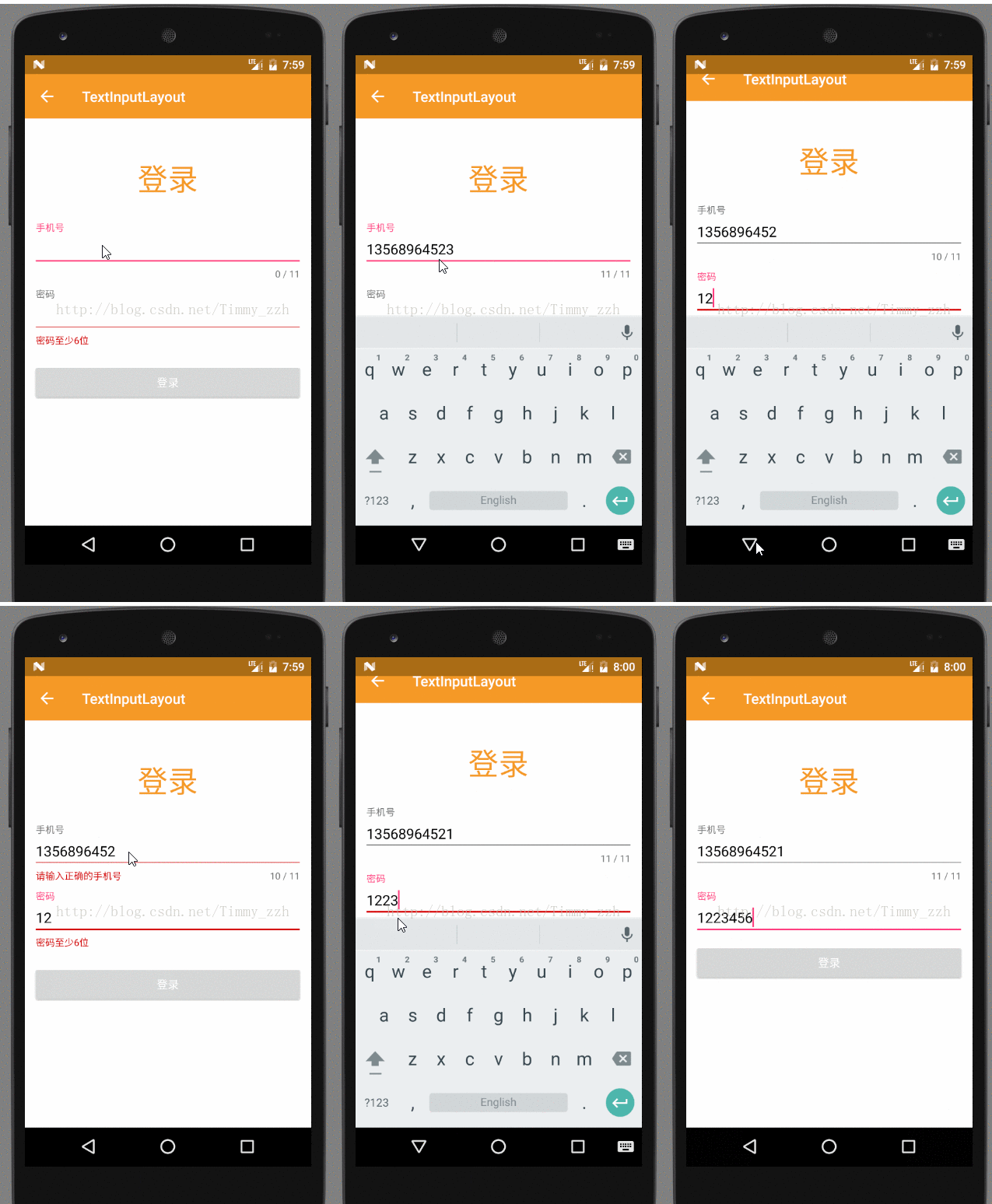
- 效果图
- TextInputLayout的使用
- 源码解析
- TextInputLayout继承自LinearLayout,配合EditText使用,可以实现MD风格效果
- 使用前添加依赖
compile 'com.android.support:appcompat-v7:23.4.0'compile 'com.android.support:design:23.4.0'
- 在xml文件中,EditText作为子空间放到TextInputLayout中
<LinearLayout xmlns:android="http://schemas.android.com/apk/res/android"android:layout_width="match_parent"android:layout_height="match_parent"android:orientation="vertical"><include layout="@layout/common_toolbar" /><TextViewandroid:layout_width="wrap_content"android:layout_height="wrap_content"android:layout_gravity="center_horizontal"android:layout_marginTop="50dp"android:text="登录"android:textColor="@color/colorPrimary"android:textSize="38sp" /><android.support.design.widget.TextInputLayoutandroid:id="@+id/til_username"android:layout_width="match_parent"android:layout_marginLeft="10dp"android:layout_marginRight="10dp"android:layout_height="wrap_content"android:layout_marginTop="30dp"><EditTextandroid:id="@+id/et_username"android:layout_width="match_parent"android:layout_height="wrap_content"android:hint="手机号"android:textColor="@color/Black" /></android.support.design.widget.TextInputLayout><android.support.design.widget.TextInputLayoutandroid:id="@+id/til_password"android:layout_width="match_parent"android:layout_marginLeft="10dp"android:layout_marginRight="10dp"android:layout_height="wrap_content"><EditTextandroid:id="@+id/et_password"android:layout_width="match_parent"android:layout_height="wrap_content"android:hint="密码"android:textColor="@color/Black" /></android.support.design.widget.TextInputLayout><Buttonandroid:id="@+id/btn_login"android:layout_width="match_parent"android:layout_height="wrap_content"android:layout_margin="10dp"android:text="登录"android:textAllCaps="false" /></LinearLayout>
- 当EidtText获得焦点后提示信息往上移动
tilUserName.setHint("手机号");tilPassword.setHint("密码");
- 设置EditText输入文字最大值并监听
tilUserName.setCounterEnabled(true);tilUserName.setCounterMaxLength(11);
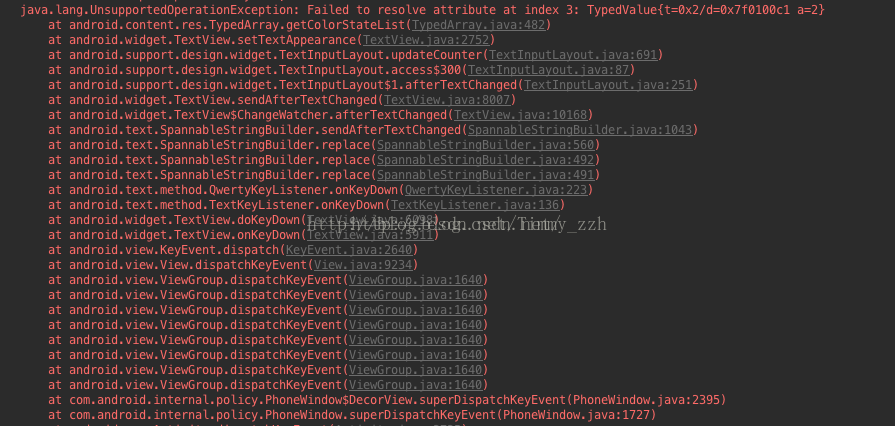
- 解决报错:java.lang.UnsupportedOperationException: Failed to resolve attribute at index
:需要自己在主题中设置
//在Theme主题的style中添加该item<item name="textColorError">@color/design_textinput_error_color_light</item>
- 当输入的信息不正确时,给出错误提示(例如手机格式不正确)
tilUserName.setError("手机号最多11位");
//不显示错误信息tilUserName.setErrorEnabled(false);
- Activity代码
public class TextInputLayoutActivity extends BaseActivity {/*** 正则表达式:验证密码*/public static final String REGEX_PASSWORD = "^[a-zA-Z0-9]{6,16}$";/*** 正则表达式:验证手机号*/public static final String REGEX_MOBILE = "^((13[0-9])|(15[^4,\\D])|(18[0,5-9]))\\d{8}$";@Overrideprotected void onCreate(Bundle savedInstanceState) {super.onCreate(savedInstanceState);setContentView(R.layout.activity_text_input_layout);initToolBar();final TextInputLayout tilUserName = (TextInputLayout) findViewById(R.id.til_username);final TextInputLayout tilPassword = (TextInputLayout) findViewById(R.id.til_password);Button btnLogin = (Button) findViewById(R.id.btn_login);btnLogin.setOnClickListener(new View.OnClickListener() {@Overridepublic void onClick(View v) {String phone = tilUserName.getEditText().getText().toString().trim();String password = tilPassword.getEditText().getText().toString().trim();boolean pass = true;tilUserName.setErrorEnabled(false);tilPassword.setErrorEnabled(false);if (!isMobile(phone)) {//输入的不是手机号tilUserName.setError("请输入正确的手机号");pass = false;}if (!isPassword(password)) {tilPassword.setError("密码至少6位");pass = false;}if (!pass) {return;}doLogin();}});//设置提示信息tilUserName.setHint("手机号");tilUserName.setCounterEnabled(true);tilUserName.setCounterMaxLength(11);tilPassword.setHint("密码");tilUserName.getEditText().addTextChangedListener(new TextWatcher() {@Overridepublic void beforeTextChanged(CharSequence s, int start, int count, int after) {}@Overridepublic void onTextChanged(CharSequence s, int start, int before, int count) {if (s.toString().length() > 11) {tilUserName.setError("手机号最多11位");} else {tilUserName.setErrorEnabled(false);}}@Overridepublic void afterTextChanged(Editable s) {}});}private void doLogin() {Toast.makeText(TextInputLayoutActivity.this, "登录验证通过", android.widget.Toast.LENGTH_SHORT).show();}public static boolean isMobile(String mobile) {return Pattern.matches(REGEX_MOBILE, mobile);}public static boolean isPassword(String password) {return Pattern.matches(REGEX_PASSWORD, password);}}
- 源码解析
- 构造函数:该类继承自LinearLayout,orientation为垂直
public class TextInputLayout extends LinearLayout {public TextInputLayout(Context context) {this(context, null);}public TextInputLayout(Context context, AttributeSet attrs) {this(context, attrs, 0);}public TextInputLayout(Context context, AttributeSet attrs, int defStyleAttr) {// Can't call through to super(Context, AttributeSet, int) since it doesn't exist on API 10super(context, attrs);ThemeUtils.checkAppCompatTheme(context);setOrientation(VERTICAL);setWillNotDraw(false);setAddStatesFromChildren(true);mCollapsingTextHelper.setTextSizeInterpolator(AnimationUtils.FAST_OUT_SLOW_IN_INTERPOLATOR);mCollapsingTextHelper.setPositionInterpolator(new AccelerateInterpolator());mCollapsingTextHelper.setCollapsedTextGravity(Gravity.TOP | GravityCompat.START);//获取xml设置的属性信息final TypedArray a = context.obtainStyledAttributes(attrs,R.styleable.TextInputLayout, defStyleAttr, R.style.Widget_Design_TextInputLayout);mHintEnabled = a.getBoolean(R.styleable.TextInputLayout_hintEnabled, true);setHint(a.getText(R.styleable.TextInputLayout_android_hint));mHintAnimationEnabled = a.getBoolean(R.styleable.TextInputLayout_hintAnimationEnabled, true);if (a.hasValue(R.styleable.TextInputLayout_android_textColorHint)) {mDefaultTextColor = mFocusedTextColor =a.getColorStateList(R.styleable.TextInputLayout_android_textColorHint);}final int hintAppearance = a.getResourceId(R.styleable.TextInputLayout_hintTextAppearance, -1);if (hintAppearance != -1) {setHintTextAppearance(a.getResourceId(R.styleable.TextInputLayout_hintTextAppearance, 0));}mErrorTextAppearance = a.getResourceId(R.styleable.TextInputLayout_errorTextAppearance, 0);final boolean errorEnabled = a.getBoolean(R.styleable.TextInputLayout_errorEnabled, false);final boolean counterEnabled = a.getBoolean(R.styleable.TextInputLayout_counterEnabled, false);setCounterMaxLength(a.getInt(R.styleable.TextInputLayout_counterMaxLength, INVALID_MAX_LENGTH));mCounterTextAppearance = a.getResourceId(R.styleable.TextInputLayout_counterTextAppearance, 0);mCounterOverflowTextAppearance = a.getResourceId(R.styleable.TextInputLayout_counterOverflowTextAppearance, 0);a.recycle();setErrorEnabled(errorEnabled);setCounterEnabled(counterEnabled);if (ViewCompat.getImportantForAccessibility(this)== ViewCompat.IMPORTANT_FOR_ACCESSIBILITY_AUTO) {// Make sure we're important for accessibility if we haven't been explicitly notViewCompat.setImportantForAccessibility(this,ViewCompat.IMPORTANT_FOR_ACCESSIBILITY_YES);}ViewCompat.setAccessibilityDelegate(this, new TextInputAccessibilityDelegate());}- }
- 构造函数中主要处理
- 设置错误提示信息setErrorEnabled()
public void setErrorEnabled(boolean enabled) {- //巧妙的写法,判断如果和错误提示状态和之前是一样的,不用处理->学习
if (mErrorEnabled != enabled) {if (mErrorView != null) {ViewCompat.animate(mErrorView).cancel();}if (enabled) {//进入到这个条件中,表示之前之前状态是没有该错误提示空间,需要创建并添加mErrorView = new TextView(getContext());try {mErrorView.setTextAppearance(getContext(), mErrorTextAppearance);//在xml文件中设置错误信息样式} catch (Exception e) {// Probably caused by our theme not extending from Theme.Design*. Instead// we manually set something appropriate//使用系统的样式mErrorView.setTextAppearance(getContext(),android.support.v7.appcompat.R.style.TextAppearance_AppCompat_Caption);mErrorView.setTextColor(ContextCompat.getColor(getContext(), R.color.design_textinput_error_color_light));}mErrorView.setVisibility(INVISIBLE);//先隐藏ViewCompat.setAccessibilityLiveRegion(mErrorView,ViewCompat.ACCESSIBILITY_LIVE_REGION_POLITE);addIndicator(mErrorView, 0);//添加到Indicator中} else {//false的话,需要将该错误信息的背景和对象引用置空,并刷新界面mErrorShown = false;updateEditTextBackground();removeIndicator(mErrorView);mErrorView = null;}mErrorEnabled = enabled;}}
在看下addIndicator()方法private void addIndicator(TextView indicator, int index) {if (mIndicatorArea == null) {//发现,mIndicatorArea也是一个LinearLayout,且方向为横向摆放,EidtText长度信息也是放在该控件中mIndicatorArea = new LinearLayout(getContext());mIndicatorArea.setOrientation(LinearLayout.HORIZONTAL);//将该控件mIndicatorArea添加至TextInputLayout中addView(mIndicatorArea, LinearLayout.LayoutParams.MATCH_PARENT,LinearLayout.LayoutParams.WRAP_CONTENT);// Add a flexible spacer in the middle so that the left/right views stay pinnedfinal Space spacer = new Space(getContext());final LinearLayout.LayoutParams spacerLp = new LinearLayout.LayoutParams(0, 0, 1f);mIndicatorArea.addView(spacer, spacerLp);if (mEditText != null) {adjustIndicatorPadding();}}mIndicatorArea.setVisibility(View.VISIBLE);//添加mIndicatorArea.addView(indicator, index);mIndicatorsAdded++;}
- 设置EditText长度提示信息setCounterEnable(),该方法和setErrorEnabled()方法类似
public void setCounterEnabled(boolean enabled) {if (mCounterEnabled != enabled) {if (enabled) {mCounterView = new TextView(getContext());//新建mCounterView.setMaxLines(1);try {mCounterView.setTextAppearance(getContext(), mCounterTextAppearance);} catch (Exception e) {// Probably caused by our theme not extending from Theme.Design*. Instead// we manually set something appropriatemCounterView.setTextAppearance(getContext(),android.support.v7.appcompat.R.style.TextAppearance_AppCompat_Caption);mCounterView.setTextColor(ContextCompat.getColor(getContext(), R.color.design_textinput_error_color_light));}addIndicator(mCounterView, -1);//添加if (mEditText == null) {updateCounter(0);} else {updateCounter(mEditText.getText().length());}} else {removeIndicator(mCounterView);mCounterView = null;}mCounterEnabled = enabled;}}
- ViewGroup的三个主流方法中处理逻辑
- draw()
@Overridepublic void draw(Canvas canvas) {super.draw(canvas);if (mHintEnabled) {mCollapsingTextHelper.draw(canvas);}}
mHintEnabled默认为true:mHintEnabled = a.getBoolean(R.styleable.TextInputLayout_hintEnabled, true);
- onLayout()
@Overrideprotected void onLayout(boolean changed, int left, int top, int right, int bottom) {super.onLayout(changed, left, top, right, bottom);if (mHintEnabled && mEditText != null) {final int l = mEditText.getLeft() + mEditText.getCompoundPaddingLeft();final int r = mEditText.getRight() - mEditText.getCompoundPaddingRight();mCollapsingTextHelper.setExpandedBounds(l,mEditText.getTop() + mEditText.getCompoundPaddingTop(),r, mEditText.getBottom() - mEditText.getCompoundPaddingBottom());// Set the collapsed bounds to be the the full height (minus padding) to match the// EditText's editable areamCollapsingTextHelper.setCollapsedBounds(l, getPaddingTop(),r, bottom - top - getPaddingBottom());mCollapsingTextHelper.recalculate();}}
- 问题一:TextInputLayout和EditText是如何关联的?
@Overridepublic void addView(View child, int index, ViewGroup.LayoutParams params) {if (child instanceof EditText) {setEditText((EditText) child);super.addView(child, 0, updateEditTextMargin(params));} else {// Carry on adding the View...super.addView(child, index, params);}}
关键方法为addView(child),该方法继承自ViewGroup,会将内部的EditText添加至TextInputLayout中
- 再看setEditText()方法
private void setEditText(EditText editText) {// If we already have an EditText, throw an exceptionif (mEditText != null) {throw new IllegalArgumentException("We already have an EditText, can only have one");}if (!(editText instanceof TextInputEditText)) {Log.i(LOG_TAG, "EditText added is not a TextInputEditText. Please switch to using that"+ " class instead.");}mEditText = editText;// Use the EditText's typeface, and it's text size for our expanded textmCollapsingTextHelper.setTypefaces(mEditText.getTypeface());mCollapsingTextHelper.setExpandedTextSize(mEditText.getTextSize());final int editTextGravity = mEditText.getGravity();mCollapsingTextHelper.setCollapsedTextGravity(Gravity.TOP | (editTextGravity & GravityCompat.RELATIVE_HORIZONTAL_GRAVITY_MASK));mCollapsingTextHelper.setExpandedTextGravity(editTextGravity);// Add a TextWatcher so that we know when the text input has changedmEditText.addTextChangedListener(new TextWatcher() {@Overridepublic void afterTextChanged(Editable s) {updateLabelState(true);if (mCounterEnabled) {updateCounter(s.length());}}@Overridepublic void beforeTextChanged(CharSequence s, int start, int count, int after) {}@Overridepublic void onTextChanged(CharSequence s, int start, int before, int count) {}});// Use the EditText's hint colors if we don't have one setif (mDefaultTextColor == null) {mDefaultTextColor = mEditText.getHintTextColors();}// If we do not have a valid hint, try and retrieve it from the EditText, if enabledif (mHintEnabled && TextUtils.isEmpty(mHint)) {setHint(mEditText.getHint());// Clear the EditText's hint as we will display it ourselvesmEditText.setHint(null);}if (mCounterView != null) {updateCounter(mEditText.getText().length());}if (mIndicatorArea != null) {adjustIndicatorPadding();}// Update the label visibility with no animationupdateLabelState(false);}
- 该方法里主要处理
- 监听EditText输入:在监听回调中,可以获取到EditText输入文本的长度,并且展示
private void updateCounter(int length) {boolean wasCounterOverflowed = mCounterOverflowed;if (mCounterMaxLength == INVALID_MAX_LENGTH) {mCounterView.setText(String.valueOf(length));mCounterOverflowed = false;} else {mCounterOverflowed = length > mCounterMaxLength;if (wasCounterOverflowed != mCounterOverflowed) {mCounterView.setTextAppearance(getContext(), mCounterOverflowed ?mCounterOverflowTextAppearance : mCounterTextAppearance);}mCounterView.setText(getContext().getString(R.string.character_counter_pattern,length, mCounterMaxLength));}if (mEditText != null && wasCounterOverflowed != mCounterOverflowed) {updateLabelState(false);updateEditTextBackground();}}
- EidtText控件中hint隐藏文字在获取到焦点的时候,所做的网上动画效果:调用的方法就是updateLabelState()
private void updateLabelState(boolean animate) {final boolean hasText = mEditText != null && !TextUtils.isEmpty(mEditText.getText());//EditText文本是否为空final boolean isFocused = arrayContains(getDrawableState(), android.R.attr.state_focused);//EditText是否获取到焦点final boolean isErrorShowing = !TextUtils.isEmpty(getError());if (mDefaultTextColor != null) {mCollapsingTextHelper.setExpandedTextColor(mDefaultTextColor.getDefaultColor());}if (mCounterOverflowed && mCounterView != null) {mCollapsingTextHelper.setCollapsedTextColor(mCounterView.getCurrentTextColor());} else if (isFocused && mFocusedTextColor != null) {mCollapsingTextHelper.setCollapsedTextColor(mFocusedTextColor.getDefaultColor());} else if (mDefaultTextColor != null) {mCollapsingTextHelper.setCollapsedTextColor(mDefaultTextColor.getDefaultColor());}if (hasText || isFocused || isErrorShowing) {// We should be showing the label so do so if it isn't alreadycollapseHint(animate);} else {// We should not be showing the label so hide itexpandHint(animate);}}
动画//关闭动画,如果有正在运行的动画,先关闭在开启private void collapseHint(boolean animate) {if (mAnimator != null && mAnimator.isRunning()) {mAnimator.cancel();}if (animate && mHintAnimationEnabled) {animateToExpansionFraction(1f);} else {mCollapsingTextHelper.setExpansionFraction(1f);}}private void expandHint(boolean animate) {if (mAnimator != null && mAnimator.isRunning()) {mAnimator.cancel();}if (animate && mHintAnimationEnabled) {animateToExpansionFraction(0f);} else {mCollapsingTextHelper.setExpansionFraction(0f);}}
private void animateToExpansionFraction(final float target) {if (mCollapsingTextHelper.getExpansionFraction() == target) {return;}if (mAnimator == null) {mAnimator = ViewUtils.createAnimator();mAnimator.setInterpolator(AnimationUtils.LINEAR_INTERPOLATOR);mAnimator.setDuration(ANIMATION_DURATION);//动画监听mAnimator.setUpdateListener(new ValueAnimatorCompat.AnimatorUpdateListener() {@Overridepublic void onAnimationUpdate(ValueAnimatorCompat animator) {mCollapsingTextHelper.setExpansionFraction(animator.getAnimatedFloatValue());//最后交给了CollapsingTextHelp类去处理}});}mAnimator.setFloatValues(mCollapsingTextHelper.getExpansionFraction(), target);mAnimator.start();//开启动画}
- CollapsingTextHelp类就是TextInputLayout的辅助类,主要用于展示EditText提示信息,和动画处理
//作为TextInputLayout的全局变量private final CollapsingTextHelper mCollapsingTextHelper = new CollapsingTextHelper(this);
- 设置提示信息
public void setHint(@Nullable CharSequence hint) {if (mHintEnabled) {setHintInternal(hint);sendAccessibilityEvent(AccessibilityEvent.TYPE_WINDOW_CONTENT_CHANGED);}}
private void setHintInternal(CharSequence hint) {mHint = hint;mCollapsingTextHelper.setText(hint);//交给CollapsingTextHelp处理}
- setError()方法逻辑:内部会调用setErrorEnabled(true);
public void setError(@Nullable final CharSequence error) {mError = error;if (!mErrorEnabled) {if (TextUtils.isEmpty(error)) {// If error isn't enabled, and the error is empty, just returnreturn;}// Else, we'll assume that they want to enable the error functionalitysetErrorEnabled(true);}// Only animate if we've been laid out already and we have a different errorfinal boolean animate = ViewCompat.isLaidOut(this)&& !TextUtils.equals(mErrorView.getText(), error);mErrorShown = !TextUtils.isEmpty(error);// Cancel any on-going animationViewCompat.animate(mErrorView).cancel();if (mErrorShown) {mErrorView.setText(error);mErrorView.setVisibility(VISIBLE);if (animate) {if (ViewCompat.getAlpha(mErrorView) == 1f) {// If it's currently 100% show, we'll animate it from 0ViewCompat.setAlpha(mErrorView, 0f);}//动画执行ViewCompat.animate(mErrorView).alpha(1f).setDuration(ANIMATION_DURATION).setInterpolator(AnimationUtils.LINEAR_OUT_SLOW_IN_INTERPOLATOR).setListener(new ViewPropertyAnimatorListenerAdapter() {@Overridepublic void onAnimationStart(View view) {view.setVisibility(VISIBLE);}}).start();} else {// Set alpha to 1f, just in caseViewCompat.setAlpha(mErrorView, 1f);}} else {if (mErrorView.getVisibility() == VISIBLE) {if (animate) {ViewCompat.animate(mErrorView).alpha(0f).setDuration(ANIMATION_DURATION).setInterpolator(AnimationUtils.FAST_OUT_LINEAR_IN_INTERPOLATOR).setListener(new ViewPropertyAnimatorListenerAdapter() {@Overridepublic void onAnimationEnd(View view) {mErrorView.setText(error);view.setVisibility(INVISIBLE);}}).start();} else {mErrorView.setText(error);mErrorView.setVisibility(INVISIBLE);}}}updateEditTextBackground();updateLabelState(true);}- 16年最后一发
这篇关于TextInputLayout源码解析的文章就介绍到这儿,希望我们推荐的文章对编程师们有所帮助!





