本文主要是介绍第十章 MyBatis,希望对大家解决编程问题提供一定的参考价值,需要的开发者们随着小编来一起学习吧!
一、Mybatis generator 自动生成代码
1.1 创建 Spring Initializr 工程
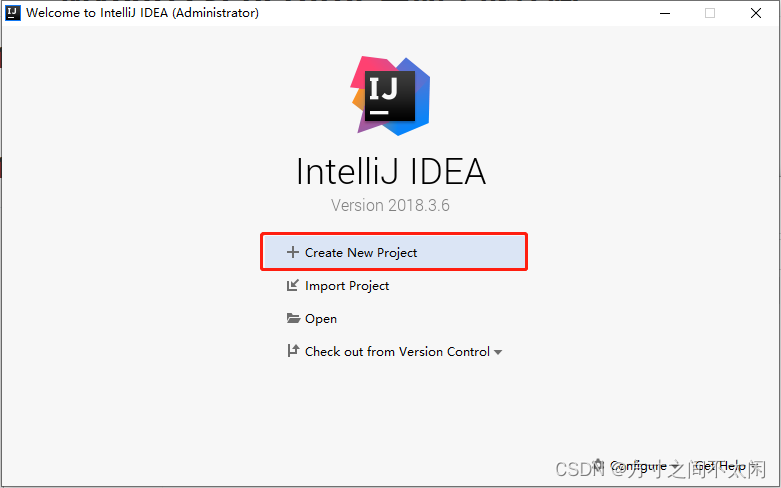
1. 点击【Create New Project】;
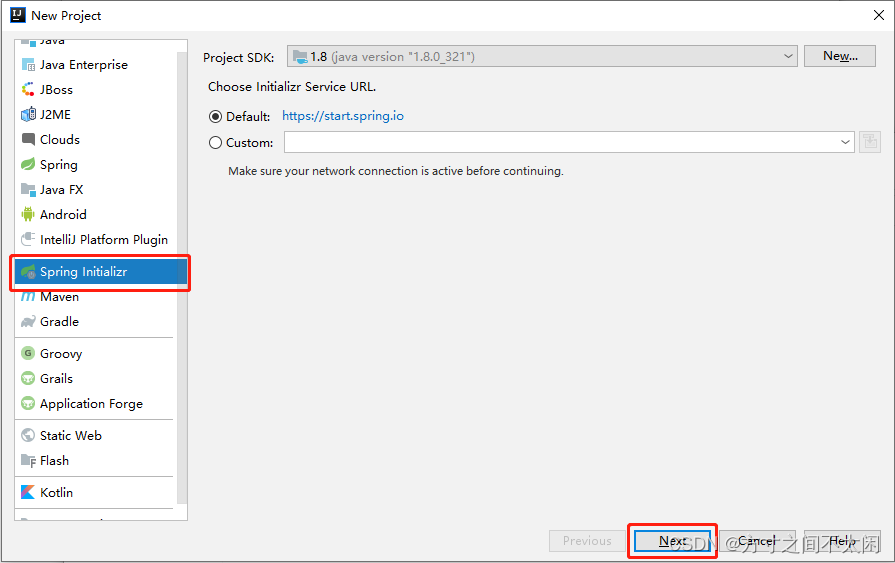
2. 点击[Spring Initializr],然后点击【Next】;
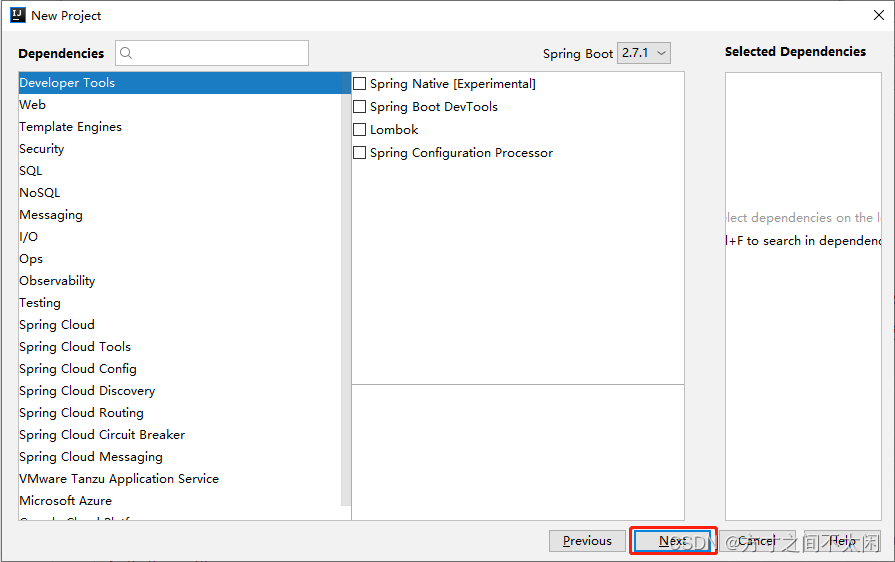
3. 设置【Group】、【Artifact】、【Java Version】和【Package】,然后点击【Next】;

4. 点击【Next】;
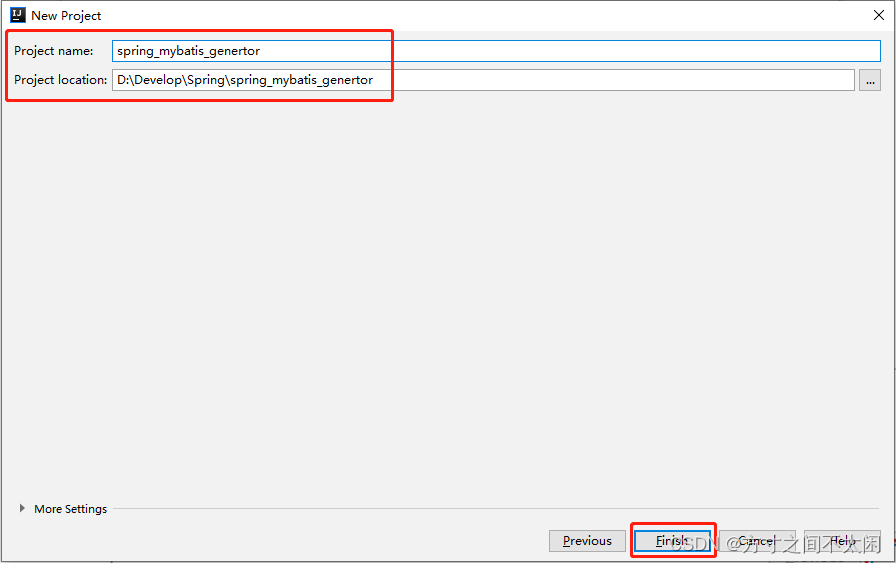
5. 设置好【Project name】和【Project location】,点击【Finish】;
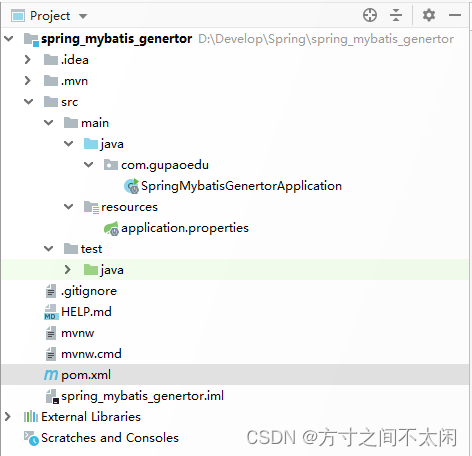
6. 生成的项目结构如下:
1.2 pom 文件引入相关依赖
<?xml version="1.0" encoding="UTF-8"?>
<project xmlns="http://maven.apache.org/POM/4.0.0" xmlns:xsi="http://www.w3.org/2001/XMLSchema-instance"xsi:schemaLocation="http://maven.apache.org/POM/4.0.0 https://maven.apache.org/xsd/maven-4.0.0.xsd"><modelVersion>4.0.0</modelVersion><parent><groupId>org.springframework.boot</groupId><artifactId>spring-boot-starter-parent</artifactId><version>2.7.1</version><relativePath/> <!-- lookup parent from repository --></parent><groupId>com.gupaoedu</groupId><artifactId>spring_mybatis_generator</artifactId><version>0.0.1-SNAPSHOT</version><name>spring_mybatis_generator</name><description>Demo project for Spring Boot</description><properties><java.version>1.8</java.version></properties><dependencies><dependency><groupId>org.springframework.boot</groupId><artifactId>spring-boot-starter-web</artifactId></dependency><dependency><groupId>org.mybatis.spring.boot</groupId><artifactId>mybatis-spring-boot-starter</artifactId><version>2.1.4</version></dependency><dependency><groupId>mysql</groupId><artifactId>mysql-connector-java</artifactId><scope>runtime</scope></dependency><dependency><groupId>org.springframework.boot</groupId><artifactId>spring-boot-starter-test</artifactId><scope>test</scope></dependency><dependency><groupId>org.springframework.boot</groupId><artifactId>spring-boot-devtools</artifactId></dependency><dependency><groupId>org.mybatis.generator</groupId><artifactId>mybatis-generator-core</artifactId><version>1.3.2</version></dependency></dependencies><build><plugins><plugin><groupId>org.springframework.boot</groupId><artifactId>spring-boot-maven-plugin</artifactId></plugin><plugin><groupId>org.mybatis.generator</groupId><artifactId>mybatis-generator-maven-plugin</artifactId><version>1.3.5</version><configuration><overwrite>false</overwrite><configurationFile>src/main/resources/generatorConfig.xml</configurationFile></configuration><dependencies><dependency><groupId>mysql</groupId><artifactId>mysql-connector-java</artifactId><version>5.1.47</version></dependency></dependencies></plugin></plugins><resources><resource><directory>src/main/java</directory><includes><include>**/*.properties</include><include>**/*.xml</include></includes></resource></resources></build></project>
1.3 配置 generatorConfig.xml 文件
<?xml version="1.0" encoding="UTF-8"?>
<!DOCTYPE generatorConfigurationPUBLIC "-//mybatis.org//DTD MyBatis Generator Configuration 1.0//EN""http://mybatis.org/dtd/mybatis-generator-config_1_0.dtd">
<generatorConfiguration><!-- context 是逆向工程的主要配置信息 --><!-- id:起个名字 --><!-- targetRuntime:设置生成的文件适用于那个 mybatis 版本 --><context id="default" targetRuntime="MyBatis3"><!--optional,指在创建class时,对注释进行控制--><commentGenerator><property name="suppressDate" value="true"/><!-- 是否去除自动生成的注释 true:是 : false:否 --><property name="suppressAllComments" value="true"/></commentGenerator><!--jdbc的数据库连接 wg_insert 为数据库名字--><jdbcConnection driverClass="com.mysql.jdbc.Driver"connectionURL="jdbc:mysql://localhost:3306/test?serverTimezone=Asia/Shanghai"userId="root"password="123456"></jdbcConnection><!--非必须,类型处理器,在数据库类型和java类型之间的转换控制--><javaTypeResolver><!-- 默认情况下数据库中的 decimal,bigInt 在 Java 对应是 sql 下的 BigDecimal 类 --><!-- 不是 double 和 long 类型 --><!-- 使用常用的基本类型代替 sql 包下的引用类型 --><property name="forceBigDecimals" value="false"/></javaTypeResolver><!-- targetPackage:生成的实体类所在的包 --><!-- targetProject:生成的实体类所在的硬盘位置 --><javaModelGenerator targetPackage="com.gupaoedu.entity"targetProject="src/main/java"><!-- 是否允许子包 --><property name="enableSubPackages" value="false"/><!-- 是否对modal添加构造函数 --><property name="constructorBased" value="true"/><!-- 是否清理从数据库中查询出的字符串左右两边的空白字符 --><property name="trimStrings" value="true"/><!-- 建立modal对象是否不可改变 即生成的modal对象不会有setter方法,只有构造方法 --><property name="immutable" value="false"/></javaModelGenerator><!-- targetPackage 和 targetProject:生成的 mapper 文件的包和位置 --><sqlMapGenerator targetPackage="com.gupaoedu.mapper"targetProject="src/main/java"><!-- 针对数据库的一个配置,是否把 schema 作为字包名 --><property name="enableSubPackages" value="false"/></sqlMapGenerator><!-- targetPackage 和 targetProject:生成的 interface 文件的包和位置 --><javaClientGenerator type="XMLMAPPER"targetPackage="com.gupaoedu.mapper" targetProject="src/main/java"><!-- 针对 oracle 数据库的一个配置,是否把 schema 作为字包名 --><property name="enableSubPackages" value="false"/></javaClientGenerator><!-- tableName是数据库中的表名,domainObjectName是生成的JAVA模型名,后面的参数不用改,要生成更多的表就在下面继续加table标签 --><table tableName="user_info" domainObjectName="UserInfo"enableCountByExample="false" enableUpdateByExample="false"enableDeleteByExample="false" enableSelectByExample="false"selectByExampleQueryId="false"></table></context>
</generatorConfiguration>
1.4 配置 application.properties 文件
spring.datasource.url = jdbc:mysql://localhost:3306/test?useUnicode=true&characterEncoding=utf-8&serverTimezone=UTC&useSSL=true
spring.datasource.username=root
spring.datasource.password=123456
spring.datasource.driver-class-name=com.mysql.jdbc.Driver
1.5 新建【IUserInfoService】接口
package com.gupaoedu.service;import com.gupaoedu.entity.UserInfo;
import java.util.List;public interface IUserInfoService {UserInfo selectByPrimaryKey(Integer id);List<UserInfo> selectAll();}
1.6 新建【UserInfoServiceImpl】
package com.gupaoedu.service.impl;import com.gupaoedu.entity.UserInfo;
import com.gupaoedu.mapper.UserInfoMapper;
import com.gupaoedu.service.IUserInfoService;
import org.springframework.beans.factory.annotation.Autowired;
import org.springframework.stereotype.Component;
import org.springframework.stereotype.Service;
import java.util.List;@Component // 不加此注解 UserInfoController @Autowired注解下 userInfoService会标红
@Service
public class UserInfoServiceImpl implements IUserInfoService {@Autowiredprivate UserInfoMapper userInfoMapper;@Overridepublic UserInfo selectByPrimaryKey(Integer id) {return userInfoMapper.selectByPrimaryKey(id);}@Overridepublic List<UserInfo> selectAll() {return userInfoMapper.selectAll();}
}
1.7 新建【UserInfoController】
package com.gupaoedu.controller;import com.gupaoedu.entity.UserInfo;
import com.gupaoedu.service.IUserInfoService;
import org.springframework.beans.factory.annotation.Autowired;
import org.springframework.web.bind.annotation.GetMapping;
import org.springframework.web.bind.annotation.PathVariable;
import org.springframework.web.bind.annotation.RestController;import java.util.List;@RestController
public class UserInfoController {@Autowiredprivate IUserInfoService userInfoService;@GetMapping("/get={id}")UserInfo select(@PathVariable Integer id) {return userInfoService.selectByPrimaryKey(id);}@GetMapping("/getAll")List<UserInfo> selectAll() {return userInfoService.selectAll();}
}
1.8 修改【UserInfoMapper.java】
package com.gupaoedu.mapper;import com.gupaoedu.entity.UserInfo;
import org.apache.ibatis.annotations.Mapper;
import org.springframework.stereotype.Component;
import java.util.List;@Component //可以不加
@Mapper
public interface UserInfoMapper {int deleteByPrimaryKey(Integer id);int insert(UserInfo record);int insertSelective(UserInfo record);UserInfo selectByPrimaryKey(Integer id);int updateByPrimaryKeySelective(UserInfo record);int updateByPrimaryKey(UserInfo record);List<UserInfo> selectAll();
}
1.9 修改【UserInfoMapper.xml】
<?xml version="1.0" encoding="UTF-8"?>
<!DOCTYPE mapper PUBLIC "-//mybatis.org//DTD Mapper 3.0//EN" "http://mybatis.org/dtd/mybatis-3-mapper.dtd">
<mapper namespace="com.gupaoedu.mapper.UserInfoMapper"><resultMap id="BaseResultMap" type="com.gupaoedu.entity.UserInfo"><constructor><idArg column="id" javaType="java.lang.Integer" jdbcType="INTEGER" /><arg column="username" javaType="java.lang.String" jdbcType="VARCHAR" /><arg column="password" javaType="java.lang.String" jdbcType="VARCHAR" /></constructor></resultMap><sql id="Base_Column_List">id, username, password</sql><select id="selectAll" resultMap="BaseResultMap">select<include refid="Base_Column_List" />from user_info</select><select id="selectByPrimaryKey" parameterType="java.lang.Integer" resultMap="BaseResultMap">select<include refid="Base_Column_List" />from user_infowhere id = #{id,jdbcType=INTEGER}</select><delete id="deleteByPrimaryKey" parameterType="java.lang.Integer">delete from user_infowhere id = #{id,jdbcType=INTEGER}</delete><insert id="insert" parameterType="com.gupaoedu.entity.UserInfo">insert into user_info (id, username, password)values (#{id,jdbcType=INTEGER}, #{username,jdbcType=VARCHAR}, #{password,jdbcType=VARCHAR})</insert><insert id="insertSelective" parameterType="com.gupaoedu.entity.UserInfo">insert into user_info<trim prefix="(" suffix=")" suffixOverrides=","><if test="id != null">id,</if><if test="username != null">username,</if><if test="password != null">password,</if></trim><trim prefix="values (" suffix=")" suffixOverrides=","><if test="id != null">#{id,jdbcType=INTEGER},</if><if test="username != null">#{username,jdbcType=VARCHAR},</if><if test="password != null">#{password,jdbcType=VARCHAR},</if></trim></insert><update id="updateByPrimaryKeySelective" parameterType="com.gupaoedu.entity.UserInfo">update user_info<set><if test="username != null">username = #{username,jdbcType=VARCHAR},</if><if test="password != null">password = #{password,jdbcType=VARCHAR},</if></set>where id = #{id,jdbcType=INTEGER}</update><update id="updateByPrimaryKey" parameterType="com.gupaoedu.entity.UserInfo">update user_infoset username = #{username,jdbcType=VARCHAR},password = #{password,jdbcType=VARCHAR}where id = #{id,jdbcType=INTEGER}</update>
</mapper>
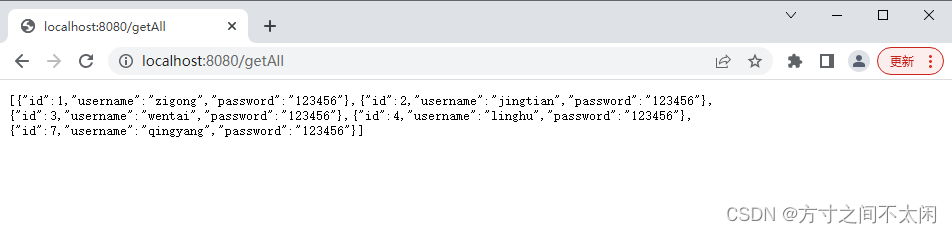
1.10 执行结果

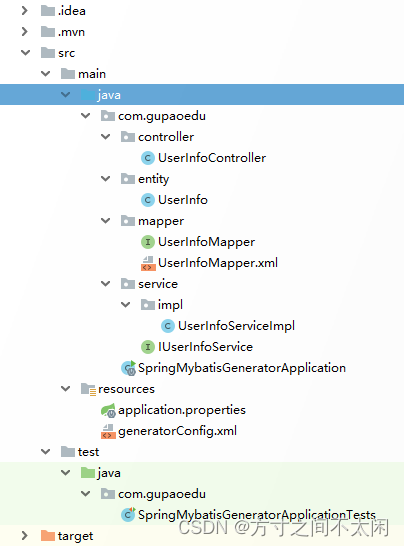
1.11 最终项目结构如下:
这篇关于第十章 MyBatis的文章就介绍到这儿,希望我们推荐的文章对编程师们有所帮助!




