本文主要是介绍华为mpls vpn方案A配制案例,希望对大家解决编程问题提供一定的参考价值,需要的开发者们随着小编来一起学习吧!
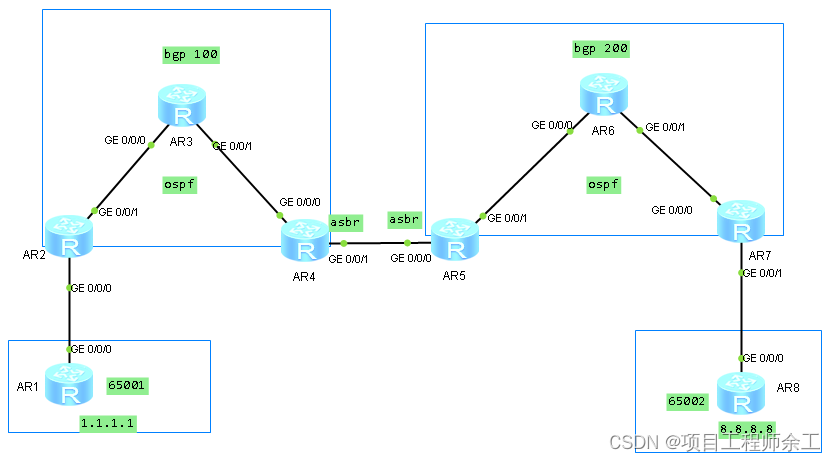
每台路由的loopback 0口和设备名对应,如ar1:1.1.1.1
AR3和AR6上面不起bgp,只跑ospf和mpls
最终实现1.1.1.1通8.8.8.8
方案A的特点是asbr之间交互的是普通的ip报文 ,互相双方都认为自己对端是ce设备。
如果有多个vpn业务的话,asbr之间要用子接口了,要么多个物理接口,所以方案A只适用于少的vpn业务方案
配置命令:
R1和R8省略,它们是常规的bgp配置
R2:
router id 2.2.2.2
wlan ac-global carrier id other ac id 0
set cpu-usage threshold 80 restore 75
ip vpn-instance vpn
ipv4-family
route-distinguisher 100:1
vpn-target 100:1 export-extcommunity
vpn-target 100:1 import-extcommunity
mpls lsr-id 2.2.2.2
mpls
mpls ldp
aaa
authentication-scheme default
authorization-scheme default
accounting-scheme default
domain default
domain default_admin
local-user admin password cipher % % K8m.Nt84DZ}e#<0`8bmE3Uw}% %
local-user admin service-type http
firewall zone Local
priority 15
interface GigabitEthernet0/0/0
ip binding vpn-instance vpn
ip address 10.0.12.2 255.255.255.0
interface GigabitEthernet0/0/1
ip address 10.0.23.2 255.255.255.0
mpls
mpls ldp
interface GigabitEthernet0/0/2
interface NULL0
interface LoopBack0
ip address 2.2.2.2 255.255.255.255
ospf enable 1 area 0.0.0.0
bgp 100
peer 4.4.4.4 as-number 100
peer 4.4.4.4 connect-interface LoopBack0
ipv4-family unicast
undo synchronization
peer 4.4.4.4 enable
ipv4-family vpnv4
policy vpn-target
peer 4.4.4.4 enable
ipv4-family vpn-instance vpn
network 2.2.2.2 255.255.255.255
peer 10.0.12.1 as-number 65001
ospf 1
area 0.0.0.0
network 10.0.23.2 0.0.0.0
user-interface con 0
authentication-mode password
user-interface vty 0 4
user-interface vty 16 20
R3:
router id 3.3.3.3
wlan ac-global carrier id other ac id 0
set cpu-usage threshold 80 restore 75
mpls lsr-id 3.3.3.3
mpls
mpls ldp
aaa
authentication-scheme default
authorization-scheme default
accounting-scheme default
domain default
domain default_admin
local-user admin password cipher % % K8m.Nt84DZ}e#<0`8bmE3Uw}% %
local-user admin service-type http
firewall zone Local
priority 15
interface GigabitEthernet0/0/0
ip address 10.0.23.3 255.255.255.0
mpls
mpls ldp
interface GigabitEthernet0/0/1
ip address 10.0.34.3 255.255.255.0
mpls
mpls ldp
interface GigabitEthernet0/0/2
interface NULL0
interface LoopBack0
ip address 3.3.3.3 255.255.255.255
ospf enable 1 area 0.0.0.0
ospf 1
area 0.0.0.0
network 10.0.23.3 0.0.0.0
network 10.0.34.3 0.0.0.0
R4
router id 4.4.4.4
wlan ac-global carrier id other ac id 0
set cpu-usage threshold 80 restore 75
ip vpn-instance vpn
ipv4-family
route-distinguisher 100:1
vpn-target 100:1 export-extcommunity
vpn-target 100:1 import-extcommunity
mpls lsr-id 4.4.4.4
mpls
mpls ldp
aaa
authentication-scheme default
authorization-scheme default
accounting-scheme default
domain default
domain default_admin
local-user admin password cipher % % K8m.Nt84DZ}e#<0`8bmE3Uw}% %
local-user admin service-type http
firewall zone Local
priority 15
interface GigabitEthernet0/0/0
ip address 10.0.34.4 255.255.255.0
mpls
mpls ldp
interface GigabitEthernet0/0/1
ip binding vpn-instance vpn
ip address 10.0.45.4 255.255.255.0
interface GigabitEthernet0/0/2
interface NULL0
interface LoopBack0
ip address 4.4.4.4 255.255.255.255
ospf enable 1 area 0.0.0.0
bgp 100
peer 2.2.2.2 as-number 100
peer 2.2.2.2 connect-interface LoopBack0
ipv4-family unicast
undo synchronization
peer 2.2.2.2 enable
ipv4-family vpnv4
policy vpn-target
peer 2.2.2.2 enable
ipv4-family vpn-instance vpn
peer 10.0.45.5 as-number 200
ospf 1
area 0.0.0.0
network 10.0.34.4 0.0.0.0
R5
router id 5.5.5.5
wlan ac-global carrier id other ac id 0
set cpu-usage threshold 80 restore 75
ip vpn-instance vpn
ipv4-family
route-distinguisher 100:1
vpn-target 100:1 export-extcommunity
vpn-target 100:1 import-extcommunity
mpls lsr-id 5.5.5.5
mpls
mpls ldp
aaa
authentication-scheme default
authorization-scheme default
accounting-scheme default
domain default
domain default_admin
local-user admin password cipher % % K8m.Nt84DZ}e#<0`8bmE3Uw}% %
local-user admin service-type http
firewall zone Local
priority 15
interface GigabitEthernet0/0/0
ip binding vpn-instance vpn
ip address 10.0.45.5 255.255.255.0
interface GigabitEthernet0/0/1
ip address 10.0.56.5 255.255.255.0
mpls
mpls ldp
interface GigabitEthernet0/0/2
interface NULL0
interface LoopBack0
ip address 5.5.5.5 255.255.255.255
ospf enable 1 area 0.0.0.0
bgp 200
peer 7.7.7.7 as-number 200
peer 7.7.7.7 connect-interface LoopBack0
ipv4-family unicast
undo synchronization
peer 7.7.7.7 enable
ipv4-family vpnv4
policy vpn-target
peer 7.7.7.7 enable
ipv4-family vpn-instance vpn
peer 10.0.45.4 as-number 100
ospf 1
area 0.0.0.0
network 10.0.56.5 0.0.0.0
R6
router id 6.6.6.6
wlan ac-global carrier id other ac id 0
set cpu-usage threshold 80 restore 75
mpls lsr-id 6.6.6.6
mpls
mpls ldp
aaa
authentication-scheme default
authorization-scheme default
accounting-scheme default
domain default
domain default_admin
local-user admin password cipher % % K8m.Nt84DZ}e#<0`8bmE3Uw}% %
local-user admin service-type http
firewall zone Local
priority 15
interface GigabitEthernet0/0/0
ip address 10.0.56.6 255.255.255.0
mpls
mpls ldp
interface GigabitEthernet0/0/1
ip address 10.0.67.6 255.255.255.0
mpls
mpls ldp
interface GigabitEthernet0/0/2
interface NULL0
interface LoopBack0
ip address 6.6.6.6 255.255.255.255
ospf enable 1 area 0.0.0.0
ospf 1
area 0.0.0.0
network 10.0.56.6 0.0.0.0
network 10.0.67.6 0.0.0.0
R7
router id 7.7.7.7
wlan ac-global carrier id other ac id 0
set cpu-usage threshold 80 restore 75
ip vpn-instance vpn
ipv4-family
route-distinguisher 100:1
vpn-target 100:1 export-extcommunity
vpn-target 100:1 import-extcommunity
mpls lsr-id 7.7.7.7
mpls
mpls ldp
aaa
authentication-scheme default
authorization-scheme default
accounting-scheme default
domain default
domain default_admin
local-user admin password cipher % % K8m.Nt84DZ}e#<0`8bmE3Uw}% %
local-user admin service-type http
firewall zone Local
priority 15
interface GigabitEthernet0/0/0
ip address 10.0.67.7 255.255.255.0
mpls
mpls ldp
interface GigabitEthernet0/0/1
ip binding vpn-instance vpn
ip address 10.0.78.7 255.255.255.0
interface GigabitEthernet0/0/2
interface NULL0
interface LoopBack0
ip address 7.7.7.7 255.255.255.255
ospf enable 1 area 0.0.0.0
bgp 200
peer 5.5.5.5 as-number 200
peer 5.5.5.5 connect-interface LoopBack0
ipv4-family unicast
undo synchronization
peer 5.5.5.5 enable
ipv4-family vpnv4
policy vpn-target
peer 5.5.5.5 enable
ipv4-family vpn-instance vpn
peer 10.0.78.8 as-number 65002
ospf 1
area 0.0.0.0
network 10.0.67.7 0.0.0.0
这篇关于华为mpls vpn方案A配制案例的文章就介绍到这儿,希望我们推荐的文章对编程师们有所帮助!





