本文主要是介绍解决百度地图在模拟器上运行报 java.lang.IllegalArgumentException: No config chosen问题,希望对大家解决编程问题提供一定的参考价值,需要的开发者们随着小编来一起学习吧!
解决百度地图在模拟器上运行报 java.lang.IllegalArgumentException: No config chosen 问题
1. 问题复现
在近期公司使用模拟器(网易MuMu)进行项目演示时,在进入存在百度地图(Android版本 7.4.2版本)之后,页面出现奔溃,后台日志为:
Back traces starts.
java.lang.IllegalArgumentException: No config chosen
com.baidu.platform.comapi.map.h$a.chooseConfig(GLTextureView.java:655)
com.baidu.platform.comapi.map.h$e.a(GLTextureView.java:789)
com.baidu.platform.comapi.map.h$f.l(GLTextureView.java:1164)
com.baidu.platform.comapi.map.h$f.run(GLTextureView.java:1002)
2. 查找源码,定位问题
经过问题的复盘,找到了是位于源码位置报错的:
com.baidu.platform.comapi.map.h$a.chooseConfig(GLTextureView.java:655)
具体代码位置如下:
com.baidu.platform.comapi.map.h
类下面的一个抽象类 a ,实现了EGLConfigChooser 接口,在实现chooseConfig接口时报错:
private abstract class a implements EGLConfigChooser {protected int[] a;public a(int[] configSpec) {this.a = this.a(configSpec);}public EGLConfig chooseConfig(EGL10 egl, EGLDisplay display) { // 代码省略... EGLConfig config = this.a(egl, display, configs);if (config == null) {throw new IllegalArgumentException("No config chosen");} else {return config;}}abstract EGLConfig a(EGL10 var1, EGLDisplay var2, EGLConfig[] var3);}
我们可以看到 EGLConfig这个类是由a方法返回的,我们可以看到,当config==null 时,会直接报出异常IllegalArgumentException,那么我们可以查看一下这个抽象类a是由谁来集成的?
通过搜索源码,它的继承方式是这样的:
package com.baidu.platform.comapi.map;public class h extends TextureView {private abstract class a implements EGLConfigChooser {}private class b extends com.baidu.platform.comapi.map.h.a {private int[] j = new int[1];protected int c;protected int d;protected int e;protected int f;protected int g;protected int h;public b(int redSize, int greenSize, int blueSize, int alphaSize, int depthSize, int stencilSize) {super(new int[]{12324, redSize, 12323, greenSize, 12322, blueSize, 12321, alphaSize, 12325, depthSize, 12326, stencilSize, 12344});this.c = redSize;this.d = greenSize;this.e = blueSize;this.f = alphaSize;this.g = depthSize;this.h = stencilSize;}public EGLConfig a(EGL10 egl, EGLDisplay display, EGLConfig[] configs) {EGLConfig[] var4 = configs;int var5 = configs.length;for(int var6 = 0; var6 < var5; ++var6) {EGLConfig config = var4[var6];int d = this.a(egl, display, config, 12325, 0);int s = this.a(egl, display, config, 12326, 0);if (d >= this.g && s >= this.h) {int r = this.a(egl, display, config, 12324, 0);int g = this.a(egl, display, config, 12323, 0);int b = this.a(egl, display, config, 12322, 0);int a = this.a(egl, display, config, 12321, 0);if (r == this.c && g == this.d && b == this.e && a == this.f) {return config;}}}return null;}private int a(EGL10 egl, EGLDisplay display, EGLConfig config, int attribute, int defaultValue) {return egl.eglGetConfigAttrib(display, config, attribute, this.j) ? this.j[0] : defaultValue;}}private class i extends com.baidu.platform.comapi.map.h.b {public i(boolean withDepthBuffer) {super(8, 8, 8, 0, withDepthBuffer ? 16 : 0, 0);}}}
综上所属,h下面的a,b和i的关系为:

我们可以看到 h.c中其实没有a方法实现的,那么a方法的实现就是在h.b中了,我们可以来简单看一下h.b方法的实现:
public EGLConfig a(EGL10 egl, EGLDisplay display, EGLConfig[] configs) {EGLConfig[] var4 = configs;int var5 = configs.length;for(int var6 = 0; var6 < var5; ++var6) {EGLConfig config = var4[var6];int d = this.a(egl, display, config, 12325, 0);int s = this.a(egl, display, config, 12326, 0);if (d >= this.g && s >= this.h) {int r = this.a(egl, display, config, 12324, 0);int g = this.a(egl, display, config, 12323, 0);int b = this.a(egl, display, config, 12322, 0);int a = this.a(egl, display, config, 12321, 0);if (r == this.c && g == this.d && b == this.e && a == this.f) {return config;}}}return null;}private int a(EGL10 egl, EGLDisplay display, EGLConfig config, int attribute, int defaultValue) {return egl.eglGetConfigAttrib(display, config, attribute, this.j) ? this.j[0] : defaultValue;}
这里我们可以看到,当执行r == this.c && g == this.d && b == this.e && a == this.f为真时,才能返回对应的config对象,如果都不匹配,那么将会导致返回null·,今儿导致程序奔溃。问题找到了,我们应该怎么去改它呢?
3. 通过源码去修复它
我也不拐弯抹角了,经过对源码的分析,列举一下自己对这个问题修复的看法。首先,我们知道了问题所在的地方,那么我们是否在方法类b中的a方法永远不返回null,那样就不会导致出现No config chosen异常,虽然这种方法会导致所选择的EGLConfig和所需要的config不匹配,导致页面存在拉伸或者压缩的问题,但是这相比于奔溃,应该会好很多。那么就按照这个说的干吧。
首先,要修改返回值,使用它原有的逻辑肯定是不行的,但是我们返现这个 h.a抽象类实现的是 EGLConfigChooser,它是来自android.opengl.GLSurfaceView下的一个接口,比较熟悉openGL的人应该比较熟悉它:
public interface EGLConfigChooser {/*** Choose a configuration from the list. Implementors typically* implement this method by calling* {@link EGL10#eglChooseConfig} and iterating through the results. Please consult the* EGL specification available from The Khronos Group to learn how to call eglChooseConfig.* @param egl the EGL10 for the current display.* @param display the current display.* @return the chosen configuration.*/EGLConfig chooseConfig(EGL10 egl, EGLDisplay display);}
那我能不能自定义一下我们的h.a、h.b和h.i类呢,把源码拷一遍,然后把a方法返回值修改一下即可,好,那么说干就干:
h.a类如下:
public abstract class ParentEGLConfigChooser implements GLSurfaceView.EGLConfigChooser {protected int[] a;public ParentEGLConfigChooser(int[] configSpec) {this.a = this.a(configSpec);}public EGLConfig chooseConfig(EGL10 egl, EGLDisplay display) {int[] num_config = new int[1];if (!egl.eglChooseConfig(display, this.a, (EGLConfig[])null, 0, num_config)) {throw new IllegalArgumentException("eglChooseConfig failed");} else {int numConfigs = num_config[0];if (numConfigs <= 0) {throw new IllegalArgumentException("No configs match configSpec");} else {EGLConfig[] configs = new EGLConfig[numConfigs];if (!egl.eglChooseConfig(display, this.a, configs, numConfigs, num_config)) {throw new IllegalArgumentException("eglChooseConfig#2 failed");} else {EGLConfig config = this.a(egl, display, configs);if (config == null) {throw new IllegalArgumentException("No config chosen");} else {return config;}}}}}abstract EGLConfig a(EGL10 var1, EGLDisplay var2, EGLConfig[] var3);private int[] a(int[] configSpec) {int len = configSpec.length;int[] newConfigSpec = new int[len + 2];System.arraycopy(configSpec, 0, newConfigSpec, 0, len - 1);newConfigSpec[len - 1] = 12352;newConfigSpec[len] = 4;newConfigSpec[len + 1] = 12344;return newConfigSpec;}}
对于h.b类,我们可以实现如下:
public class SubEGLConfigChooser extends ParentEGLConfigChooser {private final int[] j = new int[1];protected int c;protected int d;protected int e;protected int f;protected int g;protected int h;public SubEGLConfigChooser(int redSize, int greenSize, int blueSize, int alphaSize, int depthSize, int stencilSize) {super(new int[]{12324, redSize, 12323, greenSize, 12322, blueSize, 12321, alphaSize, 12325, depthSize, 12326, stencilSize, 12344});this.c = redSize;this.d = greenSize;this.e = blueSize;this.f = alphaSize;this.g = depthSize;this.h = stencilSize;}public EGLConfig a(EGL10 egl, EGLDisplay display, EGLConfig[] configs) {BaseLog.i("----show the a------>>" + egl + "---->>" + display + "---->>" + Arrays.toString(configs));for (EGLConfig config : configs) {int d = this.a(egl, display, config, 12325);int s = this.a(egl, display, config, 12326);if (d >= this.g && s >= this.h) {int r = this.a(egl, display, config, 12324);int g = this.a(egl, display, config, 12323);int b = this.a(egl, display, config, 12322);int a = this.a(egl, display, config, 12321);if (r == this.c && g == this.d && b == this.e && a == this.f) {return config;}}}//TODO 直接修改这里,返回第一个 configs[0], 暂时还未发现任何异常return configs[0];}private int a(EGL10 egl, EGLDisplay display, EGLConfig config, int attribute) {return egl.eglGetConfigAttrib(display, config, attribute, this.j) ? this.j[0] : 0;}
}
同样,对于h.i类,我们可以自定义类为:
public class TargetEGLConfigChooser extends SubEGLConfigChooser{public TargetEGLConfigChooser() {super(8, 8, 8, 0, 16 , 0);}
}这三个类我们已经写好了,那么如何将我们的TargetEGLConfigChooser 替换成目标h.i方法呢?这个可能要花一些时间,我们来大致了解一下 BaiduMap的基础架构,我们以 TextureMapView为例子:
TextureMapView是继承自ViewGroup, 它有一个私有属性值b,其类型为MapTextureView, 属性b在TextureMapView的初始化方法中被初始化:

在 MapTextureView中,首先它是继承自com.baidu.platform.comapi.map.h的:

同时,我们在h类中找到了h,h是一个EGLConfigChooser类型的接口,
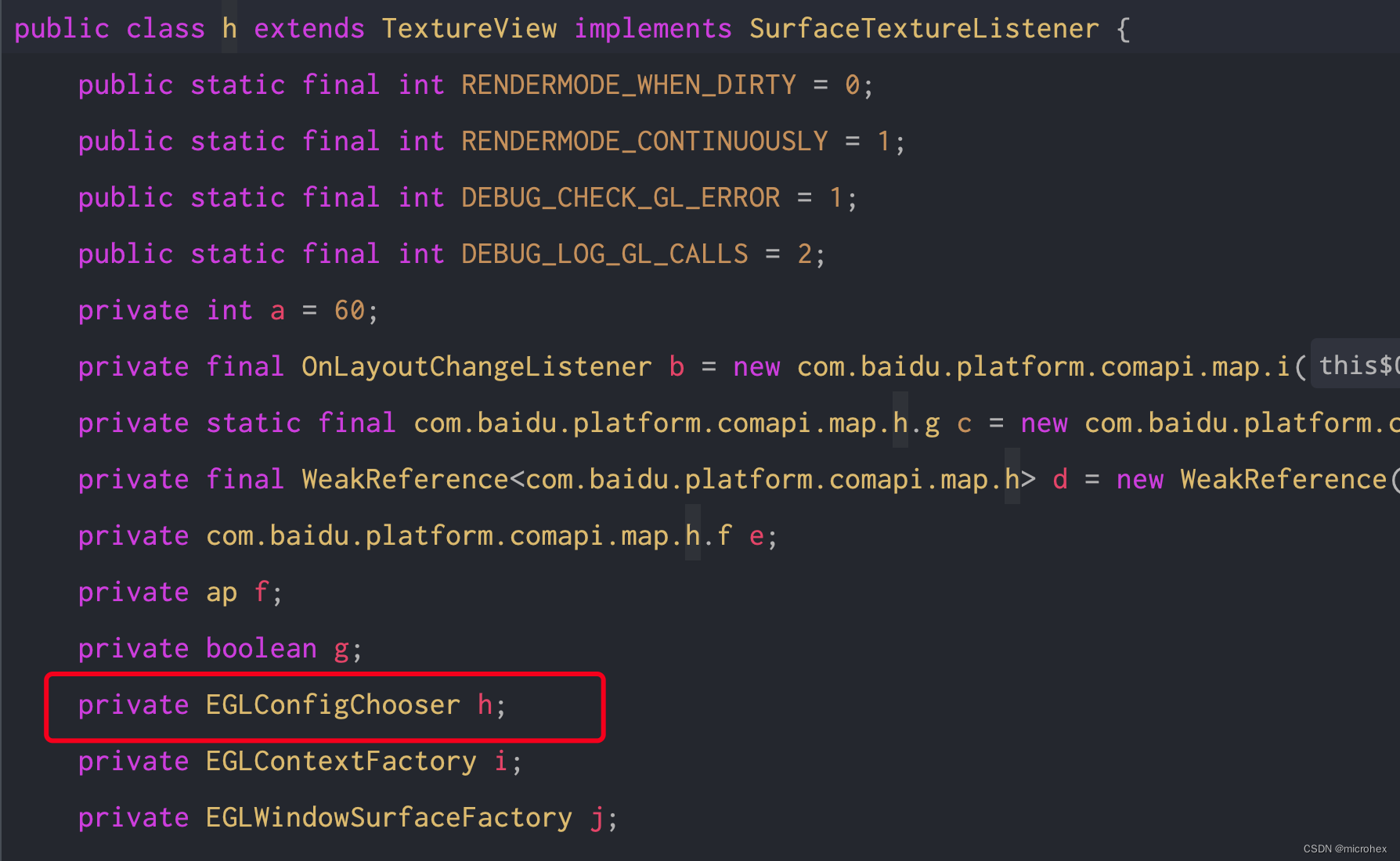
通过程序分析, 那么这个h的实现类就是咋们的h.i. 主要问题分析完成了,那么就好做了,直接使用反射,将我们的h的实现类直接由h.i替换成我们的 TargetEGLConfigChooser即可,代码很简单,就几行:
public class TextureMapViewFix {public static void tryToFixException(TextureMapView mapView) {try {Field b = mapView.getClass().getDeclaredField("b");  // 找到bb.setAccessible(true);Object bObject = b.get(mapView);BaseLog.i("bObject = " + bObject);if (null == bObject) {BaseLog.i("bObject is null and return");return;}Field h = bObject.getClass().getSuperclass().getDeclaredField("h"); //找到其父类,然后查找子元素hh.setAccessible(true);Object aObject = h.get(bObject);BaseLog.i("aObject = " + aObject);h.set(bObject, new TargetEGLConfigChooser());  //替换成咋们自定义的目标类  TargetEGLConfigChooserObject aObject1 = h.get(bObject);BaseLog.i("aObject1 = " + aObject1);  //检查是否更新成功}catch (Exception e) {e.printStackTrace();}}
}
4. 总结
可能baidu地图的源码是混淆的,所以啃起来不是特别的顺利,还是耐着性子看完了,问题其实并不复杂,弄清楚逻辑就比较简单了,可能就是java的反射需要点功底,其它的都好说。如果有任何问题,可以add v:javainstalling,备注:baidu.
这篇关于解决百度地图在模拟器上运行报 java.lang.IllegalArgumentException: No config chosen问题的文章就介绍到这儿,希望我们推荐的文章对编程师们有所帮助!





