本文主要是介绍HDU 1689 Just a Hook (线段树, 区间修改),希望对大家解决编程问题提供一定的参考价值,需要的开发者们随着小编来一起学习吧!
这道题 卡了我 长达 一个月之久, 从 树状数组 开始 就一直 WA, 简单的一道 线段树 区间修改模板题, 愣是让我 做了这么久 , 线段树 区间 修改 延迟标记,!!!!!!!!!!!!
Just a Hook
Time Limit: 4000/2000 MS (Java/Others) Memory Limit: 32768/32768 K (Java/Others)Total Submission(s): 35028 Accepted Submission(s): 17117
Problem Description
In the game of DotA, Pudge’s meat hook is actually the most horrible thing for most of the heroes. The hook is made up of several consecutive metallic sticks which are of the same length.
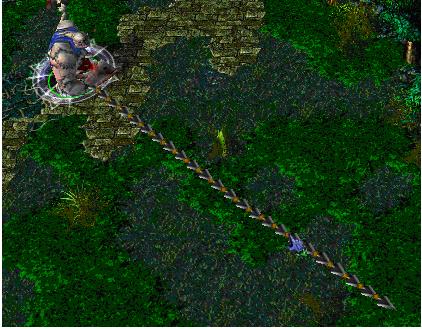
Now Pudge wants to do some operations on the hook.
Let us number the consecutive metallic sticks of the hook from 1 to N. For each operation, Pudge can change the consecutive metallic sticks, numbered from X to Y, into cupreous sticks, silver sticks or golden sticks.
The total value of the hook is calculated as the sum of values of N metallic sticks. More precisely, the value for each kind of stick is calculated as follows:
For each cupreous stick, the value is 1.
For each silver stick, the value is 2.
For each golden stick, the value is 3.
Pudge wants to know the total value of the hook after performing the operations.
You may consider the original hook is made up of cupreous sticks.
Now Pudge wants to do some operations on the hook.
Let us number the consecutive metallic sticks of the hook from 1 to N. For each operation, Pudge can change the consecutive metallic sticks, numbered from X to Y, into cupreous sticks, silver sticks or golden sticks.
The total value of the hook is calculated as the sum of values of N metallic sticks. More precisely, the value for each kind of stick is calculated as follows:
For each cupreous stick, the value is 1.
For each silver stick, the value is 2.
For each golden stick, the value is 3.
Pudge wants to know the total value of the hook after performing the operations.
You may consider the original hook is made up of cupreous sticks.
Input
The input consists of several test cases. The first line of the input is the number of the cases. There are no more than 10 cases.
For each case, the first line contains an integer N, 1<=N<=100,000, which is the number of the sticks of Pudge’s meat hook and the second line contains an integer Q, 0<=Q<=100,000, which is the number of the operations.
Next Q lines, each line contains three integers X, Y, 1<=X<=Y<=N, Z, 1<=Z<=3, which defines an operation: change the sticks numbered from X to Y into the metal kind Z, where Z=1 represents the cupreous kind, Z=2 represents the silver kind and Z=3 represents the golden kind.
For each case, the first line contains an integer N, 1<=N<=100,000, which is the number of the sticks of Pudge’s meat hook and the second line contains an integer Q, 0<=Q<=100,000, which is the number of the operations.
Next Q lines, each line contains three integers X, Y, 1<=X<=Y<=N, Z, 1<=Z<=3, which defines an operation: change the sticks numbered from X to Y into the metal kind Z, where Z=1 represents the cupreous kind, Z=2 represents the silver kind and Z=3 represents the golden kind.
Output
For each case, print a number in a line representing the total value of the hook after the operations. Use the format in the example.
Sample Input
  1
10
2
1 5 2
5 9 3
Sample Output
Case 1: The total value of the hook is 24.
反正题意 就是 让你求修改后 1-n 之间的和,
线段树, 区间修改模板!!!;
注意的要点在于
1 :延迟修改时 L 与 R 是 建立区间的 长度 而不是 修改区间的长度;
2 :数值修改时 L 与 R 是 建立区间的 长度 而不是 修改区间的长度;
3 : 要进行 向上更新 和向下更新, 并且 向下更新 一定要在 左右区间回溯之前, 向上更新 在 左右区间之后
我的代码:
#include <iostream>
#include <stdio.h>
#include <algorithm>
#include <cmath>
#include <cstring>
#include <string>
#include <queue>
#include <stack>
#include <stdlib.h>
#include <list>
#include <map>
#include <set>
#include <bitset>
#include <vector>
#define mem(a,b) memset(a,b,sizeof(a))
#define findx(x) lower_bound(b+1,b+1+bn,x)-b
#define FIN      freopen("input.txt","r",stdin)
#define FOUT     freopen("output.txt","w",stdout)
#define S1(n)    scanf("%d",&n)
#define S2(n,m)  scanf("%d%d",&n,&m)
#define Pr(n)     printf("%d\n",n)using namespace std;
typedef long long ll;
const double PI=acos(-1);
const int INF=0x3f3f3f3f;
const double esp=1e-6;
const int maxn=1e6+5;
const int MOD=1e9+7;
const int mod=1e9+7;
int dir[5][2]={0,1,0,-1,1,0,-1,0};struct SegTree{int val;int addmark;
}Seg[maxn<<2];void PushUP(int root)
{Seg[root].val=Seg[root<<1].val+Seg[root<<1|1].val;
}void build(int root,int l,int r)
{Seg[root].addmark=0;if(l==r){Seg[root].val=1;return;}int mid=(l+r)>>1;build(root<<1,l,mid);build(root<<1|1,mid+1,r);PushUP(root);
}
void PushDown(int root,int l,int r)
{if(Seg[root].addmark){Seg[root<<1].addmark=Seg[root<<1|1].addmark=Seg[root].addmark;Seg[root<<1].val=Seg[root].addmark*l;Seg[root<<1|1].val=Seg[root].addmark*r;Seg[root].addmark=0;}
}
void update(int root,int l,int r,int left,int right,int m)
{int mid=(l+r)>>1;if(left<=l&&right>=r){Seg[root].val=m*(r-l+1);Seg[root].addmark=m;return ;}PushDown(root,mid-l+1,r-mid);if(left<=mid)update(root<<1,l,mid,left,right,m);if(right>mid)update(root<<1|1,mid+1,r,left,right,m);PushUP(root);
}int main()
{int T;int n,m;//FIN;cin>>T;int cont=0;int x,y,z;while(T--){S1(n);build(1,1,n);S1(m);while(m--){scanf("%d%d%d",&x,&y,&z);update(1,1,n,x,y,z);}printf("Case %d: The total value of the hook is %d.\n",++cont,Seg[1].val);}
}
这篇关于HDU 1689 Just a Hook (线段树, 区间修改)的文章就介绍到这儿,希望我们推荐的文章对编程师们有所帮助!




