本文主要是介绍Rebel + LlamaIndex 构建基于知识图谱的查询引擎,希望对大家解决编程问题提供一定的参考价值,需要的开发者们随着小编来一起学习吧!
目录
一、Rebel解析非结构化数据
模型介绍
三元组
核心代码
二、LlamaIndex 构建知识图谱
三、整体处理流程
四、运行效果
五、完整代码
六、知识拓展
一、Rebel解析非结构化数据
模型介绍
Rebel模型是为端到端语言生成(REBEL)关系提取而设计的。它利用基于 BART 模型的自回归 seq2seq 方法,对200多种不同的关系类型执行端到端关系提取。这种方法通过将三联体表示为一个文本序列来简化关系提取。该模型特别适用于从原始文本中提取关系三元组,这在填充知识库或事实核查等信息抽取任务中至关重要。
三元组
三元组是指由三个元素组成的有序组合,通常用于表示关系或事实。在自然语言处理中,三元组通常用于表示实体之间的关系,例如“约翰是玛丽的兄弟”可以表示为一个三元组(约翰,兄弟,玛丽)。在关系抽取任务中,目标是从文本中提取这样的三元组,以便将文本转换为结构化数据,例如知识库或图数据库。
核心代码
下面介绍运用这模型的核心函数
def extract_triplets(input_text):text = triplet_extractor.tokenizer.batch_decode([triplet_extractor(input_text, return_tensors=True, return_text=False)[0]["generated_token_ids"]])[0]triplets = []relation, subject, relation, object_ = '', '', '', ''text = text.strip()current = 'x'for token in text.replace("<s>", "").replace("<pad>", "").replace("</s>", "").split():if token == "<triplet>":current = 't'if relation != '':triplets.append({'head': subject.strip(), 'type': relation.strip(),'tail': object_.strip()})relation = ''subject = ''elif token == "<subj>":current = 's'if relation != '':triplets.append({'head': subject.strip(), 'type': relation.strip(),'tail': object_.strip()})object_ = ''elif token == "<obj>":current = 'o'relation = ''else:if current == 't':subject += ' ' + tokenelif current == 's':object_ += ' ' + tokenelif current == 'o':relation += ' ' + tokenif subject != '' and relation != '' and object_ != '':triplets.append((subject.strip(), relation.strip(), object_.strip()))return triplets
- 输入: 该函数接受 Input _ text,它应该是一个文本字符串,可能包含关于各种实体及其关系的信息。
- 输出: 该函数返回一个字典列表 Triplet。每个字典表示从输入文本中提取的一个三元组,键为“ head”(主题)、“ type”(关系)和“ tail”(对象)。
- 这个函数对于将自然语言文本转换为可用于填充知识图的结构化数据(三联体)至关重要,从而增强了 LlamaIndex 知识图查询引擎的能力。
二、LlamaIndex 构建知识图谱
RAG框架LlamaIndex核心——各种索引应用分析-CSDN博客
#用知识图谱索引从documents即paul_graham_essay.txt里读取内容
index = KnowledgeGraphIndex.from_documents(documents, kg_triplet_extract_fn=extract_triplets, service_context=service_context)
paul_graham_essay.txt的主要内容如下:
- This article is a detailed account of the author's journey through various stages of his life, focusing on his work in programming, art, and entrepreneurship. It begins with his early experiences in writing short stories and programming on the IBM 1401, followed by his transition to microcomputers and the development of his programming skills. The author's interest in artificial intelligence (AI) led him to study Lisp and work on AI projects, including reverse-engineering SHRDLU.
- His dissatisfaction with the limitations of AI at the time led him to focus on Lisp programming and writing a book about it. He then recounts his experiences at Harvard, where he studied philosophy and computer science, and his subsequent decision to pursue a career in art. This decision was influenced by his realization that art could be both enduring and financially viable.
- The author's journey in the art world included attending the Accademia di Belle Arti in Florence and the Rhode Island School of Design (RISD), where he developed his painting skills and explored different artistic styles. Despite his passion for art, he found himself drawn back to programming and entrepreneurship, co-founding Viaweb, an early e-commerce platform.
- Viaweb's success led to its acquisition by Yahoo, providing the author with financial freedom to pursue his artistic ambitions. However, he found himself drawn back to programming, particularly Lisp, and embarked on a project to create a new Lisp dialect called Arc.
- The author's work on Arc and his involvement in the startup community led to the creation of Y Combinator, an influential startup accelerator. Y Combinator's unique approach to funding and supporting startups, including its batch model, has had a significant impact on the startup ecosystem.
- Throughout his varied career, the author reflects on the importance of working on projects that may not be prestigious but are personally meaningful and fulfilling. He emphasizes the value of independent thinking and the potential for rapid change in various fields, including essay writing and software development.
- The article concludes with the author's decision to step back from Y Combinator and focus on painting and writing essays, while also contemplating his next project. He reflects on the challenges and rewards of his diverse career, highlighting the importance of passion, curiosity, and the pursuit of meaningful work.
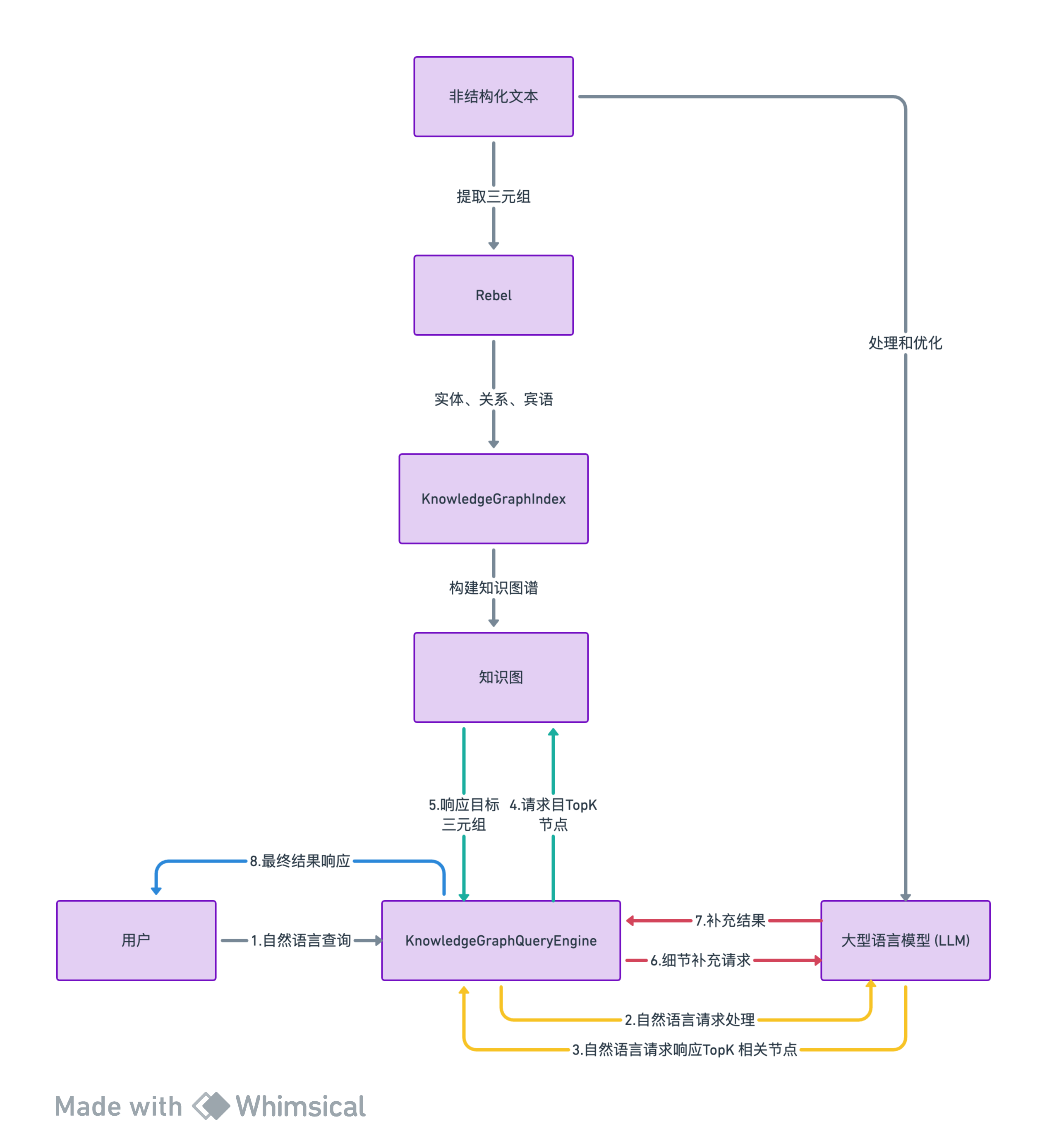
三、整体处理流程
-
提取三元组: 使用Rebel模型提取文本中的三元组信息。Rebel直接处理非结构化文本,识别出其中的实体(subjects)、关系(relations)和宾语(objects)。
-
构建知识图谱: 在
KnowledgeGraphIndex中,这些三元组被用来构建知识图谱。 -
查询引擎:KnowledgeGraphQueryEngine:作为统一的查询和响应入口
-
LLM: LLM在查询知识图谱时发挥作用。用户可以通过自然语言提问,LLM帮助解析这些查询,找到与查询相关的三元组。
-
处理和优化: 在构建知识图谱时,LLM可能用于进一步处理和优化Rebel提取的三元组,例如,通过提炼、概括或补充信息来增强图谱的质量。
四、运行效果
五、完整代码
"""Rebel + LlamaIndex 知识图谱查询引擎LlamaIndex 支持构建和查询跨知识图谱。它通过提取和存储三元组(`(subject, relation, object)`)的形式工作。然后在查询时,使用查询文本中的关键词来获取三元组以及它们来自的文本片段来回答查询。默认设置将使用 LLM 来构建知识图谱,这可能
- 慢
- 使用大量 token为了解决这个问题,你可以插入任何函数来替换默认的三元组提取函数!在这个笔记本中,我们演示使用 [Babelscape/rebel-large]( 来为我们提取三元组。这是一个轻量级模型,专门为知识图谱提取三元组进行了微调。了解更多关于使用 LlamaIndex 与知识图谱的信息,请访问我们的文档
- [基本知识图谱索引](
- [知识图谱索引 + 向量索引]
- [知识图谱索引 + Nebula]
- [查询现有的 Nebula KGs]
- [知识图谱索引 + Kuzu]:## 依赖
"""
#!sudo apt install python3.10-venv
#!python3 -m venv openai_env
!source openai_env/bin/activate
!pip install   llama-index transformers pyvis networkx
!pip install   fastapi kaleido python-multipart uvicorn cohere
!pip install openai!wget"""## Rebel Pipeline我们实例化了 `rebel-large` 模型的 pipeline。遵循官方模型文档,我们还构建了一个函数,将输出解析为三元组列表,形式为 `(subj, rel, obj)`。**注意:** 如果你不使用 `CUDA`,请从 pipeline 构造函数中删除 `device` 参数。
"""from transformers import pipelinetriplet_extractor = pipeline('text2text-generation', model='Babelscape/rebel-large', tokenizer='Babelscape/rebel-large', device='cuda:0')# 函数用于解析生成的文本并提取三元组
# Rebel 输出特定格式。这段代码大部分是从Rebel模型复制过来的!def extract_triplets(input_text):text = triplet_extractor.tokenizer.batch_decode([triplet_extractor(input_text, return_tensors=True, return_text=False)[0]["generated_token_ids"]])[0]triplets = []relation, subject, relation, object_ = '', '', '', ''text = text.strip()current = 'x'for token in text.replace("<s>", "").replace("<pad>", "").replace("</s>", "").split():if token == "<triplet>":current = 't'if relation != '':triplets.append({'head': subject.strip(), 'type': relation.strip(),'tail': object_.strip()})relation = ''subject = ''elif token == "<subj>":current = 's'if relation != '':triplets.append({'head': subject.strip(), 'type': relation.strip(),'tail': object_.strip()})object_ = ''elif token == "<obj>":current = 'o'relation = ''else:if current == 't':subject += ' ' + tokenelif current == 's':object_ += ' ' + tokenelif current == 'o':relation += ' ' + tokenif subject != '' and relation != '' and object_ != '':triplets.append((subject.strip(), relation.strip(), object_.strip()))return triplets"""## 构建图谱在这里,我们将构建索引,并利用 `rebel` 提取三元组。
"""import openai
import os# 使用 openai 生成自然语言响应,基于 paul graham 的文章
os.environ["OPENAI_API_KEY"] = "sk-xxxxxx"
os.environ["OPENAI_API_BASE"] = ""
openai.api_key = os.environ["OPENAI_API_KEY"]
openai.api_base = os.environ["OPENAI_API_BASE"]from llama_index import SimpleDirectoryReader, KnowledgeGraphIndex, ServiceContextdocuments = SimpleDirectoryReader(input_files=["./paul_graham_essay.txt"]).load_data()from llama_index.llms import OpenAI# rebel 支持最多 512 个输入 tokens,但较短的序列也可以工作得很好
service_context = ServiceContext.from_defaults(llm=OpenAI(model_name="gpt-3.5-turbo"), chunk_size=256)#用知识图谱索引从documents即paul_graham_essay.txt里读取内容
index = KnowledgeGraphIndex.from_documents(documents, kg_triplet_extract_fn=extract_triplets, service_context=service_context)"""## 查询在查询期间,从查询文本中提取关键词,并用于查找具有相同 `subj` 的三元组(及其关联文本片段)。
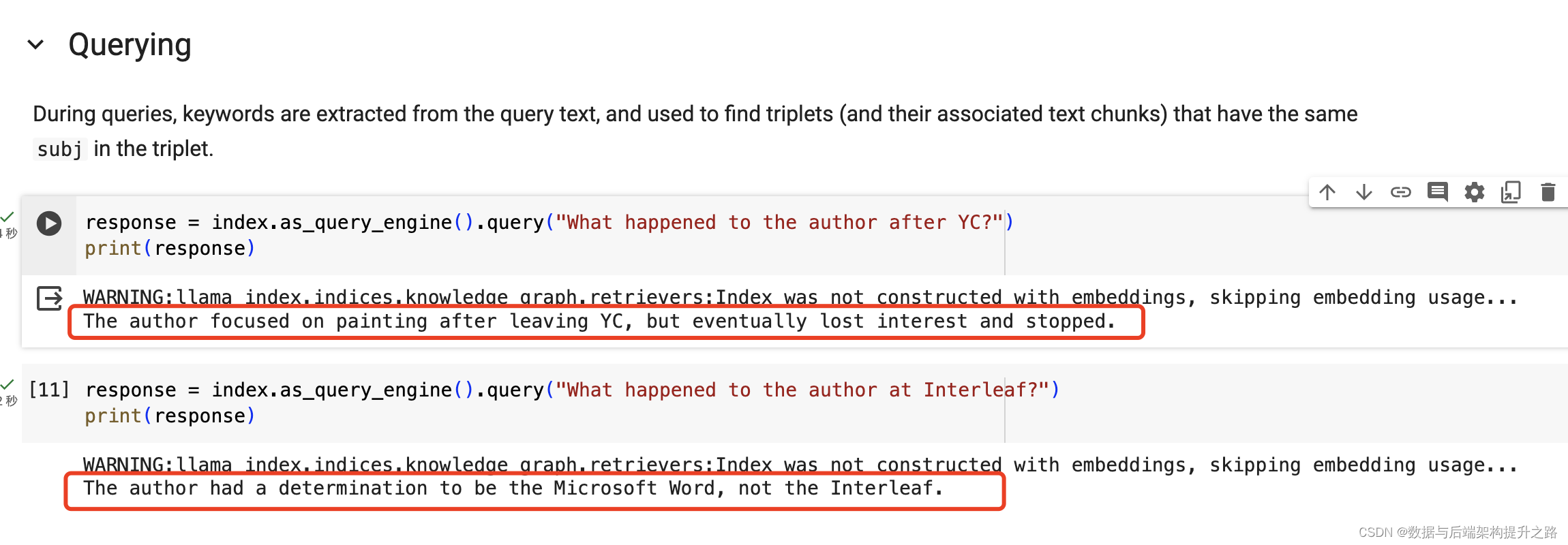
"""response = index.as_query_engine().query("YC 之后作者发生了什么?")
print(response)response = index.as_query_engine().query("作者在 Interleaf 发生了什么?")
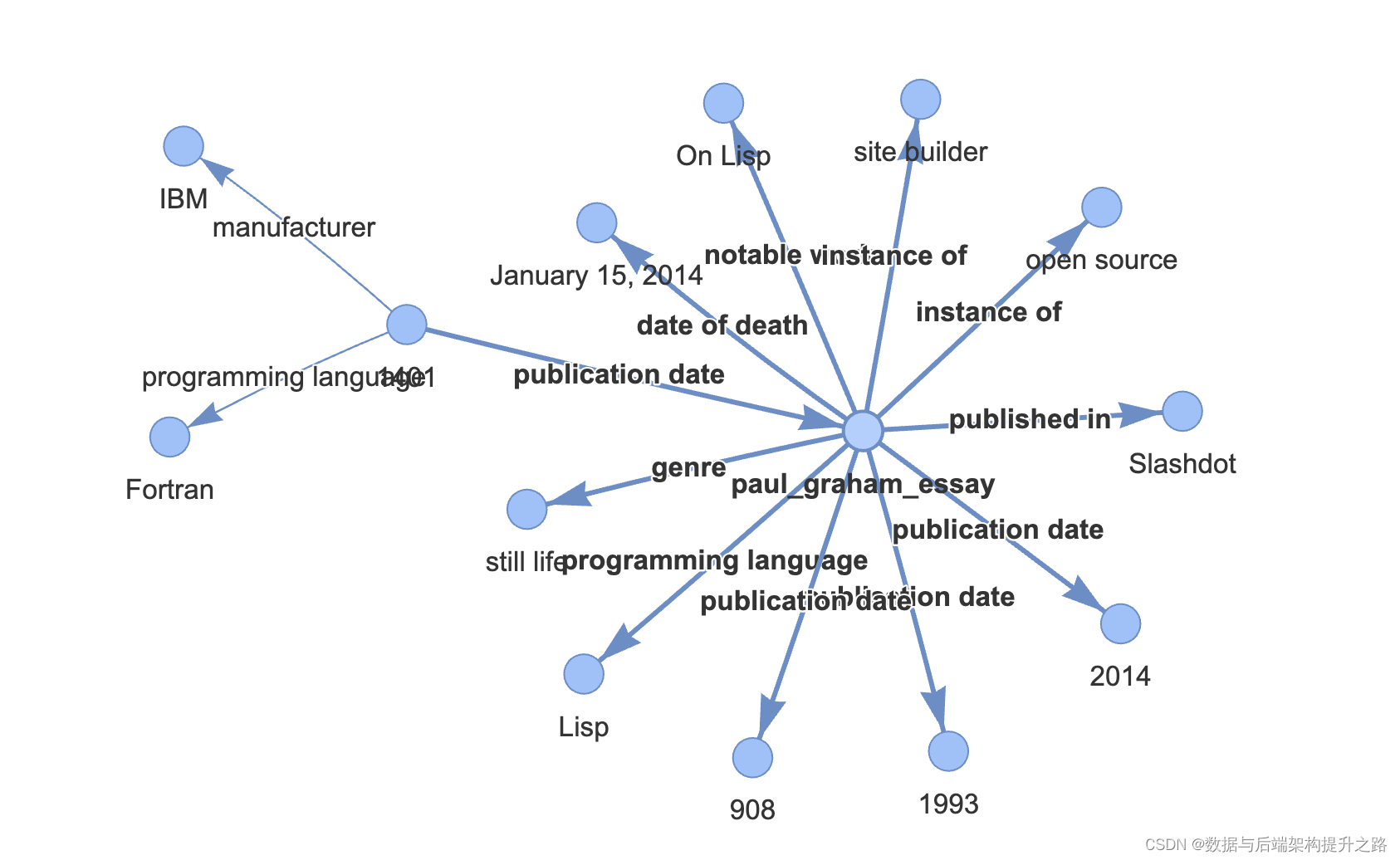
print(response)"""## 可视化我们可以使用 networkx 在笔记本中显示图谱!虽然并非所有三元组都是完美或正确的,但 `rebel` 在提取适当的 `subj` 值方面做得很好,这有助于查询引擎定位用于回答问题的文本片段!
"""from pyvis.network import Networkg = index.get_networkx_graph()
net = Network(notebook=True, cdn_resources="in_line", directed=True)
net.from_nx(g)
net.show('/content/example.html')import IPython
IPython.display.HTML(filename='/content/example.html')
```
六、知识拓展
本文中用到了LlamaIndex内置的知识图谱,实际生产环境一般不这么干需要引入外部知识谱图库NebulaGraph,知识图谱并非所有情况都有优势,知识图谱的答案非常简洁(仅使用三元组),但仍然提供了丰富的信息。许多问题并不包含大块的小颗粒知识。在这些情况下,额外的知识图检索器可能没有那么有用,可以考虑用VectorStoreIndex。
VectorStoreIndex更多关注于基于向量的数值计算和相似度搜索,KnowledgeGraphIndex则侧重于图形数据的结构化查询和关系探索。
二者的选择取决于特定的应用需求和数据特点
这篇关于Rebel + LlamaIndex 构建基于知识图谱的查询引擎的文章就介绍到这儿,希望我们推荐的文章对编程师们有所帮助!






